Chilat Doina
June 7, 2026
You're probably already staring at more dashboards than you need. Seller Central. Ads. Inventory. Maybe a reporting layer on top. Yet the hard questions still linger.
What are shoppers typing before they buy from you? Which products are stealing the sale when they don't choose you? Which ASINs create a second order versus a one-time transaction?
That's where most scaling brands hit the wall. You have sales data, but not enough buyer context. You can see what happened. You can't always see why.
At a certain size, intuition stops being enough. You can't keep making listing, PPC, pricing, and catalog decisions based on gut feel when every move affects multiple ASINs, multiple campaigns, and a lot more cash.
Amazon Brand Analytics gives you a better operating view. Amazon describes it as a free analytics suite for brands enrolled in Amazon Brand Registry, built around aggregated customer search and purchase data for strategic decisions, and access through Seller Central requires a Professional selling plan according to Amazon's Brand Analytics overview. That matters because it puts first-party marketplace behavior directly in your hands.
Most sellers underuse it.
They open Top Search Terms, glance at a few keywords, then close the tab and go back to ad reports. That's leaving money on the table. The true value of Amazon Brand Analytics is that it helps you connect shopper behavior to business decisions across three areas:
When we use ABA well, it becomes less of a report library and more of a decision engine. It helps you answer practical questions:
Practical rule: If a dashboard doesn't lead to a pricing, content, ad, inventory, or product decision, it's just entertainment.
The brands that get the most from Amazon Brand Analytics don't treat it as a research tool they check occasionally. They build a repeatable review cadence and use it to make fewer bad bets.
That's the difference between guessing and scaling.
A common scenario looks like this. The PPC team is chasing search terms, the catalog team is fixing listings, and leadership wants cleaner forecasting. Amazon Brand Analytics can help all three, but only if the account is set up so the right people can access it, trust it, and act on it.

Brand Registry is the entry point. Without it, ABA is not part of your operating toolkit.
That matters for more than permissions. The sellers who get the most from ABA usually have control of the brand basics first: listing authority, merchandising assets, catalog consistency, and internal roles. The reports become much more useful when your team can change the listing, adjust ad strategy, fix variation structure, or plan a product launch based on what they find.
Seller Central setup also matters. As noted earlier, a Professional selling plan is part of access requirements. For established brands, the bigger issue is usually not eligibility. It is whether the account is structured cleanly enough for ABA to become part of weekly decision-making.
Access problems usually show up as workflow problems.
If Brand Registry sits under one login, reporting lives with another team, and nobody owns review cadence, ABA turns into a reference tool instead of a growth tool. We have seen this happen after acquisitions, agency transitions, and marketplace expansions. The data is there. The operating discipline is not.
Use a simple operating standard:
| Requirement | Why it matters |
|---|---|
| Brand Registry enrollment | Gives your brand access to Amazon's brand-level reporting environment |
| Professional selling plan | Required for access through Seller Central |
| Clear internal ownership | Prevents ABA from becoming “someone else's dashboard” |
| Decision cadence | Turns data into actions instead of occasional observations |
Strong sellers treat ABA access like infrastructure. It supports faster decisions in pricing, content, ads, retention, and new product planning.
That is also where a disciplined data-driven decision-making process for ecommerce teams matters. ABA is first-party marketplace data. Third-party tools are still useful, but ABA gives you a cleaner read on how Amazon shoppers search, compare, and buy inside the platform where revenue is won or lost.
A setup that works usually includes a few basics:
Giving broad access without ownership creates noise. Giving the right team a repeatable workflow creates decisions.
The best ABA setup is the one your team reviews every week and ties to actions that affect revenue.
The easiest way to get lost in Amazon Brand Analytics is to treat it like a menu of unrelated reports. It makes more sense when you organize it by the business question each report answers.
Following a major update in 2022, Amazon Brand Analytics expanded into a broader reporting system with 15+ detailed reports in fuller form, covering search behavior, demographics, repeat purchases, and more. Independent coverage also highlights metrics such as Ordered Revenue, Ordered Units, Average Sales Price, Glance Views, Conversion Rate, RepOOS, and Lost Buy Box, which is why many operators now treat ABA as a core decision tool rather than a niche feature, as described in Seller Labs' breakdown of Amazon Brand Analytics.
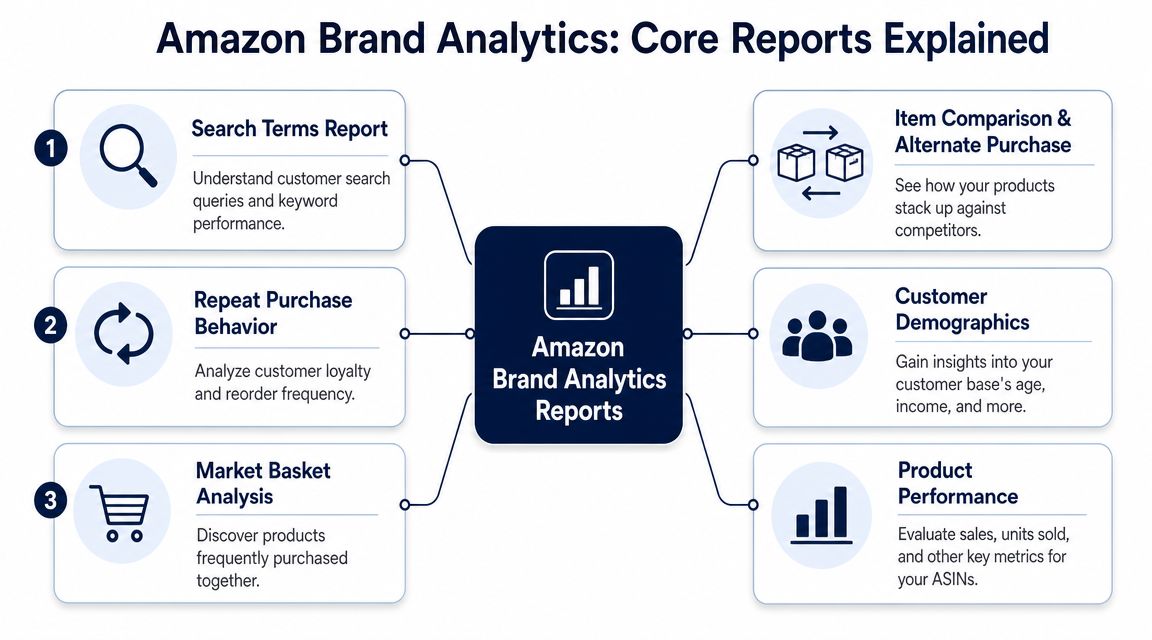
It is the typical starting point for most sellers, and for good reason. Search is still the front door.
This report helps answer one of the most important questions on Amazon. What are customers searching for?
It's useful for keyword discovery, but that's only the first layer. The stronger use case is mapping demand against your actual market position. If a term matters to your category and your brand isn't winning meaningful click or conversion presence on it, you have a gap.
Watch these signals closely:
If you want a sharper feel for query behavior before changing campaigns or content, review broader Amazon search behavior patterns and keyword context alongside ABA.
These reports move you from keyword theory into catalog execution.
Use them when you need to answer questions like:
A common mistake is to treat visibility as success. It isn't. An ASIN with healthy impressions and weak downstream action usually needs work on price, images, reviews, copy, or offer structure.
Within this context, Amazon Brand Analytics becomes more than a keyword tool.
This report tells you whether a product creates customer habit or just catches a one-time buyer. That distinction matters for valuation, ad efficiency, and inventory planning.
Products with repeat demand can usually tolerate a more aggressive acquisition posture because the first order isn't the entire story. Products with weak repeat behavior need stronger contribution margins up front.
Look at this report when you're deciding:
High top-line sales can hide a weak product. Repeat behavior often tells the truth faster.
These reports help you understand who is buying and how customer groups behave over time.
They're most useful when you're refining creative direction, product line extensions, and messaging. If a brand keeps chasing broad appeal while the data points to a tighter customer profile, efficiency usually suffers.
Customer Loyalty Analytics adds another layer by helping you think in audience segments rather than raw orders alone.
At this stage, a lot of brands finally discover who they're really competing against.
Your real competitors are not always the brands you think they are.
This report shows where customers compare your products and where they ultimately buy something else instead. That's different from manually searching the category and guessing.
Use it to diagnose whether you're losing on:
| Signal | Likely issue |
|---|---|
| Frequent comparison | You're in the consideration set |
| Frequent alternate purchase | Your offer loses at the point of decision |
| Repeated losses to similar products | Price, positioning, or features may be off |
| Losses to differently positioned products | Your core value proposition may be unclear |
This report is one of the most valuable tools in ABA because it points to adjacency.
You can use it to spot:
The best use of Market Basket isn't random bundling. It's identifying logical add-ons that increase order value and strengthen category ownership.
Most brands don't need more reports. They need repeatable plays.
Amazon states that Brand Analytics data is generally available within 72 hours after the close of a period, and Seller Central supports exports in Simple view and Detailed view, which makes ABA best suited for week-over-week or period-over-period review instead of same-day optimization, according to Amazon Seller Central documentation.
That lag changes how you should use the platform. Don't stare at it daily. Build operating workflows around it.
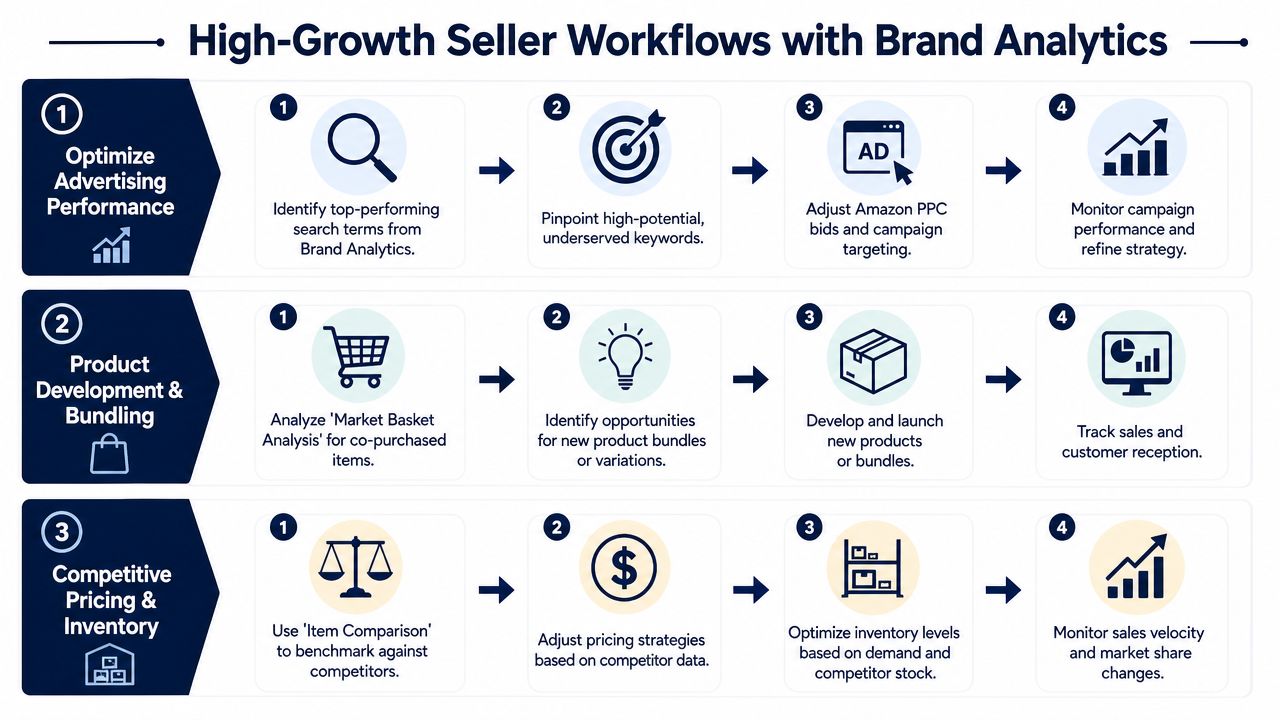
This is the play for brands that want cleaner organic and paid search expansion.
Pull Top Search Terms for your core category cluster
Start with the terms most connected to your hero products, not your entire catalog.
Sort for relevance before volume
A term can be prominent and still be wrong for your offer. Focus on shopper intent first.
Compare click share against conversion share
If shoppers click but don't buy, the keyword may be valid while the listing underperforms. If neither moves, your product may not belong on that term.
Route actions into two buckets
Put high-intent terms into listing optimization or title, image, and A+ revisions. Put testable terms into PPC for controlled learning.
Review the next reporting window
ABA is built for delayed validation, not same-day bid decisions.
This workflow works because it stops you from treating keyword expansion as guesswork.
A lot of sellers do competitor analysis by searching their own keywords and scrolling. That's too shallow.
Use ABA to identify your real comparison set, then layer in a proper Amazon competitor analysis process to turn those signals into pricing, content, and positioning decisions.
Run the play like this:
What works is using comparison data to understand shopper trade-offs.
What doesn't work is copying a competitor's listing line by line. That usually produces bland positioning and weaker brand identity.
Here's a useful rule inside this workflow:
If shoppers compare you to one type of product and buy a different type of product, your listing may be attracting the wrong click.
This is often a positioning problem, not an advertising problem.
A short explainer can help your team visualize how to operationalize this review:
This is the play most sellers neglect because acquisition is louder.
Use Repeat Purchase Behavior to sort your catalog into three practical groups:
| Product type | Strategic use |
|---|---|
| Natural repeat product | Lean into customer retention and replenishment messaging |
| Occasional repeat product | Support with education, usage reminders, and cross-sell paths |
| One-time purchase product | Maximize first-order economics and basket size |
Then act on it:
The point isn't to force every ASIN into a retention strategy. The point is to know which ones deserve one.
Once you've got the basic workflows running, Amazon Brand Analytics starts to become more interesting. Not because it reveals magic answers, but because the gaps between the metrics tell you where the business is leaking.
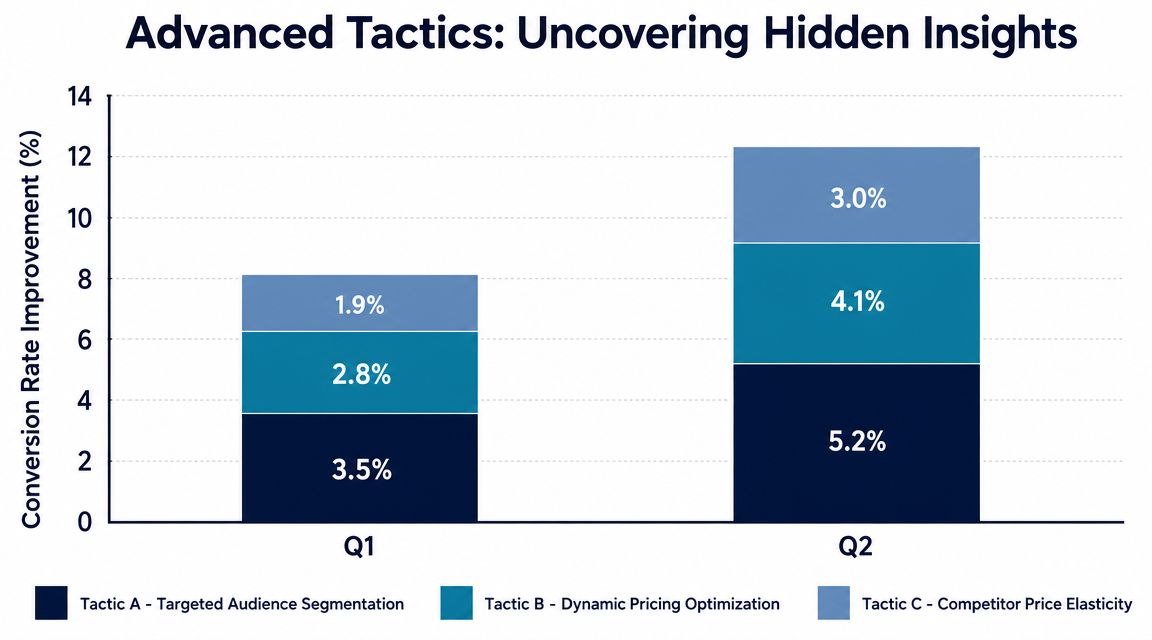
A lot of sellers celebrate click share too early.
If a search term generates strong click share but weak conversion share, your listing is winning curiosity and losing commitment. That usually points to one of a few issues:
This is one of the cleanest ABA diagnostics because it separates traffic quality from offer quality. It's especially useful when ad metrics alone are muddy.
Strong clicks with weak purchases usually mean your product got invited to the conversation but lost the final vote.
Numerous groups stop at “what should we bundle together?” That's useful, but it's not enough.
Market Basket Analysis can also shape your wider audience strategy. If certain products frequently travel with yours, that tells you something about customer context. It can influence cross-sell placements, product page sequencing, launch priorities, and DSP audience thinking if your brand runs a more advanced media stack.
In practice, the best opportunities usually come from products that feel obvious after you see the data. They fit the same usage moment, solve the next problem, or complete the shopping mission.
Experienced operators separate themselves from dashboard tourists.
Amazon Brand Analytics is powerful, but it's still an aggregated internal view of Amazon's marketplace. It should not be used as a standalone market-sizing tool. A stronger approach is to validate ABA findings against outside demand signals such as category sales trends, ad data, or Google Trends, as explained in this analysis of Amazon Brand Analytics limitations and use cases.
That trade-off matters.
If a term looks hot in ABA, it may reflect your category's behavior on Amazon during a specific period. It doesn't automatically mean the broader market is expanding. If a product pair appears often in Market Basket, that's useful, but it still needs commercial judgment before you spin up a new SKU.
The cleanest advanced setup is simple:
That habit protects you from overreacting to isolated Amazon patterns while still taking advantage of the best first-party shopping data available inside the platform.
Summit Outdoor Gear had a problem that a lot of established brands know well. Their flagship hiking tent was still selling, but growth had flattened. Ad costs were getting harder to justify, and every optimization seemed to produce only marginal improvement.
The team started with Top Search Terms and noticed a pattern. Their core tent was showing up around broad camping language, but they had weak relevance to a more specific high-intent query around lightweight backpacking use. That didn't just suggest a keyword gap. It suggested a product-positioning gap.
The listing was built to win a broad shopper. It talked about durability, weather protection, and general outdoor use. That was all true, but it didn't match the language serious backpacking buyers cared about most.
So Summit changed the operating question from “How do we bid better?” to “Are we selling the right promise to the right shopper?”
They revised copy, image sequencing, and keyword targeting around portability and fast setup. They also split campaigns more cleanly so broad category traffic didn't muddy the data for more specific backpacking intent.
Then the team reviewed competitor comparison data inside ABA. They found that shoppers were considering Summit's tent alongside a lighter competing product. That was the definitive wake-up call.
They weren't losing because their tent was bad. They were losing because the market segment they were attracting had a different priority hierarchy.
Here's how they responded:
Good ABA use doesn't just improve a listing. It tells you when the catalog itself needs to evolve.
The result wasn't one dramatic switch. It was a series of smarter decisions.
Search visibility improved because the product message matched the query better. Paid traffic became easier to manage because the team stopped forcing broad traffic into a narrow product fit. The new lighter variant gave the brand a stronger answer in competitive comparisons. The bundle created a more complete order path for the right buyer.
That's the practical value of Amazon Brand Analytics. It helps you see whether the issue is traffic, offer, product architecture, or all three.
Summit didn't grow because they found a hidden report. They grew because they used ABA to stop solving the wrong problem.
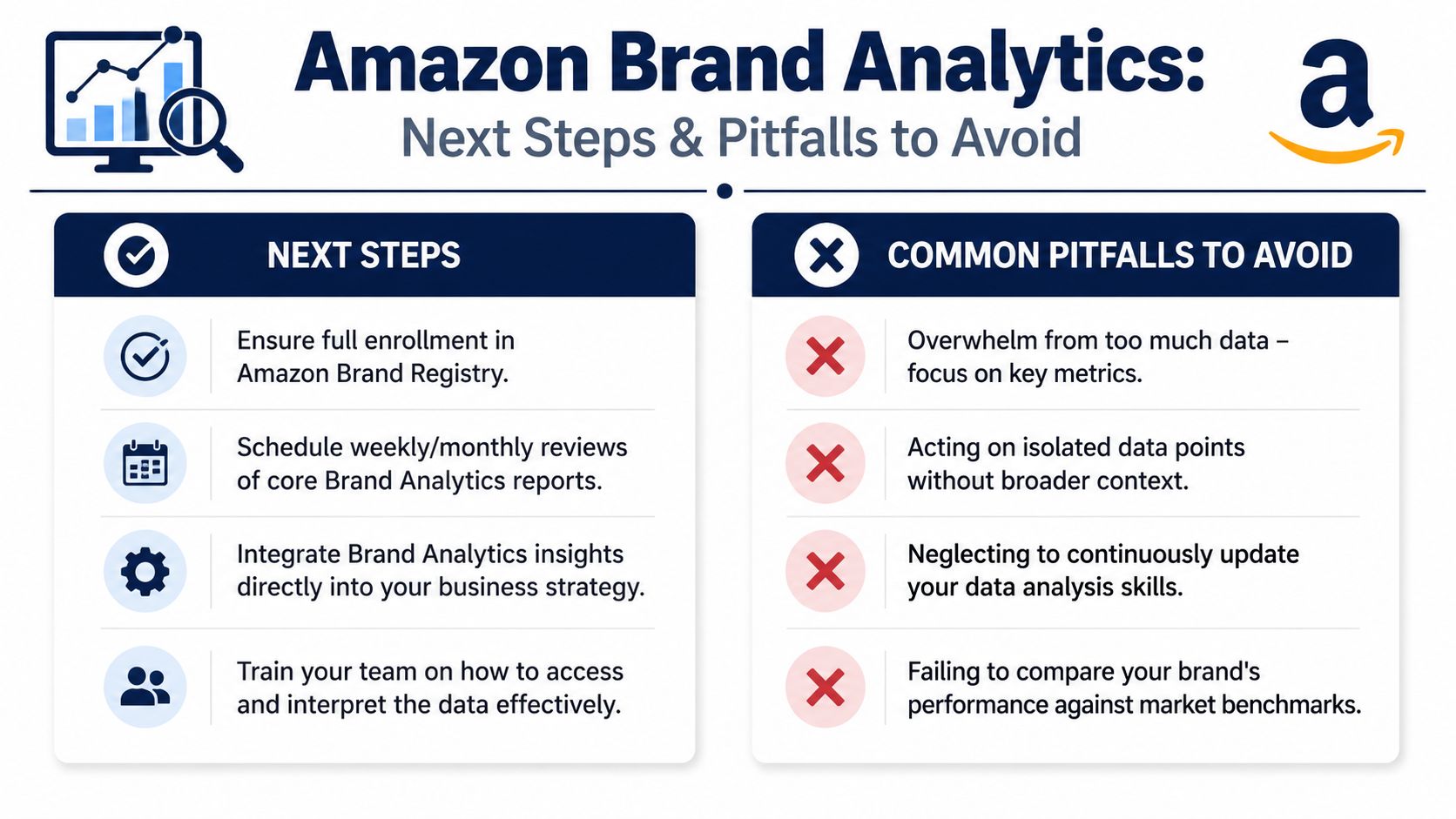
Most sellers don't fail with Amazon Brand Analytics because the tool is weak. They fail because they either overcomplicate it or use it too casually.
If you're early in your ABA usage, don't try to analyze everything.
A practical roadmap looks like this:
Consistency beats complexity here. A simple weekly review that produces action is worth far more than a giant spreadsheet nobody trusts.
The biggest errors are predictable:
| Pitfall | Better move |
|---|---|
| Checking ABA like a real-time dashboard | Use it for weekly or period-based decisioning |
| Obsessing over one metric | Read metrics in combination, especially click and conversion behavior |
| Using ABA in isolation | Validate with ad data, catalog context, and external signals |
| Treating every report as equally important | Focus first on the reports tied to your current growth constraint |
The cleanest way to use Amazon Brand Analytics is to match the report to the decision.
If your problem is rising ad costs, start with search and conversion signals. If your issue is stagnant AOV, go to Market Basket. If your catalog has too many passengers and not enough repeat winners, study repeat purchase behavior.
That's the playbook. Keep it operational. Keep it honest. And keep revisiting it as your catalog grows.
Serious sellers scale faster when they can compare notes with operators who are solving the same problems at a high level. If you want that kind of room, Million Dollar Sellers brings together proven ecommerce founders and brand leaders to share what's working across Amazon, DTC, and omnichannel growth.
Join the Ecom Entrepreneur Community for Vetted 7-9 Figure Ecommerce Founders
Learn MoreYou may also like:
Learn more about our special events!
Check Events