Chilat Doina
May 25, 2026
You're probably in the same spot a lot of serious Amazon operators hit after the first real run of success.
You already have products moving. You know how to launch, rank, and maintain velocity. But the next layer of growth gets harder because the market stops being obvious. A niche that looked clean last quarter now has copycats, price pressure, and review patterns that don't make sense at a glance. You can feel opportunity, but you can't validate it fast enough.
That's where the Helium 10 Chrome Extension earns its keep.
Used casually, it's just a convenience layer. Used well, it becomes an in-browser intelligence system for product discovery, listing pressure checks, competitor mapping, and fast margin screening. The reason it matters more now is simple. Helium 10's extension is no longer just an Amazon add-on. Its Chrome Web Store listing positions it as a browser-based tool for Amazon, Walmart, and TikTok Shop sellers, which tells you exactly where seller tooling has gone. The serious game is no longer single-channel research. It's rapid, page-level decision support across marketplaces.
For scaling brands, that shift matters.
The sellers who keep compounding usually aren't the ones with the best instincts alone. They're the ones who can pressure-test those instincts quickly, on the page, while the market is still moving. They don't rely on broad dashboard snapshots. They want answers inside search results, inside listings, inside competitor detail pages, before they commit inventory, creative, or ranking spend.
A mature Amazon business rarely stalls because the owner stops working. It stalls because the feedback loop gets slower than the market.
You search a category that used to look attractive. The top page is crowded. A few listings have obvious momentum. A few look weak but still hold rank. Reviews suggest demand is there, but the main question isn't whether buyers exist. It's whether there's still room for a sharper offer, better positioning, or stronger economics.
That's the point where most sellers split into two groups.
The first group keeps browsing and relies on feel. The second group overlays data directly on the page and starts making decisions from patterns, not impressions. That's the practical use case for the Helium 10 Chrome Extension. It gives you a faster read on what's happening where buyers shop.
Practical rule: When a category gets crowded, speed of interpretation matters almost as much as accuracy.
What makes the extension useful for operators is context. You're not leaving the browser to open five separate tools and rebuild the same picture manually. You're looking at live marketplace pages and layering research directly on top of them. That changes how quickly you can sort weak ideas from viable ones.
For a growing brand, the value isn't “more data.” It's faster decision compression. You can move from broad search to competitive shortlisting, from listing page to unit-economics check, and from review scan to product-gap hypothesis without breaking flow.
A large seller doesn't need another generic product research tutorial. They need answers to sharper questions:
The extension is useful because it supports those questions in-browser, where operators already spend time. That's why it keeps showing up in serious workflows.
Most sellers install the extension and stop there. That's a mistake.
If the permission setup is wrong, you'll get a partial version of the tool and then blame the data. The highest-value modules depend on page access. If you don't configure that properly, your workflow breaks before it starts.
The documented path is straightforward. Open the Chrome Web Store through Helium 10's extension flow, add the extension, sign in with your Helium 10 account or trial, and then confirm your browser permissions. Helium 10's own knowledge base states that the extension becomes fully useful when you explicitly enable it to “read and change site data” for broader functionality, because modules like Xray and ASIN Grabber operate as a page-level data-capture layer that parses listing pages and search results in real time for product identifiers, review metadata, and ranking signals (Helium 10 knowledge base).
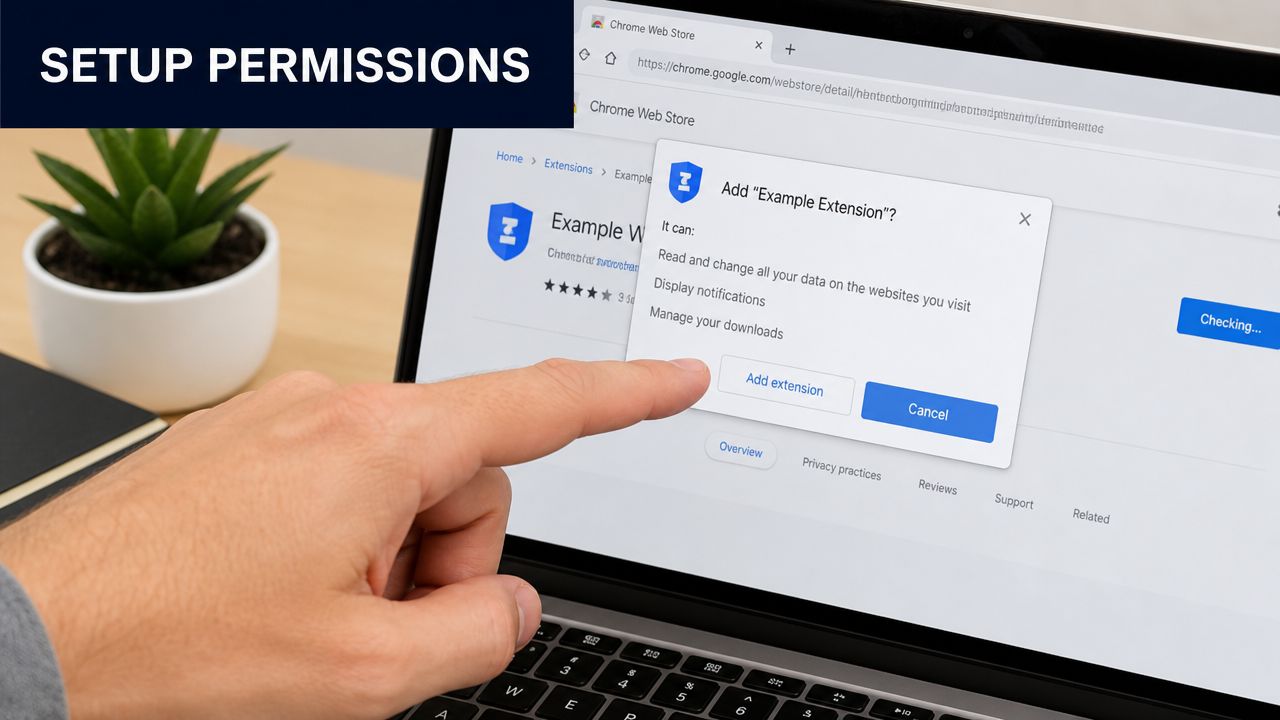
That permission language makes some sellers nervous. Fair enough. But from a technical standpoint, it's the difference between a cosmetic overlay and a research tool that can interpret what's on the page.
If you're running product research at scale, “kind of working” is useless.
A browser extension like this doesn't just pull a static database entry. It reads the page context. That means search result layouts, listing structures, seller counts, review blocks, and other visible signals feed the output. If site-level access is too narrow, some modules won't load cleanly or will return incomplete results.
In practice, that creates three common problems:
Incomplete page analysis
You think a category is weak or thinly populated, but the extension is only reading part of the page.
Broken competitive workflows
ASIN collection, review extraction, and listing-level diagnostics become inconsistent.
False confidence
This is the worst one. The data looks neat, but you're making decisions off a degraded input set.
Grant the right permissions once. Otherwise you'll waste hours troubleshooting a setup problem that looks like a market insight problem.
If you have multiple people touching research, standardize setup early.
This is basic operations work, but it matters. Most tool complaints start with poor implementation, not poor software.
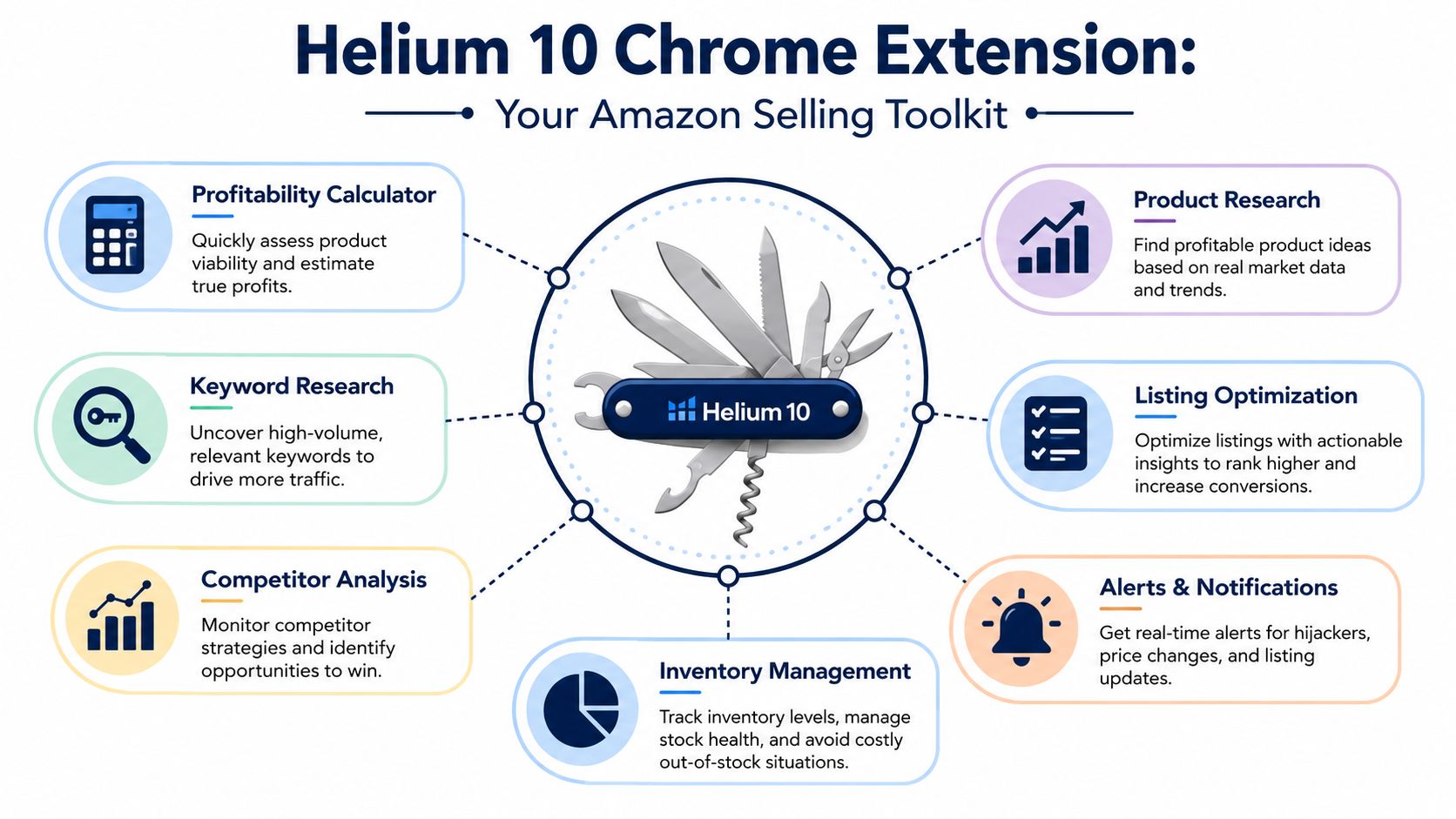
The easiest way to think about the Helium 10 Chrome Extension is as a digital multi-tool. It isn't one feature. It's a set of in-browser modules that support different decisions at different points in your workflow.
According to Helium 10-focused materials, the extension includes at least six major tools: Xray, ASIN Grabber, Profitability Calculator, Inventory Levels, Review Downloader, and Listing Health Score. Those tools are built to surface sales numbers, FBA fees, profit margins, and review data directly from an Amazon page (Bluetuskr overview of the Helium 10 Chrome Extension).
If you only use one module heavily, it'll usually be Xray.
Xray is what you open when you want a fast read on a search results page or a category cluster. For operators, that means it functions less like a feature and more like an immediate market snapshot. You're using it to understand whether a page shows fragmentation, crowding, premium pricing, weak incumbents, or obvious saturation.
The value isn't only seeing data. It's seeing it in context, while the exact products competing for buyer attention are on screen.
This tool is useful when you stop thinking product-by-product and start thinking set-by-set.
Strong operators don't analyze one rival at a time unless they have to. They gather a competitive set, segment it, and then decide who matters. ASIN Grabber helps build that set from a page you're already reviewing.
Use it when you want to:
That last point matters. A lot of wasted analysis happens because sellers compare themselves to products that share keywords but not actual buyer intent.
At this point, optimism usually gets corrected.
A product can look attractive on search results and still fail under basic margin pressure. The Profitability Calculator gives you a page-level way to test whether an idea deserves any more of your time. The point isn't to build a final financial model inside the extension. The point is to rule out weak economics fast.
A disciplined operator uses it to answer one question first: Is this worth deeper diligence, or should we kill it now?
Inventory tracking gets misused all the time.
Most sellers look at inventory levels because it feels useful. Better sellers use it to infer vulnerability. If a major competitor appears constrained, that can affect ad timing, launch timing, review velocity windows, and your willingness to push rank in that sub-niche.
Inventory data on its own doesn't hand you strategy. It gives you clues. Strategy comes from pairing that clue with what you know about listing quality, price discipline, and category behavior.
This is one of the most impactful uses of the extension if you're building differentiated products instead of cloning what already exists.
Reviews aren't just social proof. They're buyer language, defect reporting, expectation management, and unmet demand bundled together. The Review Downloader makes review mining more systematic, which matters when you're trying to isolate recurring pain points or compare sentiment across several competing offers.
The best review analysis doesn't ask, “Are customers happy?” It asks, “Where does the market keep disappointing them?”
A lot of operators skip this because it feels too simple. That's shortsighted.
Listing Health Score is useful when you need a quick diagnostic pass on execution quality. You're not treating it as gospel. You're using it to spot whether a listing appears underdeveloped, incomplete, or misaligned with category standards before you spend more time digging.
If you want a broader stack beyond the extension itself, this roundup of Amazon seller tools for serious operators is a useful companion read because it helps place the extension inside a wider operating system instead of treating it like a standalone answer.
Most product research fails because sellers either move too fast or too slowly.
Too fast means they see demand and assume the opportunity is real. Too slow means they drown in tabs and never get to a yes or no. The Helium 10 Chrome Extension works best when you use it as a compressed validation workflow.

A useful detail here is scale. One source describes Xray as able to access data from over 450 million ASINs and extract up to 100 at once from a single search page, which is why it's effective for side-by-side benchmarking of ranking, pricing, reviews, and estimated revenue without manually opening each listing (Xray capability overview).
Start on a search results page, not a single listing.
That sounds obvious, but plenty of sellers still fall in love with one item and reverse-engineer a thesis around it. The better move is to evaluate the page as a market environment. Use Xray to scan the field and ask:
A good page gives you room to believe there's a customer need. A bad page still can. But a bad page usually demands a sharper wedge.
Once the page looks worth attention, pull a list of relevant ASINs. Most operators save time with this action.
Don't just collect the highest-ranking products. Collect the listings that define how buyers are being sold to. That includes premium offers, value-priced entries, incumbents with visible weaknesses, and listings that appear to be winning despite poor execution.
I like to split the set into three groups:
True leaders
The products shaping buyer expectations in the niche.
Vulnerable leaders
Strong rank, but weak imagery, weak review themes, or weak positioning.
Noise
Listings that rank but probably shouldn't. These can still teach you where the market is sloppy.
If you want a deeper stack for this part of the process, this guide to Amazon product research tools is useful because it shows how to pair browser-level data with broader research workflows.
Now go listing by listing with the Profitability Calculator.
You stop asking whether the product sells and start asking whether you can sell it well. A lot of categories support a business. Far fewer support your cost structure, launch plan, and margin targets.
Look for practical friction points:
A market with decent demand and bad economics is still a bad market.
Good demand doesn't rescue a weak P&L. It just lets sellers lose money faster.
Don't leave validation at estimated demand and visible pricing. The true advantage is in understanding what buyers keep tolerating because they don't have a better option.
Read enough reviews to identify repeat failure patterns. Focus on the gap between what buyers expected and what they got. That's where offer design lives.
Strong examples of useful review themes include:
Once you've found repeat pain points, check whether any competitor has already solved them. If nobody has, you may have a wedge. If someone has, study how well they communicate that solution on-page.
A walkthrough like the one below can be useful if you want to see a visual product-analysis flow in action before adapting it to your own research rhythm.
At this point, the workflow should end in one of three decisions:
| Decision | What it means | Next move |
|---|---|---|
| Advance | The niche looks viable and your offer can be meaningfully better | Move to sourcing, keyword planning, and listing architecture |
| Watchlist | The idea has promise, but timing or economics are unclear | Track competitors, stock behavior, and review shifts |
| Kill | Demand exists, but the market structure doesn't work for your model | Stop spending time on it |
That discipline is what makes the extension valuable. It doesn't just help you find products. It helps you reject weak opportunities before they consume capital and attention.
Product discovery gets the attention. Listing optimization is where a lot of category share is won.
Most established brands don't need more random product ideas. They need better control over the pages they already have and sharper intelligence on why competitors convert better on specific terms. The Helium 10 Chrome Extension is useful here because it lets you audit listings while standing inside the listing environment itself.
A spreadsheet can tell you what keywords matter. It can't show you how a customer experiences the offer.
That's why I prefer to begin optimization work on live competitor pages. Open the listings that rank where you want to rank. Then evaluate them as a buyer first and an operator second. The extension helps because it gives you extra context without forcing you out of the page.

When optimizing a listing, I look for disconnects.
A competitor may have strong rank but weak messaging. Another may have polished creative but poor clarity. Another may win because they answer the buyer's top objections faster than everyone else. The point isn't to admire top listings. It's to isolate the mechanism behind their performance.
Use the extension to assess things like:
That's where tools like Listing Health Score become useful. Not because a single score determines quality, but because it can flag obvious weaknesses you should confirm manually.
A lot of listing updates fail because they're additive. Sellers just pile in more keywords, more copy, more claims.
That usually makes the page worse.
A better workflow is gap-based:
That often leads to improvements in titles, bullets, imagery, and A+ logic because you're anchoring changes to market reality instead of internal opinion.
If five competitors mention the same feature and buyers still complain, the market doesn't have a feature problem. It has a communication problem.
Not every top-ranking listing deserves equal attention. Focus on the pages buyers are most likely comparing directly against yours.
I usually evaluate them through four lenses:
| Lens | What to check | Why it matters |
|---|---|---|
| Relevance | Is the listing clearly aligned to the keyword intent? | Rank without relevance often doesn't hold |
| Clarity | Does the page explain the offer fast? | Confused buyers don't convert well |
| Differentiation | Is there a clear reason to choose this listing? | Commodity pages get trapped on price |
| Trust | Do reviews and page structure reduce buyer hesitation? | Trust closes the sale |
For sellers refining mature catalogs, this guide on mastering Amazon listing optimization is worth pairing with extension-based page audits because it pushes the work beyond surface edits and into conversion architecture.
The big takeaway is simple. Don't use the extension to “check your listing.” Use it to compare your listing against the category's actual conversion standards and expose the gaps you can fix.
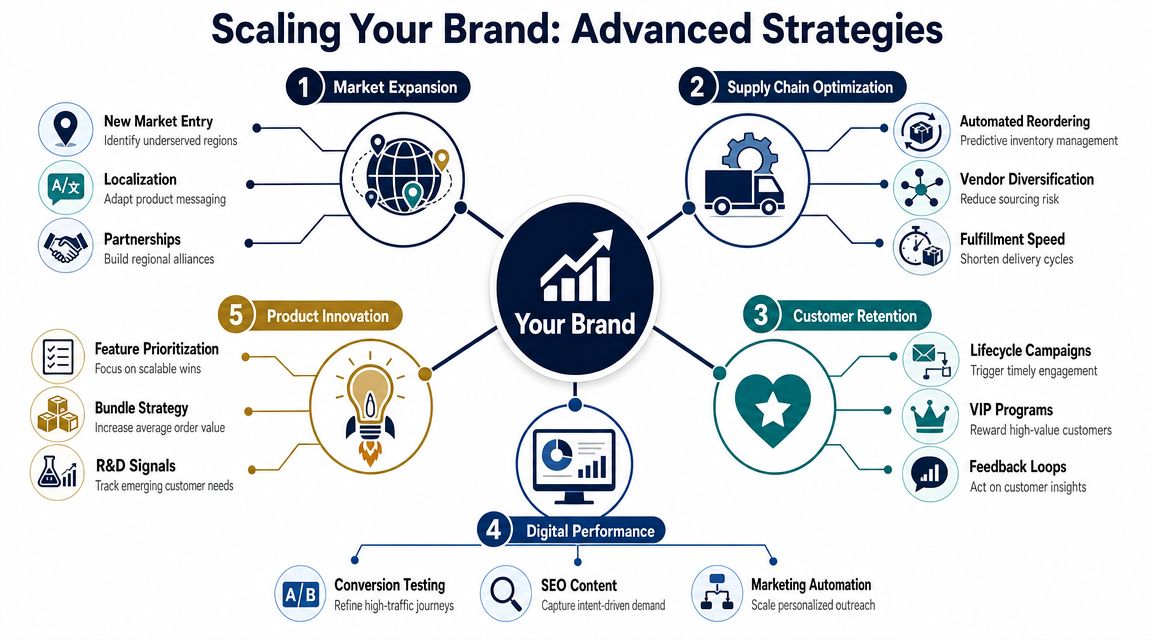
At a certain scale, the Helium 10 Chrome Extension stops being a research aid and becomes a competitive-intelligence layer.
That's the shift that matters for seven- and eight-figure brands. You're no longer using it to ask, “Can I launch something?” You're using it to ask, “Where is this category structurally weak, and how do we exploit that weakness faster than everyone else?”
Review data gets more powerful when you stop reading it one product at a time.
The key edge comes from comparing complaints across a group of competing listings. If the same pain point appears again and again, that's not a one-off defect. That's a market-level opening. It might point to better product design, stronger bundle logic, tighter usage instructions, or cleaner visual education on the page.
Review Downloader and review analysis become strategic. You're not just collecting sentiment. You're identifying repeat friction that the whole category has normalized.
Inventory-level checks become useful when linked to action.
If a competitor appears exposed on stock, that can affect when you lean harder into ads, when you push a listing refresh, or when you enter a sub-niche with a stronger offer. Inventory data by itself doesn't tell you what to do. But combined with pricing behavior and listing weakness, it can reveal timing windows.
A smart operator treats inventory movement as one layer in a broader read:
Each pattern suggests a different opening.
The extension gets stronger when you synthesize inputs instead of reading each tool in isolation.
For example, say you see a promising search page in Xray. Then you pull a competitor set with ASIN Grabber. Then you mine reviews and spot a recurring complaint. Then you notice one of the category leaders appears vulnerable on stock. That sequence starts to tell a coherent story.
Now you're not looking at isolated metrics. You're looking at a market gap with timing, buyer dissatisfaction, and competitive weakness lined up.
That's closer to how real brand growth works. If you want additional perspective beyond Amazon-specific tactics, these online brand scaling strategies are a useful complement because they frame growth as a systems problem, not just a listing problem.
This is the part most tutorials skip, and it's the part serious sellers care about most.
A key issue for sellers in 2026 is data reliability. Public walkthroughs tend to show what browser tools display, but they rarely address sampling bias, completeness issues, or how browser-based research can degrade when Amazon changes page structure. That leaves operators to decide when extension output should be treated as directional rather than decision-grade for validating demand and inventory (discussion of browser-tool reliability in 2026).
That distinction matters.
Use extension data as closer to decision-grade when:
Treat it as directional when:
Browser data is strongest as a fast filter. It gets weaker when sellers pretend it's a substitute for full diligence.
The extension won't create an edge for you by itself. Plenty of sellers have access to the same tools.
The edge comes from how you interpret what the tool surfaces. Large brands win by building disciplined reads from imperfect information. They use browser data to narrow possibilities, identify pressure points, and move their team toward the most likely high-value actions.
That's the primary use case. Not “find a hot product.” Build a repeatable system for spotting weak competition, buyer frustration, and timing windows before they become obvious to the rest of the market.
The Helium 10 Chrome Extension matters because it shortens the distance between observation and action.
For a serious seller, that's the whole game. You don't need more random inputs. You need faster, cleaner reads on demand, competition, listing weakness, and product gaps while you're still inside the marketplace. That's where the extension is strongest.
Three takeaways matter most:
The operators who scale best in 2026 won't be the ones with the most dashboards. They'll be the ones who can turn live marketplace data into decisions quickly, then validate those decisions with discipline. That's exactly where the Helium 10 Chrome Extension fits.
No. The Chrome Web Store listing positions it as a browser-based tool for Amazon, Walmart, and TikTok Shop sellers, although many of the best-known workflows still center on Amazon page analysis through the extension's in-browser modules.
The first thing to check is permission scope. If the extension hasn't been granted the necessary site-data access, some modules can work partially or fail on certain pages. Also verify that you're signed into the correct account and testing on supported marketplace pages.
No tool like this should be treated as infallible. For high-stakes decisions, use extension data as a strong filter and confirm major conclusions with broader diligence. That's especially important in crowded categories or when Amazon page structures appear inconsistent.
Feature access and depth typically expand with paid plans, while free access is more limited. The exact packaging can change, so the practical move is to check your current account level inside Helium 10 before assuming a module is fully available.
| Feature | Free Plan Limitations | Paid Plan Access |
|---|---|---|
| Extension access | Usually limited access to core workflows | Broader access across extension modules |
| Xray usage | May be restricted in depth or frequency | More complete research usage |
| ASIN Grabber | May be partially available | Better fit for heavier competitive research |
| Profitability Calculator | Basic usage depending on account status | More practical for repeated validation work |
| Inventory and review tools | Limited or reduced access | Better suited for ongoing analysis |
| Workflow fit | Good for testing the environment | Better for brands using the extension operationally |
It can support broader marketplace workflows, but actual usefulness depends on the page you're analyzing and the marketplace support tied to your use case. Test your live target markets directly instead of assuming parity.
If you're already operating at scale and want sharper peer-level insight on what's working across Amazon, DTC, and omnichannel, Million Dollar Sellers is where serious founders trade real execution playbooks instead of surface-level advice.
Join the Ecom Entrepreneur Community for Vetted 7-9 Figure Ecommerce Founders
Learn MoreYou may also like:
Learn more about our special events!
Check Events




.png)