Chilat Doina
November 28, 2025
If you’re going to sell on Amazon, you’ll be spending a lot of time inside Amazon Seller Central. So, what is it, exactly?
Think of it as the mission control for your entire Amazon business. It’s the web-based dashboard where you manage absolutely everything—from listing your products and setting prices to checking your sales and talking to customers. It’s the one-stop shop that connects you directly to millions of shoppers around the globe.
Let’s use an analogy. Imagine you want to open a boutique in the world's biggest, busiest shopping mall. You wouldn’t just throw your products on a shelf and walk away, right? You'd need a back office—a place to track inventory, ring up sales, handle customer questions, and run a few marketing promotions.
That's exactly what Seller Central is: your digital back office for the massive Amazon marketplace.
It’s the platform that gives you, a third-party seller, the keys to the kingdom. And it's a massive kingdom. As of Q1 2025, there are over 9.7 million sellers registered on Amazon, with more than 2.5 million of them actively selling at any given moment. This is the ecosystem you're joining.
At its heart, Seller Central is all about giving you autonomy.
You aren't a wholesaler selling products to Amazon; you're a retailer selling through Amazon, directly to the end customer. That's a huge distinction. It means you call the shots on pricing, branding, and logistics.
This single interface is where all the magic happens. You can:
The main Seller Central dashboard gives you a quick, at-a-glance health check of your entire operation.

Right away, you see the most critical information: how many orders are waiting to be shipped, your sales totals for the day, and your overall account health. It’s designed to help you prioritize what needs your attention first.
Of course, mastering these tools is just one part of a much larger puzzle. A solid e-commerce marketing strategy is what will truly set you apart and give you a roadmap for using everything Seller Central has to offer.
To make this even clearer, let's break down the main jobs you'll be doing in your account.
This table sums up the key tasks you'll handle within the Seller Central dashboard.
Function AreaPrimary PurposeKey ActivitiesInventoryManage product stock levels and listings.Add new products, update prices, monitor stock, manage FBA shipments.OrdersProcess and fulfill customer purchases.View incoming orders, print packing slips, confirm shipments.AdvertisingPromote products to increase visibility and sales.Create and manage PPC campaigns (Sponsored Products, Brands, Display).ReportsAnalyze business performance with data.Access sales data, payment reports, advertising metrics, business reports.PerformanceMonitor account health and customer satisfaction.Check Account Health Dashboard, respond to customer messages, manage feedback.
Think of these five areas as the pillars of your Amazon business. A little bit of attention to each one every day goes a long way.
Key Takeaway: Amazon Seller Central is much more than just a website. It’s a powerful and dynamic management tool that puts you in the driver’s seat, giving you the control to build and scale a business on your own terms within the world's largest online marketplace.
Before you can even think about listing your first product, you'll hit a fork in the road. This is one of the first big decisions you have to make on your Amazon journey: choosing your selling plan.
Think of it like picking a cell phone plan for a new business. One option is a flexible, pay-as-you-go model perfect for when you're just dipping your toes in. The other is a flat-rate monthly subscription built for high-volume activity and packed with powerful perks.
Getting this choice right between the Individual and Professional plans is a bigger deal than it sounds. It directly shapes your fee structure, what selling tools you can access, and ultimately, your potential for profit. It’s not just about cost; it’s about making sure your Seller Central account is set up for your ambitions right from day one.
The Individual plan is tailor-made for folks who are just starting out, testing the waters, or only plan on selling a handful of items—specifically, fewer than 40 items per month. It runs on a dead-simple, per-item fee structure, which means no monthly subscription.
Instead of a monthly bill, you pay a flat $0.99 fee for every single item you sell. This is on top of the standard referral fees that all sellers pay, which is just a percentage of the item's final sale price.
This plan is the perfect low-risk entry point. If you’ve got a few things around the house to offload, or you're launching a niche product and have no idea what sales will look like, the Individual plan lets you get going without any upfront financial commitment. That said, this simplicity does come with some pretty significant limitations.
Key Takeaway: The Individual plan is the way to go if you're unsure about sales volume or know you'll sell fewer than 40 units a month. It’s a risk-free way to learn the ropes without a monthly subscription breathing down your neck.
The Professional plan is for serious businesses that are ready to scale. For a flat $39.99 per month, you get to completely sidestep that $0.99 per-item fee. Do the math: as soon as you sell your 41st item in a month, the Professional plan has already paid for itself.
But honestly, the real value here goes way beyond just saving a few bucks on fees. Upgrading unlocks a whole suite of powerful tools inside Amazon Seller Central that are absolutely essential for real growth.
The decision really boils down to some simple math and your own ambitions for the future. Let's put these two plans head-to-head to make the choice crystal clear.
Use this side-by-side comparison to choose the right Amazon Seller Central account for your business goals and sales volume.
FeatureIndividual PlanProfessional PlanMonthly Fee$0.00$39.99Per-Item Fee$0.99 per item sold$0.00Break-Even PointN/A40 items/monthBuy Box EligibilityNoYesAdvertising AccessNoYesBulk UploadsNoYesAdvanced ReportsNoYes
At the end of the day, if you plan to sell more than 40 items a month or want to use any of Amazon's powerful marketing and reporting tools, the Professional plan is the only way forward. It transforms your Seller Central account from a basic listing tool into a full-blown business management dashboard designed for serious growth.
Opening your Amazon Seller Central dashboard for the first time feels a lot like stepping into the cockpit of an airplane. You’re hit with a wall of menus, widgets, and performance charts, and it’s completely normal to feel overwhelmed. But don't sweat it—this complex-looking interface is actually an incredibly powerful command center for your entire business.
Think of it as your business’s central nervous system. Every piece of information, from a new order to a customer question, flows right through this dashboard. Learning to navigate it confidently is the first real step toward turning raw data into smart decisions and clicks into loyal customers. Let’s break down the most critical sections you’ll find yourself using every single day.

The main navigation bar, usually sitting at the top or side of your screen, is your roadmap. While Amazon sometimes tweaks the layout, the core functions are always there. These are the pillars of your day-to-day operations.
These three tabs—Catalog, Inventory, and Orders—form the operational triangle of your Amazon business. You'll likely spend most of your time here, handling the nitty-gritty tasks that keep the machine running.
Beyond just managing daily tasks, your Seller Central dashboard is a goldmine of data that tells you exactly how your business is doing. The next set of tabs provides the insights you need to keep your account healthy and strategically scale your sales. Getting comfortable here is what separates the hobbyists from the serious brand builders.
One of the most mind-blowing parts of Seller Central is that it’s your direct connection to Amazon’s massive customer base. Their catalog has over 350 million products, with most of them coming from third-party sellers just like you. Seller Central is the key that unlocks your access to this audience.
As you get your listings up, remember that presentation is everything. Learning the ropes of creating compelling product images for Amazon can give your click-through and conversion rates a massive boost, which translates directly into more sales.
Key Insight: Your dashboard isn't just for processing orders; it's a strategic weapon. Use the data in the Performance and Reports tabs to spot trends, fix problems before they blow up, and make informed decisions that actually drive growth.
Knowing your way around these areas is a core skill for any serious seller. To get a much deeper understanding, check out our complete guide on the Amazon performance metrics dashboard and learn what each number truly means for your business. Once you get the hang of these key sections, your Seller Central dashboard goes from being an intimidating control panel to your intuitive command center.
Real profitability on Amazon isn't about your sticker price; it's about what’s left in your pocket after all the fees are paid. Getting a firm grip on the numbers isn't just a good idea—it's absolutely essential for building a business that lasts.
Think of Amazon's fee structure like the overhead for a brick-and-mortar shop. You've got your rent, a cut for the cashier on every sale, and charges for how much shelf space you use.
To really win, you need to know every single potential cost, inside and out. This isn't just about dodging nasty surprises on your payment statement. It's about pricing your products smartly from day one, making sure every sale is actually building your bottom line.
Let's start peeling back the layers.
No matter what you sell or how you get it to the customer, you can count on two main costs hitting nearly every transaction: the subscription fee and the referral fee. These are the basic table stakes for playing on the Amazon field.
First up is the account subscription fee. We touched on this earlier, but as a quick refresher: if you're on the Professional plan, you're looking at a flat $39.99 monthly charge. If you go with the Individual plan, there's no monthly fee, but Amazon takes $0.99 for every single item you sell.
Then comes the referral fee. This is Amazon's commission for connecting you with their millions of customers. It’s a percentage of the total sales price—that includes the item price, shipping costs, and even any gift-wrapping charges. This fee is non-negotiable and can swing wildly depending on what category your product is in.
For instance, most items in the "Beauty & Personal Care" category come with a 15% referral fee. On the other hand, something in "Electronics" might be as low as 8%. Knowing your category's specific fee is mission-critical for calculating your true profits.
Key Takeaway: The referral fee is simply Amazon's slice of the pie for giving you access to their massive customer base. Always, always check the official fee schedule for your specific category. This percentage is one of the biggest levers affecting your profit margin.
Once you've got the core fees down, your next major cost fork-in-the-road is all about fulfillment. How you actually get your products into your customers' hands—through Fulfillment by Amazon (FBA) or Fulfillment by Merchant (FBM)—completely changes your cost structure.
With Fulfillment by Amazon (FBA), you're essentially handing over your entire logistics operation. You pay Amazon to store your products in their warehouses. When an order pops up, they handle the picking, packing, and shipping. They even take care of customer service and returns for those orders.
FBA fees are calculated based on two main things:
But that's not all. FBA sellers also have inventory storage fees. These are charged monthly and are based on the physical volume (measured in cubic feet) your products take up in their fulfillment centers.
On the flip side, with Fulfillment by Merchant (FBM), you’re the one running the show. You store your own inventory, pack your own boxes, and buy your own shipping labels. While you dodge the FBA fulfillment and storage fees, you have your own costs to deal with—shipping supplies, postage, and the time and labor to manage everything.
Beyond the big-ticket items, a few other costs can sneak onto your statement, depending on how you run your business. Knowing about these ahead of time will make your financial planning rock-solid.
Juggling all these variables can feel like a lot, which is why using the right tools is so important for staying on top of your numbers. For a much deeper dive into the financials, check out our full guide on how much it costs to sell on Amazon. Mastering these costs is the first real step to building a brand that's not just selling, but is truly profitable.
Once your Seller Central account is live, you'll hit your first major fork in the road. This decision will define your daily operations, your cost structure, and even your customer's experience: how are you actually going to get your products into their hands?
This isn't just a simple shipping question. It's a fundamental choice between two powerful models: Fulfillment by Amazon (FBA) and Fulfillment by Merchant (FBM).
Think of it like this: FBA is like handing your keys to a massive, hyper-efficient logistics partner who handles everything for you. On the other hand, FBM is like running your own boutique shipping operation out of your garage, office, or a third-party warehouse. Each path comes with its own set of trade-offs, and the best choice really boils down to your business, your products, and your goals.
With Fulfillment by Amazon (FBA), you're essentially outsourcing your entire fulfillment operation to Amazon. You ship your products in bulk to Amazon's fulfillment centers, and that's where your job ends and theirs begins. When a customer clicks "buy," Amazon's army of people and robots will pick, pack, and ship the product on your behalf.
The single biggest perk of FBA? Your products automatically get the coveted Prime badge. This unlocks free, fast shipping for millions of Prime members—a massive conversion booster that's tough to replicate on your own. Amazon also takes care of all customer service and returns for your FBA orders, freeing you up to focus on sourcing great products and marketing your brand.
Of course, this level of convenience doesn't come for free. You'll pay FBA fulfillment fees for every order they ship and monthly inventory storage fees based on how much space your products take up in their warehouses.
In sharp contrast, Fulfillment by Merchant (FBM) puts you squarely in the driver's seat. Just like the name says, you are the "merchant" responsible for the whole show. When an order pops up in Seller Central, it's on you to store the inventory, pick and pack the item, buy the postage, and get it out the door to meet Amazon's delivery promises.
This hands-on model gives you way more control over your inventory and packaging. It's a perfect fit for businesses with delicate items, oversized products, or a need for custom branding in their shipping boxes. You also get to sidestep those FBA storage fees, which can be a huge win if you deal with slower-moving inventory.
The trade-off is that you won't get the Prime badge automatically, and you're personally on the hook for meeting Amazon’s strict shipping metrics and handling all customer service yourself.
Deciding which route to take is a classic balancing act between cost and control. This decision tree helps show how your fulfillment choice is the next critical cost layer right after you pick your main account plan.
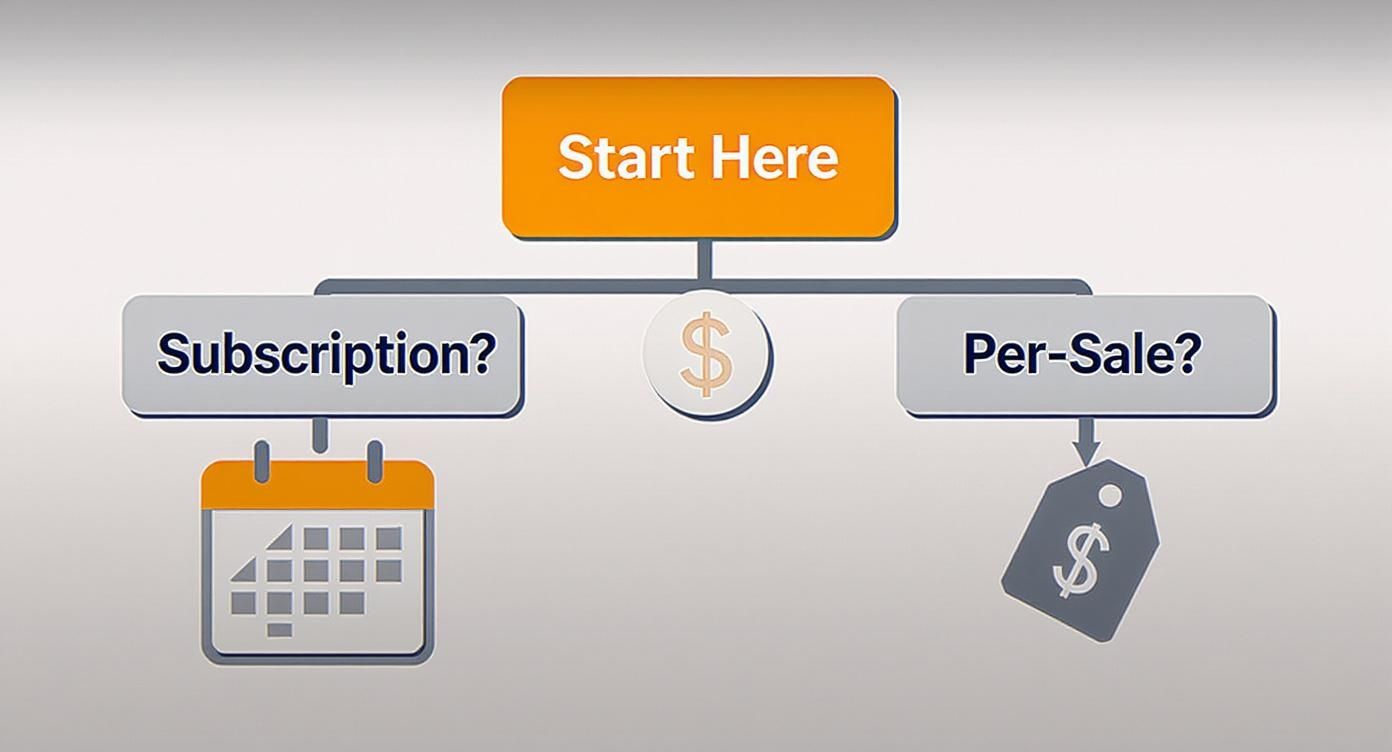
As the flowchart illustrates, once you've decided between a subscription or per-sale plan, your fulfillment fees become the next major cost to consider, showing just how important this decision is.
There's no single "best" fulfillment method—it's all about what's best for your business. To figure that out, let's break down the key factors.
Important Note: You don't have to be exclusive. Many savvy sellers use a hybrid strategy. They send their best-selling products to FBA to take advantage of Prime and handle niche or slower-moving items via FBM to save on fees and maintain control. This flexibility is one of the real strengths of the Seller Central platform.
Your first few months on Amazon are a massive learning curve, and it’s a time when small mistakes can really set you back. Just diving into Amazon Seller Central without a game plan can feel like you're trying to drink from a firehose. But if you can sidestep a few common landmines, you’ll be setting yourself up for success down the road.
Think of this as your pre-flight checklist before taking off.
The most common tripwire for new sellers? Creating lazy, ineffective product listings. So many people just upload a single, blurry photo, scribble a quick description, and then sit back wondering why they're not getting any sales. Your listing is your digital storefront—you've got to treat it that way.

Another huge misstep is completely ignoring the Account Health dashboard. That section of Seller Central isn't just for decoration; it's a direct line to how Amazon sees your performance. Letting things like a high Order Defect Rate or Late Shipment Rate slide can get your listings buried or, even worse, get your entire account suspended.
Beyond the obvious stuff, simple inventory mismanagement can sink a new business fast. Order too much stock, and you've got cash tied up and long-term storage fees eating into your profits. But order too little, and you'll stock out on your best products, killing your sales momentum and your Best Sellers Rank (BSR).
It’s just as bad to ignore customer feedback and messages. A single nasty review or an unanswered question can scare off dozens of future buyers. The reality is that over 60% of sales on Amazon come from third-party sellers just like you, and your reputation is everything. Engaging with customers quickly and professionally is non-negotiable.
So, how do you steer clear of these problems? Focus on these four things from day one:
Key Insight: Finding a great product is only half the battle on Amazon. The real winners are the ones who nail the operations. Mastering listing optimization, inventory, and customer service inside Amazon Seller Central is what separates the stores that thrive from the ones that never even get off the ground.
If you’re new to the Amazon game, you've probably got a few questions bouncing around your head. Let's tackle some of the most common ones we hear from sellers just getting their bearings.
This is a big one, and it trips a lot of people up. The easiest way to think about it is this: are you selling in Amazon's store, or are you selling to Amazon's store?
Amazon Seller Central is for the rest of us—the third-party sellers. You list your products directly on the Amazon marketplace, and you sell straight to the customer. This puts you in the driver's seat for your pricing, your inventory levels, and how your brand is presented.
Amazon Vendor Central, on the other hand, is an invite-only party. Here, you're not a retailer; you're a wholesaler. You sell your products in bulk to Amazon at wholesale prices. Amazon then owns that inventory and sells it under the classic "Ships from and sold by Amazon.com" banner.
This is the million-dollar question, and the answer is… it depends. Some sellers get the green light in as little as 24 hours, which is fantastic. More realistically, you should probably expect it to take several days, and sometimes even a couple of weeks.
What causes the hold-up? Usually, it's a documentation issue. Amazon needs to verify who you are, and any little mismatch can send your application into a manual review queue. To get through faster, make sure every document you upload—whether it’s a utility bill or a bank statement—is a high-quality scan, is current, and matches the name and address you registered with exactly.
Yep, you absolutely can. Most sellers start out as sole proprietors, using their personal info to get the ball rolling. It’s the standard path for anyone signing up for the Individual selling plan and just wants to test the waters.
But here’s the thing: once you start seeing some real sales volume, you'll want to form a proper business entity, like an LLC. It’s not just about looking professional; it’s a smart strategic move.
Ready to scale your e-commerce brand alongside the best in the business? Join Million Dollar Sellers, the exclusive, invite-only community where 7-, 8-, and 9-figure founders share strategies to dominate the market. Apply for membership today.
Join the Ecom Entrepreneur Community for Vetted 7-9 Figure Ecommerce Founders
Learn MoreYou may also like:
Learn more about our special events!
Check Events