Chilat Doina
June 15, 2026
A customer who has bought from you six times lands on your homepage after clicking a retention email. They've spent serious money with the brand. They know your assortment. They've already told you what they like through every click, browse, and repeat purchase.
And your site greets them with the same generic hero banner every first-time visitor sees.
That's the ecommerce version of a top store associate looking at a loyal client and saying, “Can I help you?” with zero memory of what they've bought before. It wastes traffic, wastes intent, and slowly teaches good customers that shopping with you won't get easier over time.
The opposite experience feels different fast. A shopper returns and sees the category they browse, search results that adapt to current intent, and recommendations that make sense for what they just viewed instead of what your merchandising team hard-coded last quarter. That doesn't feel like a gimmick. It feels like the store is paying attention.
For larger brands, that's what personalization in ecommerce really is. Not “Hi Sarah” in the subject line. Not a last-minute app bolted onto Shopify. It's the operating system for relevance across homepage, search, product discovery, email, and retention.
Most founders first encounter personalization through the shallow version. Insert first name in email. Show a “you may also like” widget. Split traffic by broad segment. That's not useless, but it's not the version that moves a large catalog, improves search quality, and protects paid traffic efficiency.
Modern personalization is much closer to a live merchandiser plus a strong sales associate plus a smart search engine working at the same time. It takes what the shopper already told you, combines it with product and behavioral data, and changes what they see while the session is still happening.
When founders ask what is personalization in ecommerce, they usually aren't asking for a dictionary definition. They're asking three harder questions:
Those are the right questions.
Statista's personalization coverage shows why this moved from nice-to-have to infrastructure. Nearly seven in ten surveyed businesses planned to increase investment in personalization even during economic pressure, and more than 50% of companies said they were already integrating generative AI into commercial applications in 2023 to improve online commerce experiences. The same source notes that about half of companies still struggled to obtain accurate data for personalization, which tells you where the primary bottleneck sits. Not interest. Data quality.
Personalization stops being “marketing” once it starts controlling search, recommendations, and merchandising decisions in real time.
A good system doesn't announce itself. It reduces friction.
It shortens the path from landing to product discovery. It improves what gets ranked first. It makes cross-sell modules look obvious instead of random. It helps a returning buyer feel like the store remembers them, even if no human touched that session.
For an 8-figure or 9-figure operator, that's the strategic point. Better relevance compounds. Generic experiences don't.
Founders mix these up all the time, and it leads to bad investment decisions.
Personalization means the system adapts automatically based on signals like behavior, history, device, location, and current session activity. Customization means the shopper actively changes something by choice. Different mechanics. Different margin profile. Different operational burden.
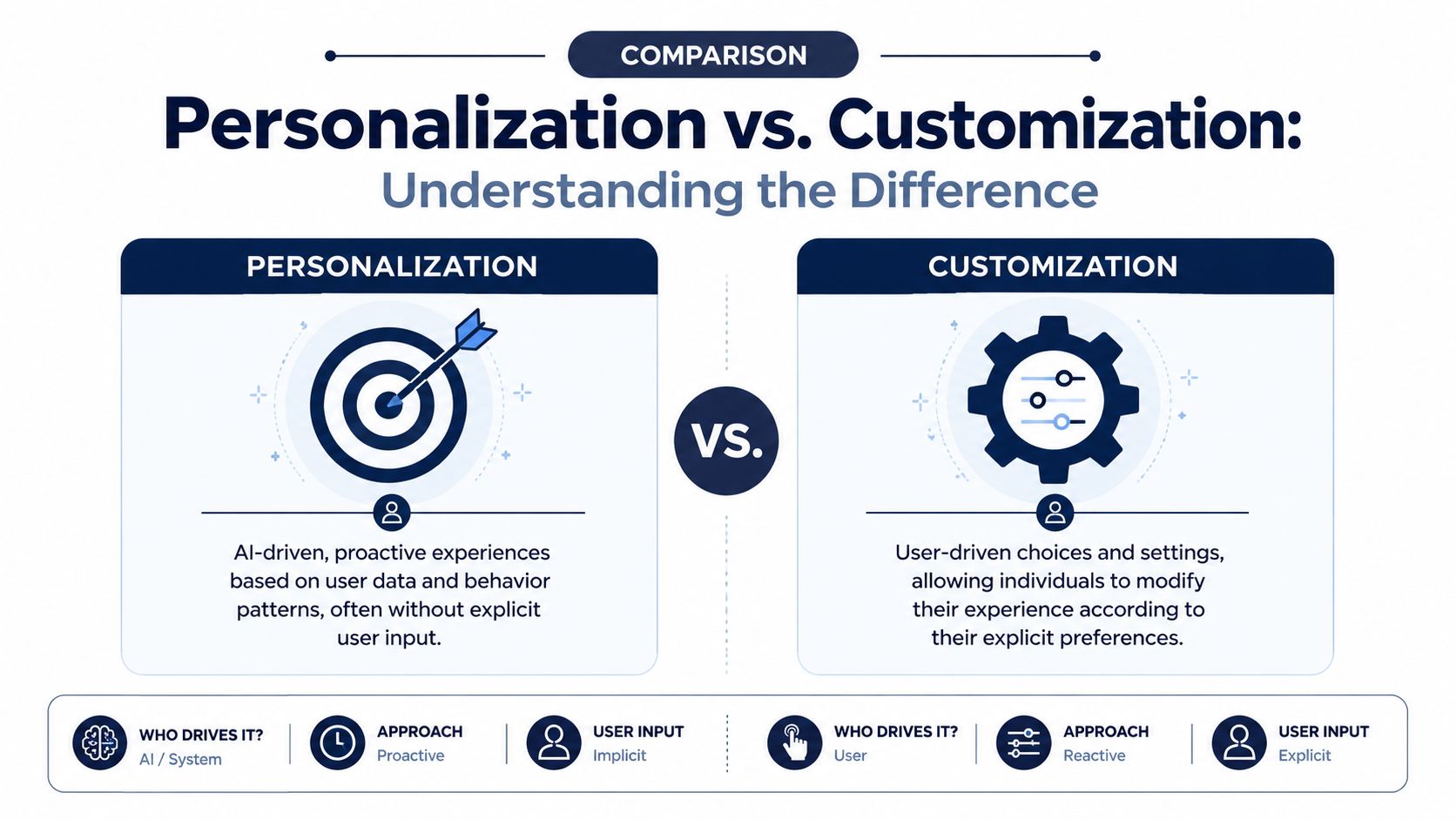
Personalization is a strong in-store associate who notices what a customer keeps reaching for and pulls better options forward. The customer doesn't need to explain much. The associate infers.
Customization is a tailor taking measurements and asking what fabric, cut, lining, and buttons the customer wants. The customer directs the outcome.
That distinction matters because the business implications are completely different.
| Model | Who drives it | What changes | Operational load |
|---|---|---|---|
| Personalization | Your system | Content, ranking, offers, recommendations | Data quality, tracking, orchestration |
| Customization | Your customer | Product attributes or product configuration | SKU logic, production workflows, returns handling |
If you sell a broad catalog with repeat purchase behavior, personalization usually improves how shoppers find and buy products. Your work is backend-heavy. Clean data. Better event collection. Tighter search and recommendation logic.
If you sell configurable products, customization can create more perceived value because the shopper is shaping the product. That often has brand and margin advantages, but it also introduces complexity in operations, production, customer service, and forecasting.
Kickflip's guide to ecommerce customization and personalization makes the key point clearly. Personalization is automatic adaptation, while customization is user-driven change. The same coverage notes that personalization has become a baseline expectation, while strategic customization can increase perceived value, reduce returns, and support premium pricing.
Decision rule: If your biggest growth problem is product discovery, relevance, and retention, start with personalization. If your biggest advantage is product uniqueness and willingness to pay, customization may deserve equal attention.
The common mistake is trying to solve a personalization problem with customization, or the reverse.
A skincare brand with poor product discovery doesn't need a fancy product builder first. It needs better search, better routines surfaced on-site, and more relevant repeat-purchase flows. A made-to-order furniture brand may need strong personalization too, but the most significant commercial benefit may stem from helping customers configure the right product without creating fulfillment chaos.
They're complementary. They aren't the same lever.
A brand doing $20 million to $100 million in revenue does not need personalization everywhere. It needs it in the places that change conversion, average order value, and repeat rate fast. Spreading effort across ten widgets usually creates noise, extra QA, and reporting confusion. Concentrate on the moments where shopper intent is clear and the wrong experience costs money.
A shopper clicks a paid ad for men's training gear, lands on a generic homepage, sees women's new arrivals, a summer campaign, and a blog post. That is not a brand problem. It is a routing problem.
For larger operators, the homepage is a traffic director. It should sort visitors into the right product path with as little friction as possible.
Good: Change the hero and featured modules for new versus returning visitors.
Better: Shift category blocks based on recent browse behavior, campaign source, or prior purchases.
Best: Re-rank collections, content, and product tiles in real time based on session signals and margin or inventory rules.
That last part matters. Merchants still need control. If a model pushes low-margin bestsellers all week while your overstock sits, the system may improve click-through while hurting contribution profit.
Search usually produces the fastest return because the shopper is declaring intent with every query, filter, and sort. Category pages come next. If ranking is weak in those two places, the rest of the personalization program is working uphill.
This is also where a lot of brands overbuy software. They add AI layers before they have disciplined segmentation, clean product attributes, or synonym rules. A simpler setup often wins first. Tighten ranking logic by audience, suppress out-of-stock or low-converting items, and use a clear merchandising framework for brand priorities.
If your team has not defined who should see what, start there. These ecommerce customer segmentation examples are a practical reference for building segments that can drive ranking, messaging, and offer logic.
A good test is simple. If a returning VIP and a first-time discount shopper see the same category order, the same badges, and the same promotions, you are leaving money on the table.
Recommendation modules fail for predictable reasons. They repeat products the shopper already rejected. They ignore compatibility. They push what the algorithm likes instead of what the basket needs.
Good: Related products on the PDP.
Better: Cart recommendations based on compatibility, routine building, or accessory logic.
Best: Session-aware recommendations that adapt to browse path, product affinity, price sensitivity, and inventory position.
Page context matters more than many teams admit:
The highest-performing recommendation setups feel like a strong store associate. They narrow the field, reduce bad choices, and make the next click easier.
Here's a useful visual on how these systems show up across channels:
Email personalization is rarely about first-name tokens. The bigger gains come from who receives the message, which products or content blocks they get, and when the send goes out.
The maturity curve usually looks like this:
| Stage | What it looks like |
|---|---|
| Basic | Same campaign, first-name token, broad segment split |
| Intermediate | Dynamic blocks by category interest or purchase history |
| Advanced | Personalized recipient selection, product picks, and send timing tied to shopper behavior |
Retention-heavy brands often miss the post-purchase window. They send an order confirmation, a shipping email, and a generic thank-you note, then wonder why second-order rate stalls. More useful flows usually win. Education for the purchased product. Replenishment timing based on expected usage. Cross-sell based on what fits the original order. Content that reduces confusion and returns.
If the stack is still maturing, start where the shopper is giving you the strongest signal and where your team can measure a clean revenue outcome.
The operators who get the best results treat personalization like merchandising infrastructure. It is not decoration. It is a system for putting the right product, message, and offer in front of the right shopper before that shopper drops out of the funnel.
If you strip away the vendor language, personalization is a real-time decisioning engine. It watches what a shopper is doing, compares it to customer and product data, and decides what to rank, show, recommend, or suppress next.
The simplest analogy is GPS.
A GPS doesn't just know your destination. It also reads current traffic, road closures, and your live position, then reroutes as conditions change. Personalization works the same way. Your catalog is the map. Customer and session events are the traffic. The model is the routing logic.
You don't need infinite data. You need useful, clean, connected data.
Epoq's explanation of ecommerce personalization puts it plainly. An effective system requires unified customer, product, and behavioral data such as clicks, purchases, and filters. The models improve from what shoppers do, and 45% of consumers say they are more likely to shop on a site that offers personalization.
That sounds technical, but the practical inputs are straightforward:
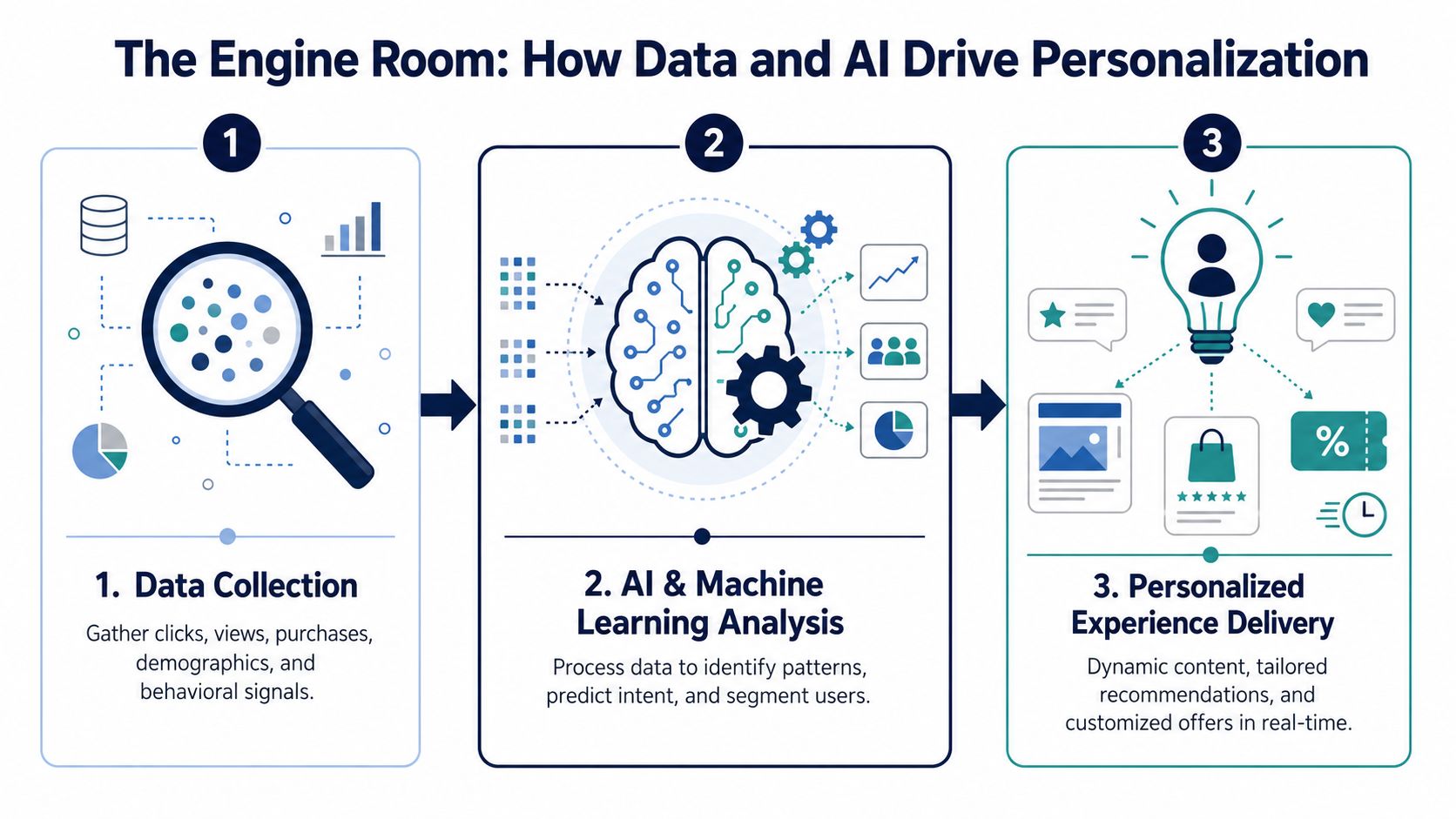
You don't need to be technical to evaluate whether your team is building this properly. You do need to know the moving parts.
This is event tracking.
If your store can't reliably capture views, clicks, add-to-carts, purchases, and filter interactions, the rest of the stack runs half-blind. A lot of personalization projects fail here because teams assume the analytics setup is enough. It usually isn't. Personalization needs event detail that can be acted on in-session, not just reviewed in a dashboard later.
This is your unified customer and product layer. Often it's a CDP or something serving the same role.
The point isn't the acronym. The point is having one place where identity, product data, and behavior connect. If your email platform knows one version of the customer, your ecommerce platform knows another, and your search layer knows neither, you'll get fragmented experiences.
For founders who want a cleaner read on the underlying discipline, this primer on what data analytics means in practice is worth reviewing because personalization quality usually rises or falls with analytics maturity.
Here, models and rules combine.
A mature stack usually blends collaborative filtering, content-based filtering, and machine-learning models with a unified data source, then activates outputs in onsite modules, email timing, and search re-ranking. RBM Soft's overview of AI and big-data personalization highlights the operational point: historical behavior builds affinity profiles, current-session signals re-rank what gets shown next, and unified datasets support consistent experiences across touchpoints.
The model doesn't need to be magical. It needs to be fed the right signals and allowed to update quickly.
Most failures aren't algorithm failures. They're operating failures.
| Failure | What it looks like | Result |
|---|---|---|
| Dirty catalog data | weak attributes, inconsistent tags, poor compatibility logic | bad recommendations |
| Broken identity | channels can't connect visits, email, and purchase history | inconsistent experiences |
| Weak instrumentation | missing events or delayed events | slow or inaccurate in-session decisions |
| No merchant controls | system pushes irrelevant products during launches or inventory shifts | team loses trust |
That's why good personalization is partly an AI problem and partly a retail operations problem. If your product data is sloppy, your “AI personalization” will automate sloppiness faster.
If personalization doesn't change revenue, it's a design exercise.
The strongest headline number available is this: companies that excel at personalization generate 40% more revenue from those activities than average players, according to figures cited by Nosto's roundup of ecommerce personalization statistics. The same source says 70% of retailers who invested in personalizing customer experience saw at least a 400% ROI. It also notes the ecommerce personalization software market is projected to grow from $263 million in 2023 to $2.4 billion by 2033, a 24.8% CAGR.
Those figures matter because they frame personalization correctly. This isn't a cosmetic conversion tactic anymore. It's a revenue discipline with its own software category.
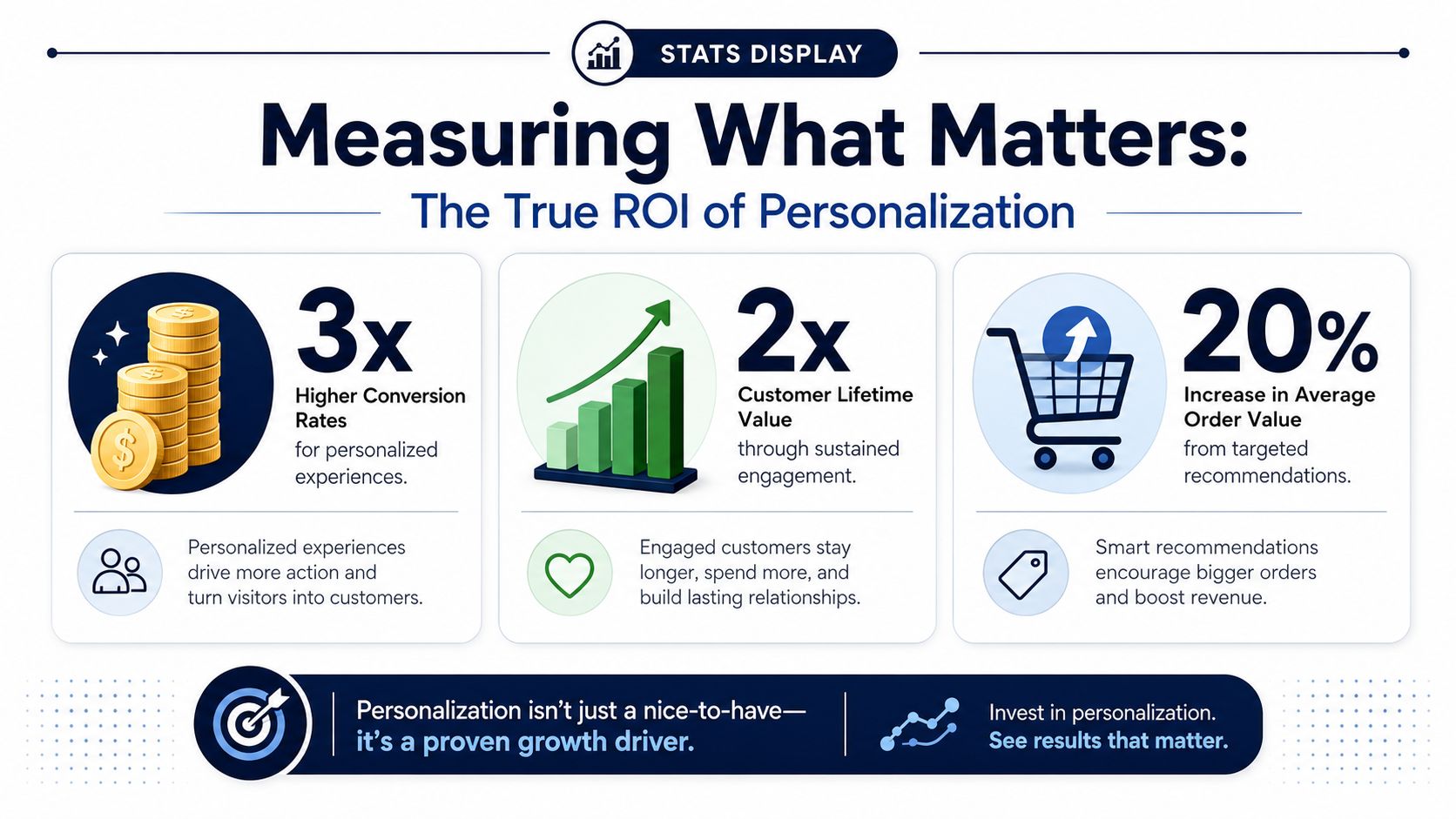
Founders get into trouble when the team reports personalization success through engagement metrics alone. More clicks on a widget can be useful. It is not the finish line.
The outcomes that matter most are usually:
You'll notice those are operating metrics and financial metrics. That's intentional.
A lot of brands “measure” personalization by turning it on and watching top-line revenue. That's not measurement. Too many variables move at once.
Use controlled testing.
Pick a high-intent surface like site search, PDP recommendations, cart recommendations, or a retention flow. Hold out a control group. Let one group see the personalized version and the other see the standard version.
That gives you a read on actual incremental impact.
If the personalized version increases clicks but hurts margin, that's not a win. If it boosts conversion by over-discounting or pushing low-quality products, that's not a durable gain either.
Tie the result back to revenue quality, not just volume.
Some personalization gains appear immediately, especially in search and cart modules. Others show up downstream in repeat purchase behavior. If you stop at the first session, you may miss the point.
For teams that need a sharper framework, this guide on ROI calculation is useful because it forces cleaner thinking around investment, cost, and return instead of hand-wavy “performance improvement.”
Operator mindset: Don't ask whether personalization works. Ask which use case produces the cleanest incremental profit after tooling, implementation, and team overhead.
Not every personalization initiative pays back equally.
| Use case | Typical commercial effect |
|---|---|
| Search re-ranking | Improves product discovery at high intent |
| Cart cross-sell | Lifts attachment rate and basket value |
| Lifecycle email personalization | Protects retention and repeat purchase |
| Homepage personalization | Useful, but often less immediate than high-intent surfaces |
That's why mature teams usually earn the right to broaden personalization by first proving a few concentrated wins. Revenue creates organizational trust. Trust creates room to expand the stack.
Most personalization projects don't fail because the idea is wrong. They fail because the sequence is wrong.
Brands buy software before they fix product data. They launch broad experiences before proving a narrow win. They rely on old cookie-heavy logic when the better path is first-party data and real-time orchestration.
Bloomreach's guidance on ecommerce personalization gets to the issue many overview pieces miss. Effective personalization now depends on first-party data and real-time orchestration, while older cookie-heavy playbooks are fading. That's not just a privacy point. It's an operating model change.
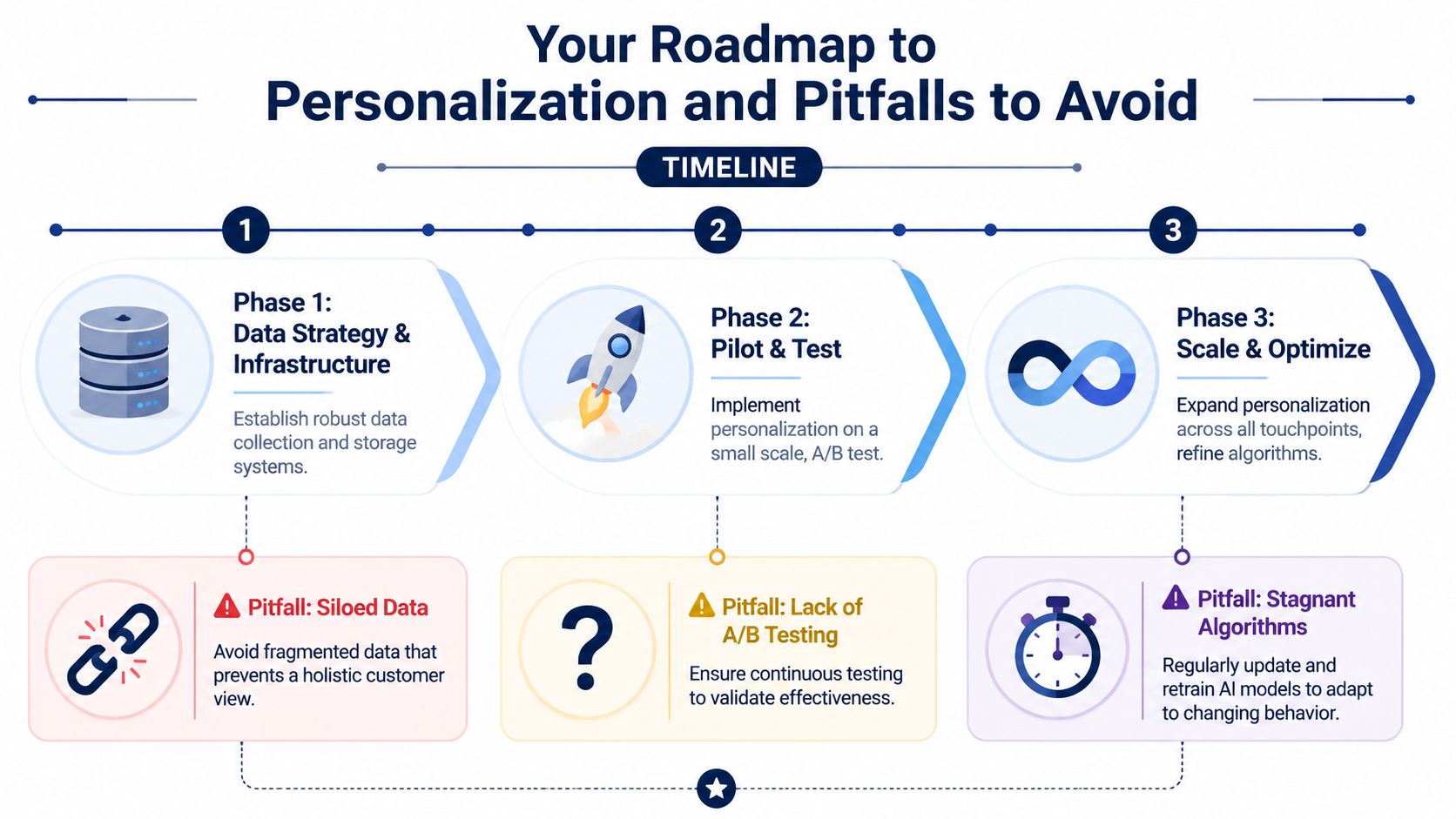
Start with data strategy and infrastructure.
You need trustworthy product attributes, event tracking that captures meaningful behavior, and a coherent customer view across channels. For most 8-figure-plus brands, this isn't glamorous work. It's cleanup. But in this work, later gains are won.
The biggest failure at this stage is trying to personalize on top of broken data. If the catalog is messy or inventory signals are delayed, the system will recommend the wrong products with more confidence.
If your team doesn't trust the data, they won't trust the outputs. If they don't trust the outputs, the project dies politically before it dies technically.
Run a pilot on a narrow use case with clear revenue logic.
Good starting points are personalized search results, PDP recommendations, cart cross-sell, or one lifecycle flow tied to a repeat-purchase category. Keep the test measurable. Keep the control clean. Keep merchant overrides available.
The common mistake here is overbuilding. Founders approve a large cross-channel rollout before anyone has proven impact in one area. That creates more meetings, more integration work, and more room for attribution confusion.
A better sequence looks like this:
Once a pilot proves out, expand into cross-channel orchestration.
Here, personalization starts feeling coherent to the customer. The site reflects recent behavior. Email follows the same logic. Search, browse, and recommendations stop contradicting each other. The experience begins to compound.
The mistake at this stage is stagnation. Teams implement an early model, stop testing, and assume relevance stays stable. It doesn't. Assortment changes. customer behavior changes. traffic mix changes. Your personalization logic needs tuning the same way paid media and pricing do.
A practical way to judge whether you're ready to scale is simple:
| If this is true | Then you're ready |
|---|---|
| Data is clean enough to support trust | Expand channels carefully |
| One use case already showed lift | Broaden the rollout |
| Merchants can still intervene | Scale without losing control |
| Privacy posture is first-party led | Build for the next few years, not the last few |
The winning brands don't treat personalization like a plugin. They treat it like retail intelligence wired into the customer journey.
If you're building at scale and want to compare notes with founders who've already pressure-tested growth systems across Amazon, DTC, and omnichannel, Million Dollar Sellers is where high-level operators have those conversations candidly. It's an invite-only community built for serious ecommerce leaders who want better answers, faster.
Join the Ecom Entrepreneur Community for Vetted 7-9 Figure Ecommerce Founders
Learn MoreYou may also like:
Learn more about our special events!
Check Events