Chilat Doina
September 8, 2026
A demand letter lands in your inbox during the busiest weekend of the year. The subject line is blunt, the response deadline is close, and your team is searching for answers while shoppers are already moving through checkout. Nobody knows whether the problem is the theme, the payment widget, the order email, or the fact that keyboard users can't reach the purchase button.
That scenario feels extreme, but the operating mistake behind it is common. Store owners treat accessibility as a storefront score instead of a customer-journey requirement. A product page may look polished while the cart drawer traps keyboard users, the payment iframe drops focus, and the order confirmation email provides no usable route back to support.
Accessibility standards are now part of ecommerce risk management. WCAG has matured through more than 25 years of revisions, from WCAG 1.0 in 1999 to WCAG 2.0 in 2008, WCAG 2.1 in 2018, and WCAG 2.2 in 2023, as documented in this history of web accessibility standards. The standard also became an ISO benchmark in 2012, helping move accessibility from specialist guidance into a recognized international reference point.
The practical response isn't to install an overlay and hope. It's to map the full buying journey, test the interfaces real customers use, fix the defects that block revenue, and keep vendors accountable.
The founder in that Black Friday scenario usually discovers three uncomfortable facts at once. First, the law rarely cares whether the accessibility problem came from a theme, an app, or a contractor. Second, an automated scan can miss failures that a screen reader user encounters immediately. Third, the checkout experience is part of the store, even when another company supplies the payment component.
That changes the business question. You're not asking whether the homepage passes a tool. You're asking whether a shopper can discover a product, select a variant, add it to the cart, pay, receive the confirmation, and request help without facing a disability-related barrier.
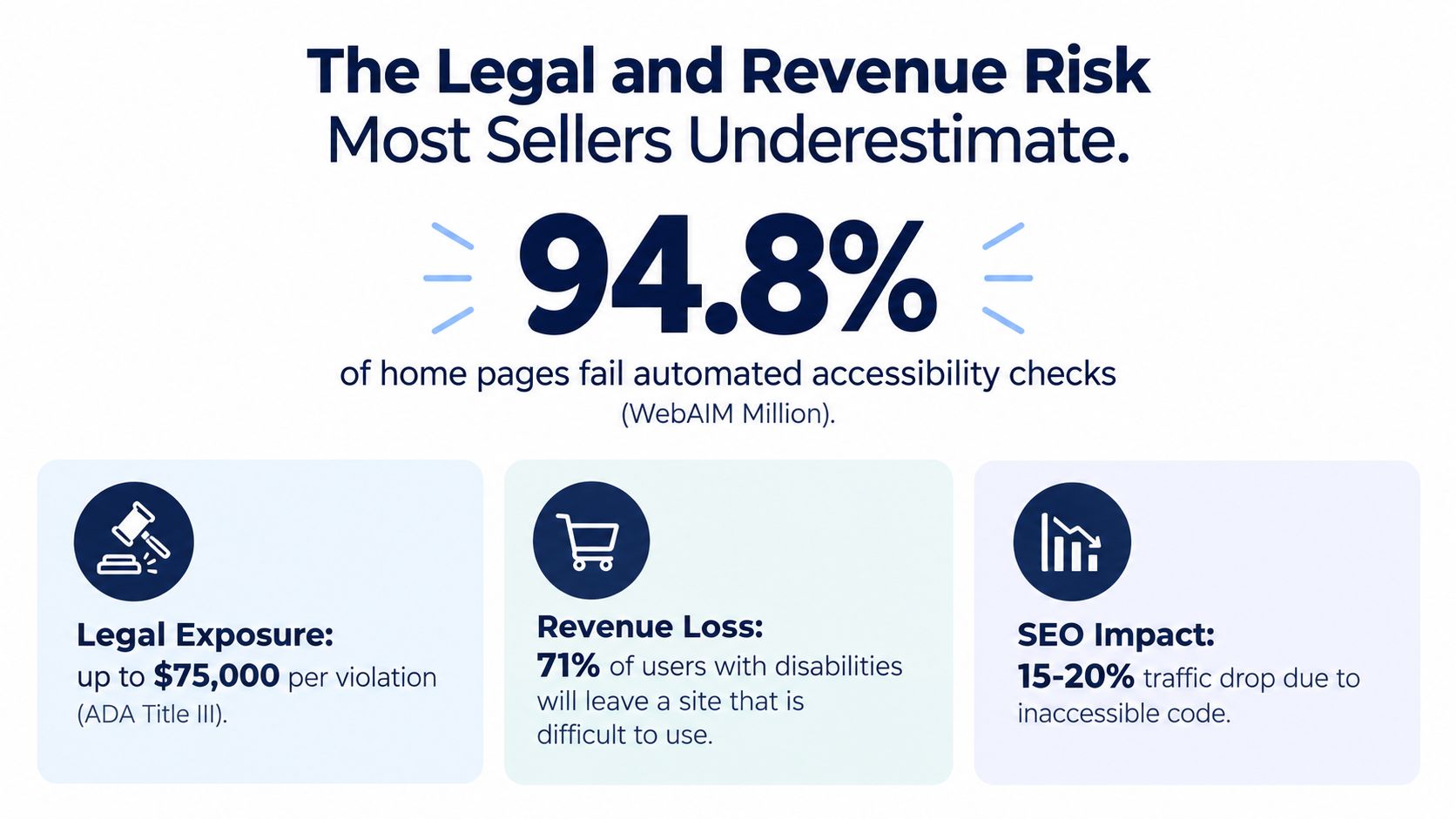
WCAG is influential because countries and regions increasingly use it in legislation, procurement, and commercial requirements. One analysis reports that WCAG appears in about 95% of national web accessibility standards worldwide. The same source records a persistent compliance gap, with 94.8% of tested home pages showing at least one detectable accessibility failure and an average homepage containing about 51 errors. Those figures come from web accessibility statistics and compliance research.
The European market makes the full-journey issue impossible to ignore. Coverage of the European Accessibility Act states that it took effect on 28 June 2025 and reaches storefronts, product pages, carts, checkout, receipts, and support channels, with EN 301 549 providing the technical framework and WCAG 2.1 AA serving as the web-content baseline. A store that audits only its landing pages is auditing only part of its exposure.
Screen reader users need meaningful labels, logical structure, and status updates that assistive technology can announce. Keyboard-only shoppers need a visible focus path through menus, filters, variant selectors, cart drawers, and payment controls. Customers with low vision need readable contrast, scalable layouts, and controls that remain usable when the page is enlarged.
These aren't abstract accommodations. They determine whether someone can finish a purchase independently. A failed checkout can produce an abandoned order, a support ticket, a refund request, or a complaint. Legal exposure is one consequence, but revenue leakage starts when the customer hits the barrier.
Founder rule: Treat every third-party customer touchpoint as part of your product. Your shopper doesn't care which vendor caused the failure.
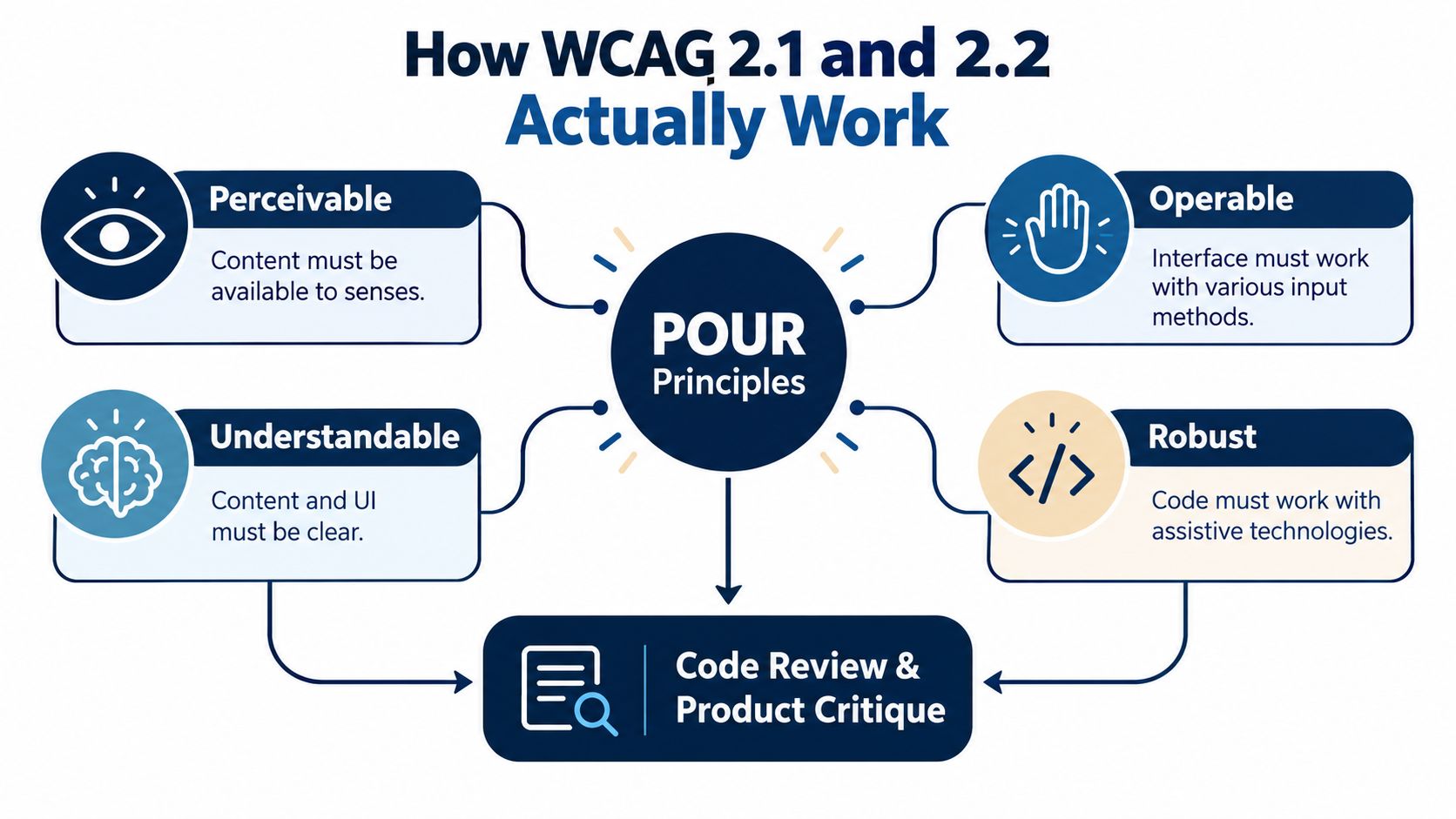
WCAG 2.1 gives design and engineering teams a practical operating model through four principles: Perceivable, Operable, Understandable, and Robust. The WCAG 2.1 specification from W3C defines these principles and supports its guidelines with testable success criteria for design specifications, procurement, regulation, and conformance testing. Treat the framework as a floor for the customer journey, not a storefront score. Checkout, post-purchase messages, and third-party widgets can still leak revenue after the main theme passes an audit.
Product imagery needs useful alternative text. “Blue running shoe, side view” communicates more than “image,” while a decorative divider should generally remain out of the spoken experience. Variant swatches need text or an accessible name, not only a color patch that a screen reader cannot identify.
Video and audio need equivalent access, and visual status changes need a nonvisual equivalent. If a product becomes unavailable after a selection, the interface should communicate that change in text that assistive technology can detect. Apply the same standard to order confirmations, shipping updates, and support widgets.
A shopper should be able to open navigation, move through filters, choose a variant, open the mini-cart, adjust quantity, and reach checkout with a keyboard. Focus must remain visible and follow a logical order. Modal dialogs need a reliable entry point, a controlled focus path, and a usable way to close them without trapping the shopper behind the overlay.
WCAG 2.2 adds criteria that matter directly to ecommerce, including requirements related to focus visibility, target size, dragging movements, and consistent help. A mobile add-to-cart control that is difficult to tap, or a checkout help link that shifts unpredictably between steps, creates friction even when the page appears complete.
Use plain labels such as “Billing address” and “Apply discount code.” When a coupon fails, identify the field or action involved and explain what the shopper can do next. “Invalid input” forces the customer to diagnose the problem. An explanation that identifies the required format supports recovery.
Keep terminology, help links, button names, and checkout structure consistent. Predictability helps shoppers with cognitive disabilities and reduces mistakes for anyone buying under time pressure. Review error messages in post-purchase forms too, including returns, exchanges, and account recovery.
Semantic HTML is the foundation. ARIA can add information to dynamic widgets, but it cannot repair broken keyboard behavior or contradictory states. Test the rendered experience after theme updates, app installations, checkout changes, and vendor changes. A component that worked in one release can fail when its markup or event handling changes.
WCAG has three conformance levels, A, AA, and AAA. Level A contains the most basic requirements, AA adds the practical requirements most organizations target, and AAA is the highest level and is not always achievable for every type of content. For ecommerce teams, WCAG 2.1 AA is the sensible baseline because it aligns with web-content expectations described in major accessibility frameworks. Audit results matter only when testing covers the full journey, including every embedded tool that can block a purchase or support request.
Founders need a practical answer: which rules can reach the store, and what evidence should the team retain? These frameworks overlap around WCAG, but their scope and enforcement differ. A storefront audit alone is not enough. Checkout, post-purchase communication, and third-party widgets can still create compliance and revenue gaps.
| Regulation | Who It Covers | WCAG Version Referenced | Ecommerce-Specific Requirements | Enforcement |
|---|---|---|---|---|
| ADA | Private businesses may face claims under disability-discrimination law, although the statute does not spell out a single web standard | Courts commonly look to WCAG 2.1 AA as a practical benchmark | Equal access to online shopping and customer interactions, including checkout and support | Private claims and public enforcement can create injunctive, financial, and legal-cost exposure |
| Section 508 | U.S. federal agencies and organizations supplying covered federal technology | Harmonized WCAG criteria are incorporated into the revised standards | Rarely applies to pure DTC stores, but matters when selling into federal supply chains | Federal procurement, contract requirements, and administrative enforcement |
| European Accessibility Act | Covered products and services offered in the EU market | WCAG 2.1 AA is the referenced web baseline in current technical guidance | Digital commerce reaches the storefront, product pages, cart, checkout, receipts, and support channels | Member-state implementation and market surveillance |
| EN 301 549 | ICT products and services measured against the European technical standard | Web requirements incorporate WCAG 2.1 Level A and AA | Extends beyond web pages to ICT, hardware, and self-service terminals | Technical conformity assessment and applicable national enforcement |
The ADA is a U.S. disability-discrimination law, not a single website checklist. Treat WCAG 2.1 AA as the engineering baseline, then test whether shoppers can complete purchases, receive order information, request support, and handle returns.
Section 508 has a public-sector and procurement focus. It has been revised several times since 1986 and now incorporates WCAG 2.0 AA by reference, as described by the U.S. Access Board's accessibility standards overview. A pure DTC seller usually falls outside its direct reach, while a supplier to federal agencies may face accessibility requirements through contracts.
The European Accessibility Act can reach covered digital commerce offered in the EU. Product discovery, cart controls, checkout, receipts, and support all belong in the review. Passing the storefront while a payment widget or confirmation flow blocks users leaves the journey incomplete.
EN 301 549 is broader than a web-page checklist. It covers non-web ICT, devices, and terminals, with measurable requirements such as a volume-control range of at least 18 dBA and an increment of 12 dBA above minimum volume, as described by the European Accessibility Resource Centre.
Build to WCAG 2.1 AA across the full customer journey. Document exceptions, vendor controls, test evidence, and remediation ownership. This creates one engineering target while preserving the jurisdiction-specific review your legal team may require.
A demand letter can arrive after a shopper encounters one inaccessible step, not after your homepage fails an automated scan. The legal exposure grows when the same defect affects checkout, account access, returns, or support. Settlement discussions also become harder when your team cannot show a documented audit, assigned ownership, and a remediation record.
Shopify, BigCommerce, WooCommerce, and custom storefronts can all become inaccessible through routine operating changes. A theme update can alter heading order. A review app can inject unlabeled controls. A currency converter can create a keyboard trap. A payment provider can introduce an iframe whose focus behavior your team never tested.
A storefront audit can pass while revenue leaks elsewhere. A shopper may be unable to choose a variant, apply a discount, complete payment, request a return, or read an order update. Third-party widgets and post-purchase systems belong in the same compliance review because the customer experiences one journey, regardless of which vendor owns each screen.
Automated tools help find missing labels, contrast issues, and certain structural defects. They cannot reliably confirm that a screen reader user understands a variant picker, that focus returns to the correct trigger after a modal closes, or that an error message supports recovery.
A passing scan is evidence that some rules were checked. It isn't evidence that a customer can complete the transaction.
Treat each blocked task as an operational defect with legal and commercial consequences. Assign a team owner, capture the affected flow, and require vendors to fix or replace components that block purchase or support.
Watch the walkthrough below, then validate every conclusion against your own store and customer journey.
Start with the journey, not the homepage. A serious audit follows a shopper from discovery through support and includes every interface your brand controls or embeds.
Product and collection templates need testing for headings, image alternatives, filters, sorting controls, swatches, price updates, and quick-view dialogs. Test a representative range of products, especially items with complex variants, subscriptions, personalization, or promotional pricing.
Checkout and payment require a separate pass. Include the standard checkout, guest purchase, account creation, address validation, discount fields, Apple Pay, Shop Pay, and any hosted payment or financing option. A checkout that works with a mouse but loses focus when the payment method changes is not operationally accessible.
Third-party widgets need vendor-level accountability. Review ratings, chat, exit-intent popups, currency converters, loyalty tools, cookie controls, and recommendation modules. Record the vendor version, component name, keyboard behavior, and fallback path. If a widget blocks purchase or support, “the app caused it” isn't a customer-facing solution.
Post-purchase channels include receipts, shipping updates, order tracking, returns, refunds, and support. Test transactional emails with a screen reader, check link purpose, use semantic headings, and verify that tracking pages expose status changes in an understandable way.
Run Lighthouse and axe-core in continuous integration to catch regressions early. Then perform manual keyboard walks through priority products and the complete checkout. Use NVDA or VoiceOver sessions on the browsers and devices your customers use, including iOS Safari and Android Chrome.
A user test with people who rely on assistive technology adds evidence that scanners can't provide. Keep the findings practical: record the URL pattern, reproduction steps, expected result, observed result, affected component, assistive technology, and revenue path.
| Audit Layer | Recommended Tools | Cadence | Owner |
|---|---|---|---|
| Templates and components | Lighthouse, axe-core, browser inspection | Every release and after theme changes | Front-end lead |
| Checkout and payment | Keyboard walk, VoiceOver, NVDA, device testing | Before checkout changes and during scheduled reviews | Ecommerce engineering |
| Embedded vendors | Manual interaction test, vendor conformance documentation | Before launch and during vendor renewal | Operations and procurement |
| Email and post-purchase | Screen reader, zoom, mobile email clients | During template changes and scheduled reviews | CRM or lifecycle owner |
Automation is a business-process problem as much as a technical one. Teams documenting ownership, escalation, and retesting can use this guide to automate business processes without allowing accessibility findings to disappear in a generic backlog.
Prioritize defects by where they block revenue and how many customers they affect, not by the number of violations a scanner reports. Fix the path to purchase first, then strengthen templates and communications around it.
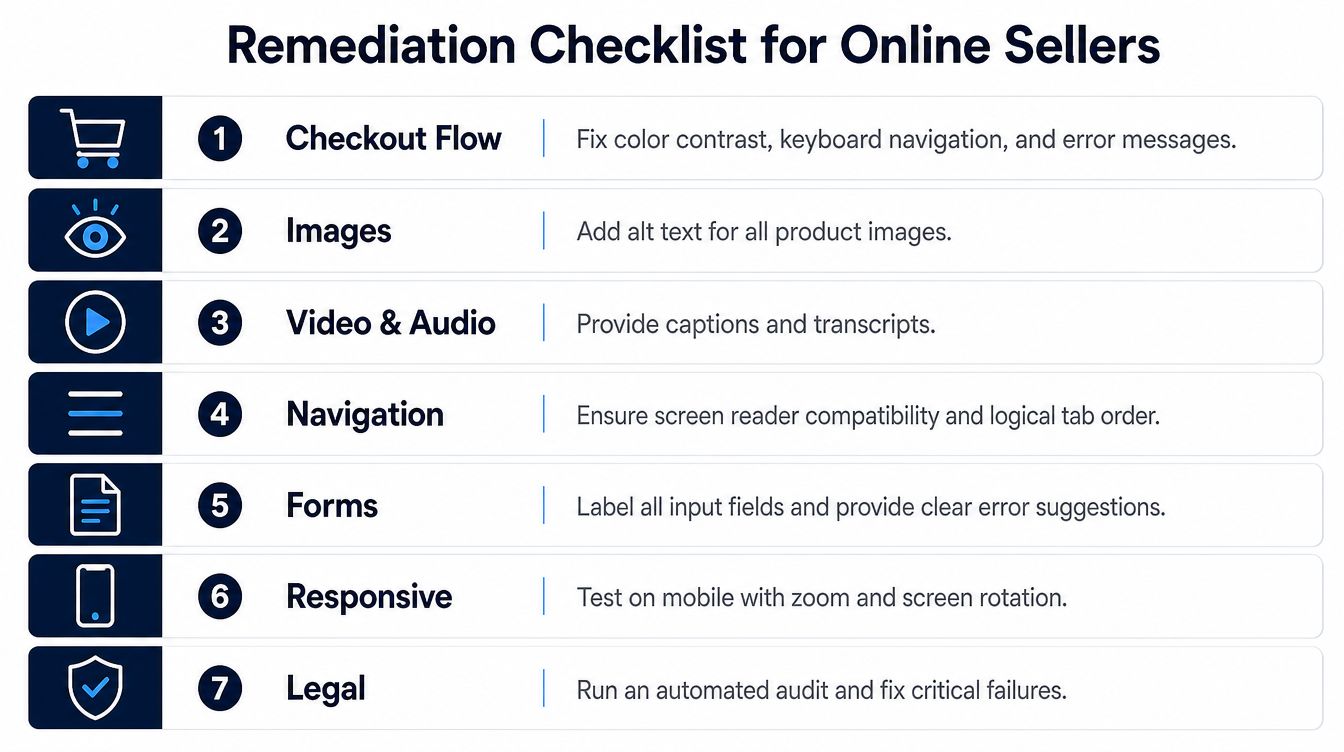
The metric isn't just violation count. Track checkout completion, support contacts tied to usability, successful form recovery, and the volume and severity of customer-reported barriers. Legal documentation should show the issue, owner, priority, remediation date, retest result, and any reason a specific fix remains open.
For product photography workflows, keep accessibility requirements alongside marketplace image rules rather than treating them as a separate creative concern. A clear Amazon image requirements guide can help teams formalize that workflow, while your storefront still needs meaningful text alternatives and accessible swatches.
Fix one complete path before scattering partial fixes across every template. A small team should first make the core navigation and checkout usable, then address reusable components, then repair post-purchase channels and vendor integrations. That sequence gives engineering a smaller number of root causes to resolve and gives legal a clearer record of sustained action.
A single audit creates a snapshot. Accessibility is a release discipline, because every theme change, app installation, campaign module, and checkout experiment can introduce a new barrier.
Assign an accessibility lead who owns the scorecard and a developer champion who reviews component changes. The founder doesn't need to manage every test, but someone must have authority to reject a launch when a new widget or theme lacks a documented conformance check.
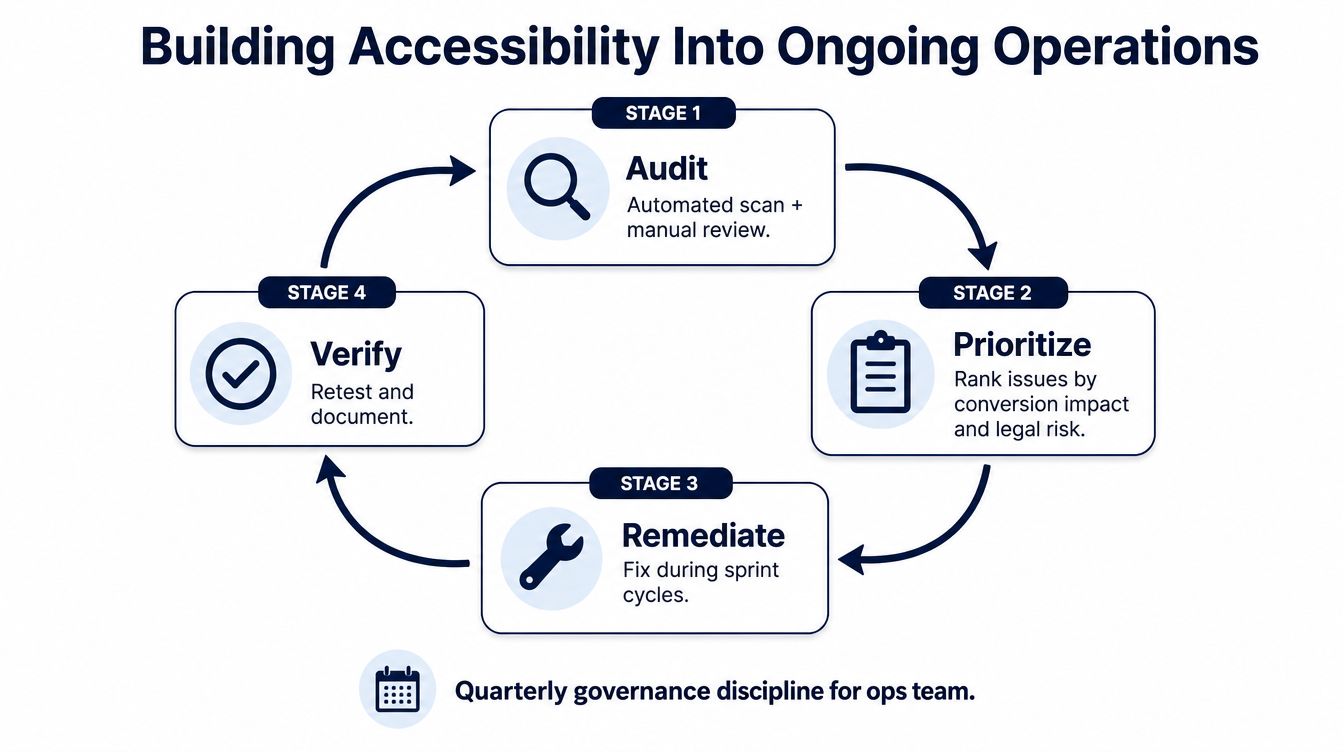
Keep a shared dashboard with open high-impact defects, affected journeys, vendor dependencies, retest status, and the date of the latest manual review. Add accessibility acceptance criteria to design reviews and release checklists, and require vendors to provide usable documentation before their scripts reach production.
Support teams also need a route for reporting barriers. Customers may describe the problem better than a scanner does, especially when the failure involves a particular device, browser, or assistive technology. For internal workflows that capture spoken issue reports, teams can review how to use speech to text as one way to turn customer or testing notes into searchable tickets.
Write the procedure down. A concise standard operating procedure guide can help operations define who audits, who triages, who approves vendor changes, and who closes a finding after verification. The objective is simple: no new digital surface should launch without an owner and a test plan.
Some themes provide a stronger foundation than others, but no platform guarantees that your complete store is accessible. Apps, custom code, marketing scripts, payment flows, and content decisions can create failures after the theme passes review. Test the live journey, not the platform label.
Repeat essential information in real page text or an accessible text alternative. Don't force a screen reader user to extract a promotion, ingredient, size, or warning from an image alone.
No. An overlay can't repair an inaccessible checkout, third-party widget, or post-purchase flow. It may add another interaction layer, so treat it as a limited tool rather than a substitute for engineering and user testing.
State the standard you target, the parts of the customer journey covered, known limitations, the support channel for reporting a barrier, and how customers can request assistance. Keep it accurate and update it when the store changes.
They should provide equivalent access, not a separate obstacle course. Make return forms, labels, status messages, emails, and support channels usable with the same independence and privacy expected during purchase.
They can be part of the customer experience and may create an accessibility issue even when a narrow technical rule treats them differently. Make receipts, invoices, return instructions, and order updates accessible instead of searching for exclusions.
Teams usually see the clearest improvement after fixing blocked journeys, not after chasing isolated scan warnings. Measure completed checkout paths, successful form recovery, support friction, and customer reports while maintaining a documented retest process.
Million Dollar Sellers gives serious ecommerce operators access to an invite-only peer network where founders share practical systems, vetted resources, and hard-earned lessons from scaling demanding businesses. Visit Million Dollar Sellers to connect with operators who can help you turn accessibility, compliance, and customer experience into disciplined operating advantages.
Join the Ecom Entrepreneur Community for Vetted 7-9 Figure Ecommerce Founders
Learn MoreYou may also like:
Learn more about our special events!
Check Events