Chilat Doina
February 14, 2026
If you're running a multi-million dollar e-commerce operation, you've already figured out the hustle part. But at this stage, growth isn't about working harder—it's about working smarter. The real path forward is to systematically reclaim your time, slash operational drag, and build systems that scale right alongside your revenue.
This guide is your roadmap to move past small tweaks and implement powerful, lasting automation that truly fuels your growth.
Every founder hits a wall where the very things that got them to their first million start to hold them back. The manual processes that worked for a handful of orders a day become serious bottlenecks when you're juggling complex supply chains and thousands of customer interactions.
Suddenly, those manageable tasks are active liabilities, draining time and money.

This is the point where knowing how to automate your business processes becomes a survival skill. It’s what separates founders who get trapped in their business from those who are free to lead it.
The problem with sticking to manual operations isn't just about wasted hours. It's a slow burn that silently eats away at your profits and puts a ceiling on your growth.
Here’s where the real damage is done:
Automation isn't about replacing your team; it's about empowering them. By removing the tedious tasks, you free up talented individuals to focus on high-impact work like strategy, customer relationships, and innovation.
A lot of founders get stuck applying band-aids—a spreadsheet macro here, a simple alert there. That’s not real automation. True automation is about designing end-to-end systems that run on their own, without you having to constantly check in.
Think of it as building an operational machine that hums along in the background, freeing you up to actually grow the business.
For example, a simple "fix" is setting a low-stock alert. A fully automated system would:
This is exactly how top operators improve operational efficiency and lay a foundation for massive scaling. The goal is to build a business that doesn't just grow bigger, but grows smarter. You’re building that capacity right into your company’s DNA.
Knowing you need to automate is one thing; figuring out where to start is a whole different ballgame. It’s tempting to just jump in and tackle the most annoying task on your plate, but that’s rarely the best move. A little data and a clear framework will ensure you’re putting your time and money where it’ll make the biggest impact.
For most e-commerce brands, the low-hanging fruit for automation sprouts in four key areas: inventory, fulfillment, customer support, and marketing. These departments are almost always swamped with the kind of repetitive, high-volume work that automation absolutely thrives on. But without a plan, you risk burning resources on projects that don’t really move the needle.
To get from a messy list of ideas to an actual roadmap, you need a simple way to score and rank them. This isn't about complex spreadsheets; it's about objectively looking at each potential project through the lens of what really matters for an e-commerce business.
By scoring each task against a few key criteria, you swap gut feelings for a strategic plan. This is the core of learning how to automate business processes in a way that builds real momentum instead of just creating more work.
Here’s the breakdown. For every automation idea, give it a score from 1 (low impact) to 5 (high impact) across these three pillars:
Add up the points. The tasks with the highest scores are your winners—your top priorities. It's a dead-simple method that gives you a clear, defensible plan.
Before you start building, it's helpful to see where the biggest wins usually are. This table maps out some of the most common—and impactful—automation opportunities we see with our clients.
.tbl-scroll{contain:inline-size;overflow-x:auto;-webkit-overflow-scrolling:touch}.tbl-scroll table{min-width:600px;width:100%;border-collapse:collapse;margin-bottom:20px}.tbl-scroll th{border:1px solid #ddd;padding:8px;text-align:left;background-color:#f2f2f2;white-space:nowrap}.tbl-scroll td{border:1px solid #ddd;padding:8px;text-align:left}Business AreaManual Task ExampleAutomation SolutionStrategic ImpactInventory ManagementManually updating stock levels across Shopify, Amazon, and Walmart after a sale.Centralized inventory sync software (e.g., Linnworks, Sellbrite).Prevents overselling, reduces stockouts, and protects seller ratings on marketplaces.Order FulfillmentCopy-pasting shipping addresses into a carrier's website to print labels one by one.Shipping automation platform (e.g., ShipStation) to batch-print labels.Drastically cuts fulfillment time, reduces human error, and enables faster shipping.Customer SupportAnswering repetitive "Where is my order?" (WISMO) support tickets.Automated chatbot or helpdesk workflow that pulls tracking data via an API.Frees up support agents for complex issues and provides instant answers for customers 24/7.MarketingManually emailing customers who left items in their cart.Abandoned cart recovery sequence using an email marketing platform (e.g., Klaviyo).Recovers lost revenue on autopilot and increases customer lifetime value.
This isn't an exhaustive list, but it's a fantastic starting point. It shows you how a small, targeted automation project can have a ripple effect across the entire business.
Let's look at how this plays out for two very different e-commerce businesses.
First, imagine a top-tier Amazon seller juggling thousands of SKUs. For them, the gold is in inventory and pricing automation.
Now, picture a direct-to-consumer (DTC) brand that’s all about building a loyal community. Their priorities will look completely different.
The most successful automation strategies don't just mimic a manual process—they fundamentally redesign it for efficiency. The goal isn't to make a human's job faster; it's to create a system that doesn't need a human in the first place.
This brand might focus on automating their customer service first.
Next, they’d likely look at recovering sales that are slipping through the cracks.
By using this simple scoring system, both businesses get a crystal-clear picture of where to start. They can confidently turn their biggest operational headaches into their most powerful competitive advantages.
Once you’ve cherry-picked the best automation opportunities, it's time to get your hands dirty and move from big-picture strategy to actual design. This is where you take a promising idea and turn it into a concrete blueprint.
The goal is simple: visually map out every single step of a process. Pinpoint each manual click, every decision point, and all the places data gets passed around before you even think about writing code or picking a tool.
Skipping this step is one of the most common—and costly—mistakes I see. Trying to automate a broken or murky process doesn't magically fix it; it just makes the chaos happen at lightning speed. A solid grasp of workflow automation is non-negotiable here because it forces you to think through the entire chain of events from start to finish.
This visual map becomes your single source of truth. It gets your dev team, stakeholders, and department heads all on the same page, which dramatically cuts down on miscommunication and painful revisions later.
Before you can build the future, you have to get brutally honest about the present. Start by mapping your chosen process exactly as it runs today—warts and all. A simple digital whiteboard like Miro or Lucidchart is perfect for creating a flowchart.
Your "As-Is" map needs to capture every little action. Don't gloss over the details. Ask questions like:
Let's take a classic e-commerce headache: handling a customer return.
The Manual "As-Is" Customer Return Process
This workflow is just a minefield of potential delays and mistakes. It’s totally dependent on email chains, manual data entry, and people remembering to talk to each other—all things that break down under pressure.
Now for the fun part. With your "As-Is" map as a guide, you get to design the dream scenario. The mission is to obliterate every manual step and decision point that technology can handle for you. You’re not just polishing the old process; you're redesigning it from the ground up for pure efficiency.
This visual gives you a simple framework for deciding what to prioritize—time sinks, error-prone steps, or things that just don't scale.
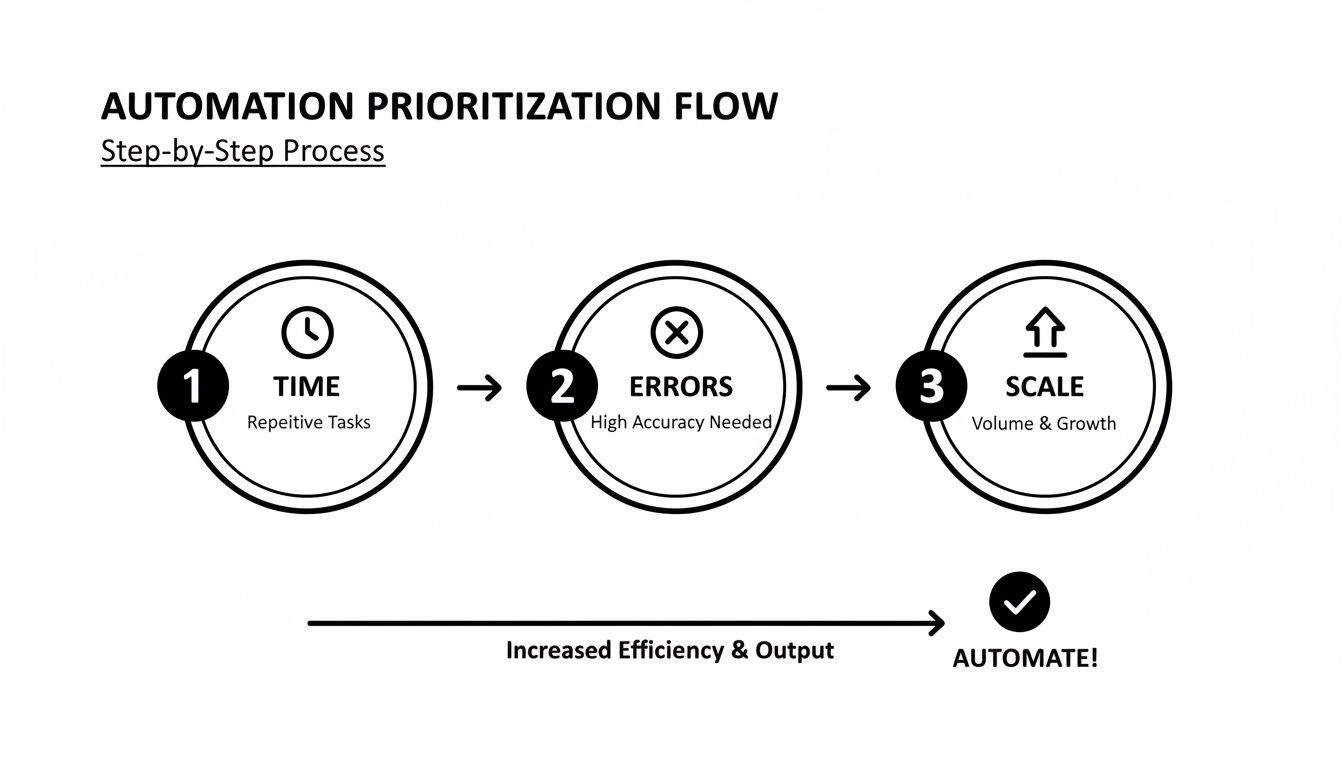
The real magic happens when you find a process that's a bottleneck in all three areas. Fixing that delivers the biggest impact, fast.
Let's redesign that chaotic returns process.
The Automated "To-Be" Customer Return Process:
The difference is night and day. The new process is faster for the customer, eliminates human error, and frees up your team to handle issues that actually require a human touch.
This clear visual map is now the exact spec sheet for your implementation. Solid documentation is the bedrock of any operation that's built to scale. If you want to formalize your internal playbooks, our guide on how to create Standard Operating Procedures is a great place to start.
Alright, you've mapped out your workflow and you know what you want to automate. Now comes the fun part: picking the tech to actually make it happen.
This is where a lot of founders get stuck. The sheer number of apps and platforms out there is overwhelming. But the key isn't just to pick a tool—it's to choose an integration strategy that fits your budget, your team's technical skills, and where you plan to take your business in the long run.
Get this right, and your tech stack becomes a growth engine. Get it wrong, and you’re left with a clunky, expensive mess that creates more problems than it solves.
Let's break down the three main ways to connect your systems so you can figure out which path makes the most sense for you.
The easiest place to start is almost always with a native integration. Think of the apps in the Shopify App Store or the marketplace for your email provider. These are tools built specifically to work with a platform you already use, often just a few clicks to install and get running.
For an e-commerce brand, a perfect example is adding a reviews app that automatically pulls order data from Shopify to send out post-purchase feedback requests. There's no complicated setup; it just works.
Next up are middleware platforms. Tools like Zapier, Make, or Tray.io are the translators of the internet, connecting apps that don't naturally talk to each other. They're the ultimate "if this happens, then do that" engines, letting you link thousands of different software tools without writing a single line of code.
You could, for instance, create a workflow where a customer tagged as "VIP" in your CRM automatically gets added to a special email list in Klaviyo. That same trigger could ping a private Slack channel for your customer success team and even create a task in Asana to send them a welcome gift.
Middleware is so powerful because it puts automation in the hands of the people who actually do the work. It lets your marketing, ops, and support teams build and maintain complex workflows that would have once required an engineering team, freeing up your developers for bigger, more strategic projects.
When off-the-shelf tools just won't cut it, it's time for a custom solution. If you need total control, unmatched flexibility, or have a workflow that's completely unique to your business, custom API development is the way to go. This means hiring developers to write code that connects your systems directly using each application's Application Programming Interface (API).
This is the big leagues. It's for core business processes that give you a real competitive edge. A seven-figure DTC brand might build a custom link between its ERP and 3PL to manage complex product bundles or create unique subscription rules that no Shopify app can handle. It’s a bigger investment of time and money upfront, but you get a solution that's perfectly sculpted to your business.
If you're looking for inspiration, our guide on AI tools for e-commerce dives into platforms that really shine when you build deep, custom integrations with them.
The payoff for getting these connections right is huge. For e-commerce founders, the right integrations drive higher revenue per visitor (RPV), better customer lifetime value (CLTV), and lower customer service costs. The data backs this up: integrated systems can boost revenue by up to 300%, lift conversions by 150%, and increase average order value by 50%.
And the market is only growing. With marketing automation projected to jump from $6.65 billion in 2024 to $15.58 billion by 2030, it’s obvious this is where the industry is heading. You can dig into more stats about how AI is shaping e-commerce on anchorgroup.tech.
So, which path is right for you? It all depends on your specific needs. This table should make the decision a little clearer.
Choosing your integration pattern is a strategic decision. It's about balancing speed, cost, and flexibility. This table breaks down the three core approaches to help you decide which is the best fit for your current stage and future ambitions.
.tbl-scroll{contain:inline-size;overflow-x:auto;-webkit-overflow-scrolling:touch}.tbl-scroll table{min-width:600px;width:100%;border-collapse:collapse;margin-bottom:20px}.tbl-scroll th{border:1px solid #ddd;padding:8px;text-align:left;background-color:#f2f2f2;white-space:nowrap}.tbl-scroll td{border:1px solid #ddd;padding:8px;text-align:left}Integration PatternBest ForProsConsTypical CostNative IntegrationQuick wins and solving problems within a single platform (e.g., Shopify).Fast setup, low cost, user-friendly.Limited functionality, vendor lock-in.$10 - $200/moMiddleware (Zapier)Connecting multiple cloud-based apps without code.High flexibility, supports thousands of apps.Can get expensive at high volume, potential latency.$50 - $500+/moCustom API DevComplex, mission-critical processes unique to your business.Infinite flexibility, optimized performance, ownable IP.High upfront cost, requires developers, ongoing maintenance.$5,000 - $50,000+ (Project-based)
Ultimately, this framework should help you line up your automation goals with a strategy that’s both practical and sustainable. You want your tech stack to be an engine for growth, not a bottleneck holding you back.
You've designed the workflow and picked the tools. Now for the fun part: execution. This is where the blueprint transforms into a living, breathing machine that actually starts generating value for your business. But a successful launch isn't about flipping a switch and hoping for the best. It's a carefully phased process designed to squash bugs, minimize risk, and get your team excited about the change.
This is the playbook for launching your new automated workflow smoothly. Knowing how to automate is only half the battle; knowing how to roll it out without blowing up your daily operations is what separates a cool idea from a genuinely game-changing one.

Whatever you do, don't go all-in on day one. A pilot program is your safety net. It lets you test the new automation in a controlled, low-risk environment so you can work out all the kinks before the system is handling your entire order volume.
Think of it as a dress rehearsal. You can isolate the pilot to a tiny, manageable segment of your business, like:
During the pilot, you'll want to run the old manual process and the new automated one in parallel. This is critical. It lets you compare the outputs side-by-side to make sure the new system is accurate, fast, and reliable. Any weird bugs or discrepancies get fixed here, long before they have a chance to mess up a real customer's order.
Thorough testing is completely non-negotiable. Your protocol needs to cover every possible scenario you can dream up—not just the "happy path" where everything works perfectly. A rock-solid testing plan is your best defense against those nightmare failures that can crater customer trust and tank your bottom line.
Your testing checklist should be ruthless. Get the team together and brainstorm everything that could possibly go wrong.
This kind of rigorous testing is what gives you the confidence to finally go live.
To prove all this work was worth it, you need to tie your efforts back to cold, hard numbers. Calculating the Return on Investment (ROI) isn't just a formality for getting your budget approved; it's how you confirm the strategy is actually working and build the case for your next automation project.
The trick is to define your Key Performance Indicators (KPIs) before you even start. Track these metrics for at least a month using your old manual process to get a solid baseline.
Your automation ROI isn't just about cutting costs. It's about building capacity. The real win is enabling your business to handle 2x the order volume with the same team, unlocking scalable growth that would be impossible with manual processes alone.
Once the automation is humming along, track the exact same KPIs and measure the difference. For e-commerce automation, the most impactful metrics usually include:
These numbers will paint a crystal-clear picture of your success.
We see this constantly with MDS members, who handle billions in collective revenue. Warehouse automation is a perfect example. Companies using robotics and AI are reporting 25-30% reductions in labor costs, fulfillment speeds that are 300% faster, and accuracy rates hitting an incredible 99%. With Autonomous Mobile Robots (AMRs) showing a payback period under 24 months and an ROI north of 250% in real-world deployments, the financial case is undeniable. You can dive deeper into the latest warehouse automation statistics and trends on sellerscommerce.com.
Automation is never a "set it and forget it" project. Your business will evolve, new tools will pop up, and your processes will need to adapt. A solid governance plan ensures your automations don't just become obsolete—they remain effective and aligned with your business goals for years to come.
Your governance framework really comes down to three things:
This structure turns automation from a one-off task into a cycle of continuous improvement. That's how you build a powerful, lasting competitive advantage.
Diving into automation can feel like a massive leap, and it’s natural to have questions. Over the years, I've seen e-commerce founders wrestle with the same handful of concerns—cost, team impact, and just figuring out where the heck to even start.
Let's clear the air and tackle the most common questions head-on.
You don't need a massive, complex system to get going. The best place to start is with the tasks that are both high-volume and painfully repetitive. Think about the boring stuff where mistakes have a real cost.
Focus on the quick wins. Look for things that will give you a clear return without a huge upfront investment of time or money.
A few no-brainers to start with:
Nailing these initial steps builds momentum. More importantly, it proves the value of automation to your team and anyone else who needs convincing.
Measuring the Return on Investment (ROI) is everything. It’s how you justify the effort and decide what to tackle next. The key is simply to compare your key metrics from before and after you flip the switch on the new process.
The single biggest mistake I see is automating a broken process. If your manual workflow is a mess, automating it just makes the mess happen faster and at a much greater scale. You have to fix the process first, then automate it.
Track the indicators that are directly hit by the change. For most e-commerce brands, the most important metrics will be:
When you assign a dollar value to these improvements—like the hourly cost of an employee or the financial hit from a customer return—you can calculate a clear, compelling ROI that makes the value undeniable.
This is a common fear, but it’s a fundamental misunderstanding of what automation is for. The goal isn't to replace your team—it's to empower them.
Think of it this way: automation is brilliant at the tedious, rule-based work that humans find draining and mind-numbing. By handing those tasks over to software, you free up your team’s most valuable assets: their creativity, strategic thinking, and ability to connect with customers.
Instead of manually punching in data, they can now focus on high-value activities that actually grow the business. Things like analyzing market trends, coming up with new products, or creating truly exceptional customer experiences.
Automation handles the noise so your people can focus on the signal.
At Million Dollar Sellers, we see top founders use automation not to shrink their teams, but to amplify their impact. Our entire community is built on sharing the exact strategies that turn operational efficiency into a massive competitive advantage. If you're ready to learn from the best operators in e-commerce, see if you qualify to join our exclusive network.
Join the Ecom Entrepreneur Community for Vetted 7-9 Figure Ecommerce Founders
Learn MoreYou may also like:
Learn more about our special events!
Check Events