Chilat Doina
September 23, 2026
A shipment can leave your prep center looking perfect and still arrive at Amazon with a problem. One unit may carry the wrong barcode, a carton label may cross a seam, or a faded print may fail at the first scan. The result isn't always obvious at dispatch. You may discover it only when receiving slows down, Amazon applies relabeling work, or inventory sits in an inbound exception.
That happens because Amazon label requirements aren't packaging preferences. They form a machine-readable identification system for units, cartons, pallets, and regulated products. A label has to identify the right inventory, survive handling, remain legally complete where required, and scan without interpretation.
This guide is for FBA sellers, wholesale operators, private-label brands, and teams preparing regulated or cross-border inventory. It starts with the label families, then moves through exact print specifications, category variations, Seller Central workflow, troubleshooting, and a final checklist you can hand to a VA or prep center. If you're still building your operating model, this overview of how FBA works on Amazon provides useful fulfillment context.
A reseller sends a boxed product to Amazon with its manufacturer barcode clearly printed on the packaging. The unit looks ready to ship, yet the receiving workflow can still fail if Amazon expects an Amazon barcode, the print does not scan, or the identifier is difficult to locate. Labeling determines whether the system can recognize the inventory without a human having to interpret it.
A reliable label performs several jobs at once. It identifies the sellable unit, connects that unit to the correct inventory record, and gives Amazon readable information as the shipment moves through receiving, storage, and fulfillment. Carton and pallet labels add routing information for the larger handling process.
Small defects can break that chain. A barcode printed too small may not decode. A label placed across a fold can become unreadable when the package flexes. Another visible barcode can leave the scanner uncertain about which identifier to capture. The defect may be limited to one package, but the resulting work can affect receiving speed, inventory accuracy, and prep coordination.
Operational principle: A compliant label is correct, readable, complete, and placed where a scanner can access it.
For resellers, March 31, 2026 marks an important change. Amazon states that all resellers, including authorized resellers, must use Amazon barcodes when sending inventory to fulfillment centers, even when a manufacturer barcode is already on the product. Products without a manufacturer barcode or Transparency barcode must receive an Amazon barcode. Brands enrolled in Brand Registry may still use manufacturer barcodes without stickers in permitted circumstances. Amazon's FBA barcode guidance explains that distinction.
A wholesale SOP that says “the UPC is already on the box” may therefore leave reseller inventory unprepared. The team must confirm inventory ownership, select the barcode Amazon expects, generate the correct label, decide whether an existing code needs covering, and verify the finished unit.
A useful final check is simple: Can a new operator identify, print, apply, and verify the correct label before the carton closes? For broader fulfillment context, review how FBA works on Amazon.
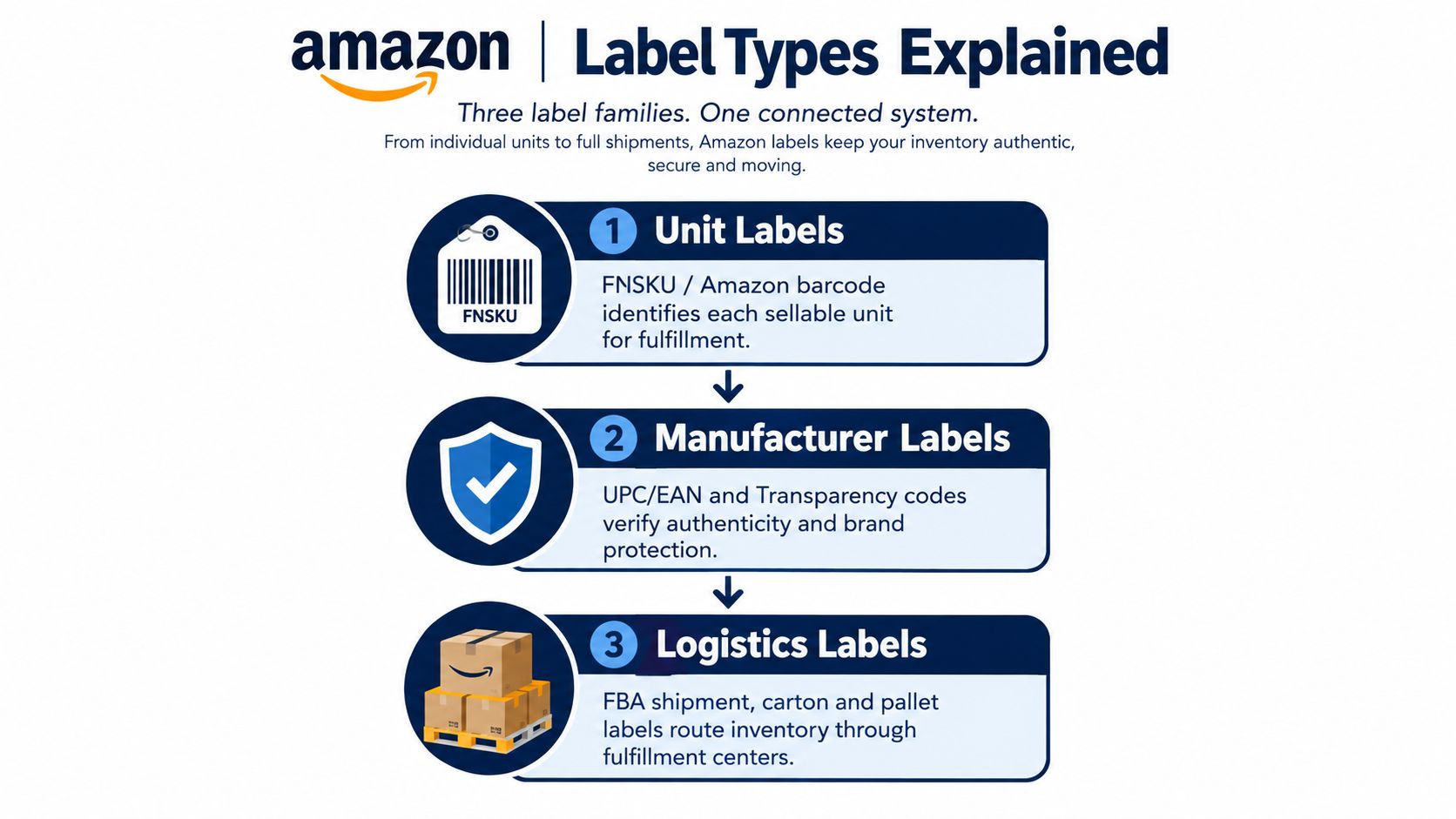
Sellers commonly confuse three label families because all of them contain barcodes. They answer different questions, much like travel documents:
The Amazon barcode, commonly represented by an FNSKU, identifies the product and the seller's inventory relationship. It belongs on each sellable unit when Amazon requires an Amazon barcode. The label should include the ASIN or FNSKU, product name, and item condition, not just an isolated barcode.
For a reseller, the March 31, 2026 change is the decision point. Amazon says resellers, including authorized resellers, must use Amazon barcodes for inbound inventory after that date, even if the manufacturer barcode remains visible on the product. That creates a different prep path from a qualifying Brand Registry brand that continues to use a manufacturer barcode without an added sticker under Amazon's stated conditions.
A UPC, EAN, or similar manufacturer barcode describes the product as created by the manufacturer. It doesn't perform the same seller-specific identification role as an Amazon barcode. A Transparency code, where applicable, supports item-level authentication and brand protection.
Don't treat these codes as interchangeable. If you're building serialized traceability across production, distribution, and authentication workflows, a guide to product serialization software can help your operations team understand the broader identification layer beyond FBA.
A carton label identifies the individual box within an FBA shipment. A pallet label identifies the pallet's relationship to that shipment. These labels don't replace the unit barcode, and a correct unit label doesn't replace the carton or pallet label.
The hierarchy matters. Unit identification gets the product recognized. Manufacturer or Transparency data supports product identity and authenticity. Logistics labeling moves the shipment through Amazon's receiving process. Before checking dimensions, first determine which layer you're preparing.
A label can pass a visual check and still fail at the scanner. Reliable receiving depends on several controls working together: physical size, barcode geometry, clear space, print definition, and readable product details. Treat the label like an access pass. The barcode gets the first scan, while the printed text helps an operator resolve a problem without guessing.
For unit labels, use a minimum size of 3 1/3 by 4 inches. Keep the barcode geometry within Amazon's stated tolerances:
These specifications work together. A correctly sized label can still scan poorly if the quiet zone is crowded, the narrow bars are blurred, or the printer clips the edge. Amazon's FBA shipping label guide provides the underlying specifications.
The human-readable fields act as a second checkpoint. If a scanner fails, an operator can compare the ASIN or FNSKU, product name, and condition with the physical unit. That check is especially useful when labels wrinkle, contrast drops, or a printhead begins to wear.
Carton and pallet labels use their own format and placement rules. Amazon's European guidance supports a label measuring 8.4 cm by 10.2 cm, or a thermal-printing format measuring 10.2 cm by 15.2 cm. Each pallet needs four labels, placed at the top center of each side. Every box in the shipment requires its own unique FBA shipping label. See Amazon's European shipment-label guidance for these requirements.
Use the generated label at its intended size. Do not photocopy, reuse, or modify it, and keep the barcode uncovered. Scaling can change the bar width and height that scanners expect. Copying can also introduce blur or weaker contrast.
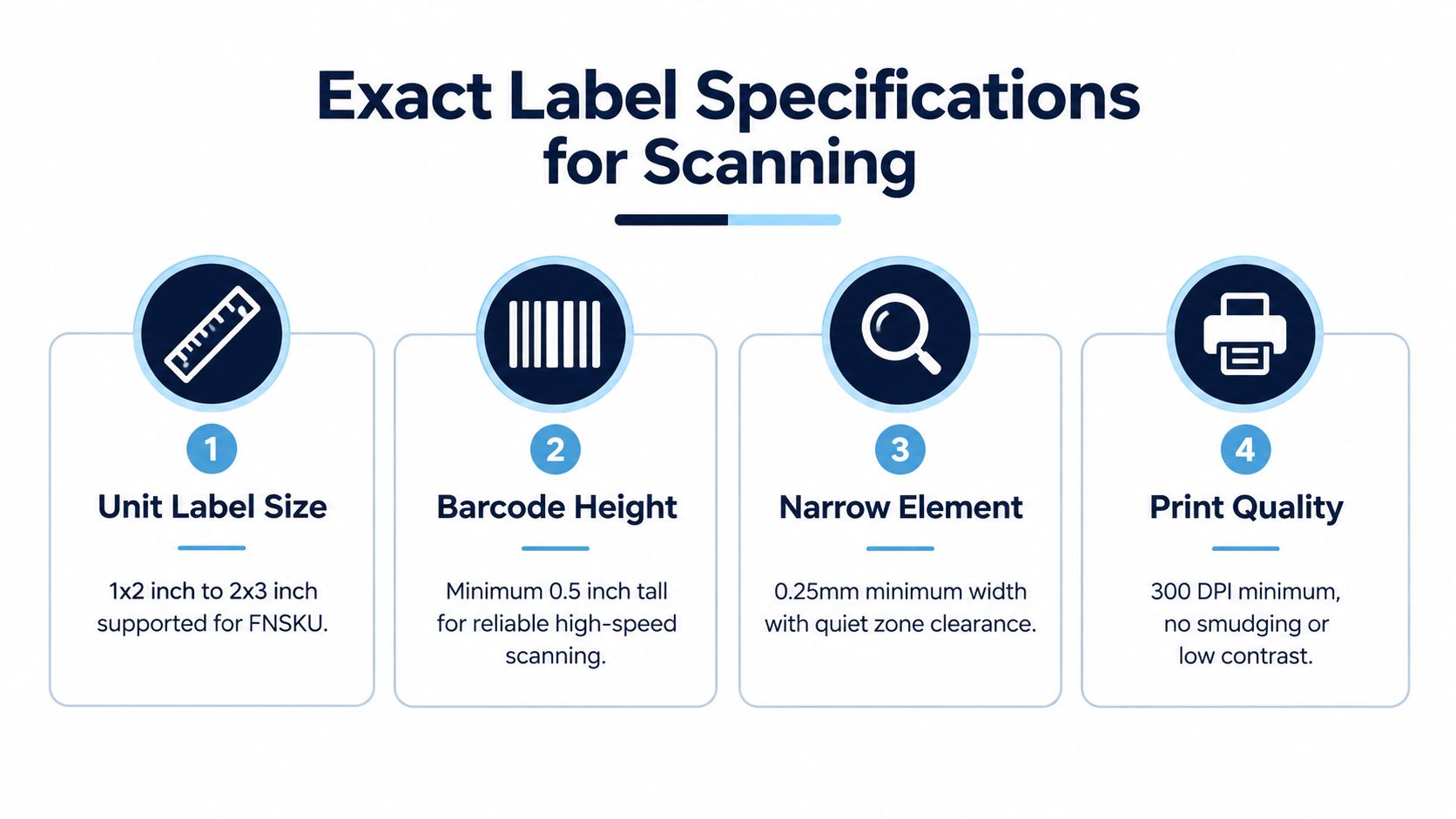
Match the printer to the workflow. Thermal printing suits recurring carton work, while laser printing suits sheet-based unit labels when output stays sharp. Inspect the first print, scan a sample, and reject labels with smudges, low contrast, wrinkles, or clipped content.
Amazon label requirements change with the fulfillment model, product category, package format, and destination market. The barcode may scan perfectly while the shipment still fails because the legal product information is incomplete or the outer carton doesn't meet logistics rules.
FBA inventory needs unit-level identification and inbound shipment labels. FBM inventory doesn't enter Amazon's fulfillment center in the same way, so the central FBA unit-label workflow may not apply to every parcel. That doesn't remove product-label obligations. A product still needs the information required by its category and market, and a seller must follow any applicable Amazon program rules.
Apparel, textiles, liquids, fragile goods, dangerous goods, food, and beverages can require additional preparation or label content. For food, Amazon's guidance calls for full compliance labeling in English, including manufacturer details, expiration date, net weight, ingredients, nutrition facts, allergens, and country of origin. A barcode-only review won't catch a missing allergen statement or incomplete origin information. Amazon's UK food and shipment guidance covers the category-specific expectations.
| Program or Category | Required Barcode | Additional Label Data | Key Placement Rule |
|---|---|---|---|
| FBA reseller inventory | Amazon barcode | ASIN or FNSKU, product name, condition | Keep the code readable on a flat, visible surface |
| Brand Registry inventory | Manufacturer barcode may remain permitted under Amazon's stated conditions | Product identity and applicable brand information | Preserve barcode visibility and surface integrity |
| Food and beverages | Applicable Amazon or manufacturer barcode | Manufacturer, expiration, net weight, ingredients, nutrition, allergens, origin | Keep legal content complete and readable |
| Box shipments | Unique FBA shipping label per box | Shipment and carton identification | Place on a flat surface, away from seams |
| Pallet shipments | Pallet labels tied to the shipment | Pallet routing information | Use one label in the top center of each side |
| Regulated or special-prep goods | Amazon-required barcode for the applicable inventory | Category, safety, or compliance information | Follow the product-specific prep and placement rules |
Cross-border teams should separate product-label law from Amazon logistics labeling. A carton can meet Amazon's scan rules and still need market-specific legal content. If your operation spans jurisdictions, external references such as these Australian label rules for manufacturing can help frame the broader distinction between manufacturing disclosures and platform logistics labels.
Sellers also need to understand whether a listing is gated or ungated before shipping stock under a particular category or program. This guide to gated and ungated Amazon categories helps place labeling decisions inside the wider listing-compliance workflow.
A shipment can leave your prep station looking perfect and still fail if the wrong item receives the right-looking label. Start with the inventory record, then move to the printer. Confirm the SKU, condition, product identity, and fulfillment method before generating a label.
Seller Central is the control panel for this process. Newer operators can use this Amazon Seller Central workflow guide to locate the relevant inventory and shipment tools.
Open the applicable inventory workflow and generate the Amazon barcode when the listing requires one. Reseller inventory needs a specific check because, from March 31, 2026, the reseller mandate requires Amazon barcodes for all resellers. A visible UPC or EAN does not replace the Amazon identifier when the workflow calls for it.
Treat the first print run like a test fit before packing the full order. Print a small batch and compare each label with the item in hand. Check the barcode's sharpness, the human-readable number, the product name, and the condition. A clear label attached to the wrong SKU remains an operational failure.
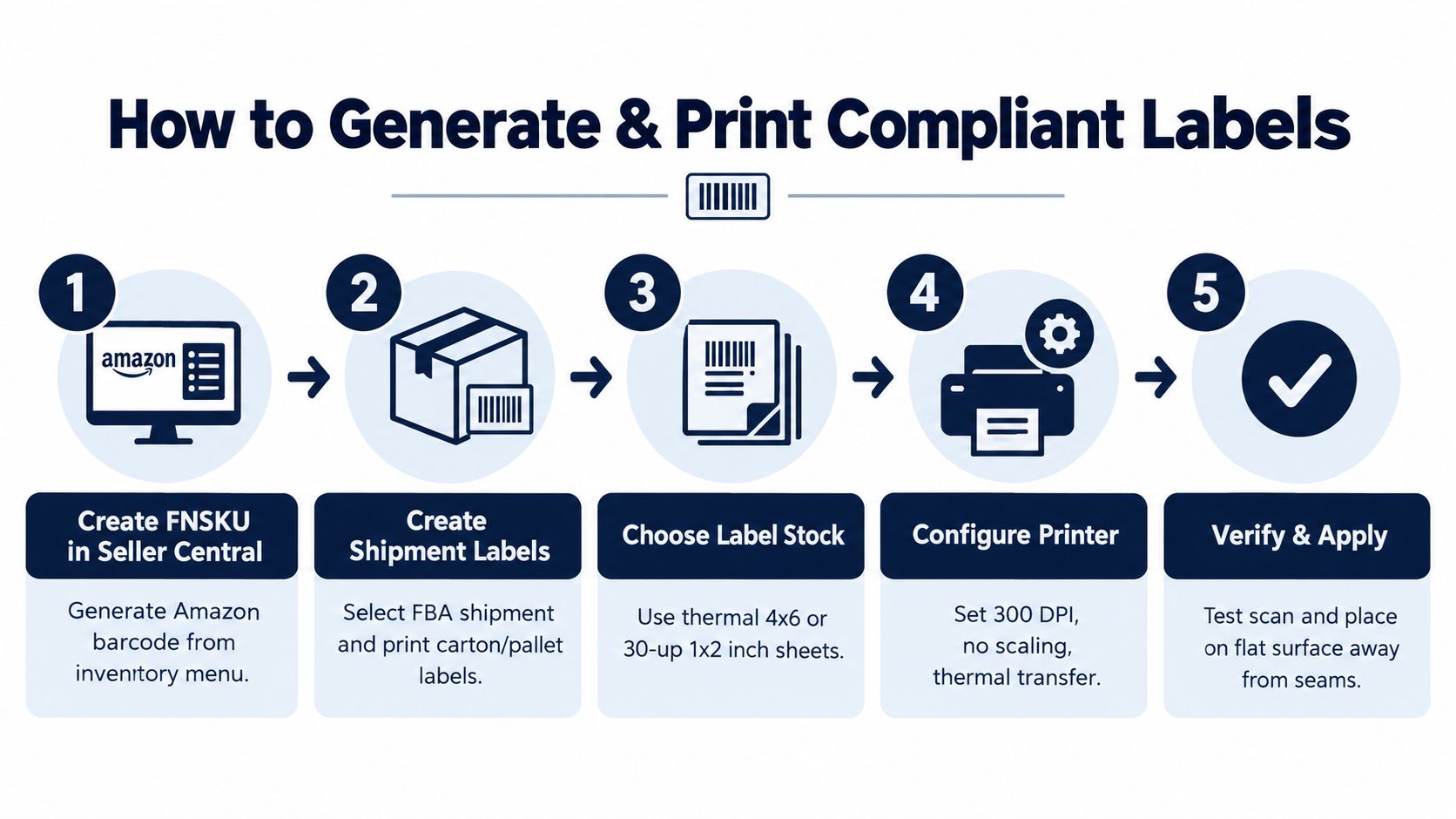
Create the FBA shipment in Seller Central, then print the carton labels generated for that shipment. Every box needs its own unique FBA shipping label. Identical contents do not make carton labels interchangeable. For pallet shipments, apply the required pallet labels in the placement specified for that shipment.
Amazon's supported European box and pallet guidance lists 8.4 by 10.2 cm labels, a thermal option of 10.2 by 15.2 cm, and four pallet labels. The Amazon shipment-label rules describe the relevant dimensions, uniqueness, and placement requirements.
Place each carton label on the largest flat surface, away from seams, corners, edges, folds, and curves. Keep the barcode uncovered. Remove or cover any old barcode on the box if it could be scanned and identify the carton incorrectly.
Before sealing the shipment, ask a second person to compare the physical unit with its generated label. Then confirm:
This pause catches two costly errors: applying a correct unit label to the wrong product and making a carton label unreadable during sealing or handling.
Amazon enforces label rules because receiving depends on fast, reliable identification. When a scan fails, a worker or downstream process may need to resolve the unit manually. Depending on the issue, inventory can face receiving holds, relabeling work, shipment rejection, or seller-performance concerns. Amazon's packaging guidance states that barcodes should remain scannable and labels shouldn't be resized or altered. Read Amazon's parcel and unit-label guidance before changing a production SOP.
| Symptom | Likely cause | Precise fix |
|---|---|---|
| Barcode won't scan | Low-resolution, smudged, undersized, or low-contrast print | Reprint at the recommended quality and scan a replacement |
| Label fails after handling | Placement over a seam, curve, edge, or fold | Move it to the largest flat visible surface |
| Wrong inventory is identified | Multiple visible barcodes or wrong barcode type | Cover conflicting codes and verify the Amazon barcode requirement |
| Carton is questioned at receiving | Reused, copied, modified, or missing unique shipment label | Regenerate and apply the label assigned to that specific box |
| Product information is incomplete | Category or market content was ignored | Review the applicable legal and Amazon category requirements |
The 2026 reseller mandate deserves special attention in wholesale operations. A prep center may have a long-standing habit of trusting manufacturer barcodes, but that habit can create the wrong inbound workflow for reseller stock. Update purchase-order intake, SKU instructions, and final inspection forms so the operator knows whether the inventory is a qualifying brand-owner workflow or a reseller workflow.
Quick fix versus durable fix: Reprinting a bad label solves one carton. Updating the SKU master, prep-center brief, and scan check prevents the same defect from recurring across the next shipment.
Extra packaging and warning labels can also create confusion if they cover the barcode or compete for visual space. Use packaging supplies such as these parcel warning labels only within a controlled placement plan, keeping the required Amazon code clear and accessible.
Turn the rules into a one-page handoff for every SKU and shipment.
Unit label record
Carton label record
Treat the barcode decision, print check, placement audit, and shipment-label match as one control system. That approach keeps labeling audit-ready as Amazon standardizes machine-readable logistics across markets and distinguishes brand-owner workflows from reseller compliance.
Million Dollar Sellers gives serious e-commerce operators access to a trusted peer network, practical strategy sharing, and firsthand operating insight from founders scaling Amazon, DTC, and omnichannel businesses. Visit Million Dollar Sellers to learn how the community can help you strengthen operational systems such as FBA labeling while scaling with greater confidence.
Join the Ecom Entrepreneur Community for Vetted 7-9 Figure Ecommerce Founders
Learn MoreYou may also like:
Learn more about our special events!
Check Events