Chilat Doina
December 12, 2025
If you're running an ecommerce store on generic accounting software or, even worse, spreadsheets, you're trying to fit a square peg in a round hole. It’s a recipe for disaster. You aren't just sending out a few invoices a month; you're juggling thousands of individual transactions, each with its own payment processor fees, complex sales tax rules, and ever-changing inventory costs. This is where standard tools completely fall apart, turning your finances into a chaotic, time-sucking mess that actively holds back your growth.
Let's be clear: specialized ecommerce accounting software isn’t a luxury. It’s a fundamental tool for accurate reporting and sustainable scaling. I'll break down exactly why traditional methods are failing and what specific challenges demand a solution built for the job.

Traditional accounting platforms were designed for a much simpler world of predictable, low-volume transactions. Think service businesses or a local brick-and-mortar shop. They simply don't have the architecture to handle the high-velocity, data-heavy reality of a modern online store.
This disconnect inevitably leads to critical errors and a mountain of manual work. For instance, a standard tool can't automatically tell the difference between a sale from your Shopify store, an Amazon FBA order, and a wholesale deal. Each channel comes with its own unique fee structures, payout schedules, and tax headaches that need to be handled differently.
The biggest point of failure, by far, is reconciliation. A generic system sees a single lump-sum deposit from Stripe or PayPal, but that's not your reality. That single deposit actually represents hundreds of individual orders, minus transaction fees, processing fees, and any refunds or chargebacks that happened along the way.
Trying to manually match that big deposit back to each individual order is a nightmare—it's practically impossible once you start to scale. This mistake leads to wildly inaccurate cash flow reports and a completely distorted view of your actual profitability.
Key Takeaway: Without automated, order-level reconciliation, you're flying blind. You can't accurately track profitability by channel or by product, which turns your most important strategic decisions into pure guesswork.
Another huge problem is managing your Cost of Goods Sold (COGS) and inventory. Ecommerce businesses are constantly dealing with fluctuating supplier costs, shipping fees, and landed costs, all of which have to be accurately tied to each unit you sell.
The explosion of online retail has only made these problems worse, creating a massive need for focused automation. Global ecommerce is on track to hit $8.1 trillion by 2026, and this incredible growth is precisely what’s driving the shift to specialized accounting solutions. You can dive deeper into the market trends in this full ecommerce software analysis. This is why finding the best accounting software for ecommerce is no longer just a nice-to-have—it's essential for survival.

To give you a credible, transparent analysis of the best accounting software for ecommerce, we didn't just skim through feature lists. We dug deep, creating a tough evaluation process based on the real financial headaches ecommerce brands deal with every single day.
This approach ensures our recommendations are rooted in what actually boosts your profits and makes your operations run smoother.
Our review hinges on six key criteria to see what each platform is really made of. We zoned in on the functions that separate a generic bookkeeping tool from a true financial command center. This guarantees our comparisons are straight to the point and relevant to your actual needs.
No ecommerce business lives on just one channel anymore. The real value is in software that truly connects with platforms like Shopify, Amazon, Walmart, and eBay—not just a flimsy, surface-level link.
We checked how well each platform pulled in detailed transaction data, from sales and refunds to those pesky channel-specific fees. A simple sync just doesn't cut it. The software has to be smart enough to sort out revenue streams and their costs from each channel without you having to clean up the mess manually. This is the bedrock of accurate profitability analysis.
If you sell physical products, your inventory is basically cash sitting on a shelf. We closely analyzed each platform's ability to track Cost of Goods Sold (COGS) in real-time. This includes tricky stuff like landed costs—think freight and duties—and making sure they’re applied correctly to every SKU.
A platform earned high marks if it could automatically update inventory value with every sale and return. Without this, your gross margin numbers are just a wild guess, and you’ll have no idea which of your products are actually making you money.
Key Insight: The best systems do more than just count stock. They give you SKU-level profit insights by syncing real-time COGS data directly to your financial statements. This connects what’s happening in your warehouse to your bottom line.
That lump-sum payout you get from Stripe or Shopify? That’s not revenue. It’s a settlement that mashes together hundreds of orders and subtracts all sorts of fees. We prioritized platforms that could automate the nightmare of matching those payouts back to the individual orders.
This three-way match—linking sales orders, payment gateway payouts, and bank deposits—is absolutely essential. It's the only way to get a crystal-clear picture of your cash flow and make sure no money is slipping through the cracks.
Selling across different states and countries brings on a massive tax compliance headache. Our evaluation zeroed in on how well each software handles the tangled web of multi-jurisdictional sales tax and VAT rules.
We looked for tools that automate calculations, keep an eye on economic nexus thresholds, and make tax filing less of a chore. Platforms with built-in compliance features or slick integrations with dedicated tax software like Avalara scored much higher.
As your business grows, so do your financial reporting needs. We looked at how well each solution could scale, from handling a ton more transactions to spitting out advanced reports for investors or your own ops team. For example, being able to generate a clean, accurate P&L is non-negotiable. Learn more about understanding your profit and loss statement to see why this report is so critical for making smart decisions.
Finally, what good are powerful features if the platform is a pain to use? We took into account the user interface, how easy it was to get set up, and the quality of customer support. We looked for intuitive dashboards and support teams that actually know a thing or two about the unique accounting challenges of ecommerce.
Picking the right accounting software for your ecommerce brand isn't about finding the one with the longest feature list. It's about matching the financial engine to your business model. A seven-figure brand juggling five international Amazon marketplaces has wildly different needs than a startup launching its first Shopify store.
This breakdown goes beyond the usual surface-level comparisons. We’re going to look at how the big players—QuickBooks Online, Xero, and NetSuite—actually perform in real-world ecommerce scenarios. We’ll also dig into the absolute necessity of specialized connectors like A2X and Synder, which are the secret sauce that turns these general tools into ecommerce powerhouses. The goal here is practical: which stack is best for which job, from untangling a messy Amazon payout to managing a multi-entity global brand.
The entire market has shifted to the cloud, and for good reason. Integrations are everything now. The global accounting software market has exploded, and cloud adoption is the main driver. In fact, a 2024 report showed cloud accounting pulling in as much as two-thirds of the total revenue share. This sends a clear message: ecommerce businesses need tools that plug directly into their sales channels. You can get the full scoop by checking out the complete accounting software market report.
QuickBooks Online and Xero are the undisputed titans of small to mid-sized business accounting. They’re accessible, affordable, and nearly every bookkeeper on the planet knows how to use them. But for an ecommerce seller, using them straight out of the box is a one-way ticket to a financial mess.
Their real magic for ecommerce is only unlocked when you pair them with a dedicated connector tool. Think of QuickBooks or Xero as the solid chassis of a car. A connector like A2X or Synder is the high-performance engine, custom-tuned for the racetrack of online retail. Without that engine, you’re just spinning your wheels.
These platforms are fantastic for:
Where they fall down on their own is with the sheer volume and granularity of data that defines ecommerce. This is exactly where specialized connectors become non-negotiable.
Connectors are the critical bridge between your sales channels and your general ledger. They don’t just mindlessly dump raw data. They process, summarize, and format it correctly so your books are accurate and reconciling them doesn't take all weekend.
A2X is the gold standard, especially for sellers on platforms with gnarly payout structures like Amazon. Anyone who's tried to decipher an Amazon settlement report knows it’s a nightmare—a jumble of sales, shipping fees, FBA fees, ad costs, and returns all mashed into one statement.
Key Differentiator: A2X’s genius lies in its ability to create a clean, summarized journal entry for each payout. It perfectly matches the lump-sum deposit from Amazon to all the individual revenue and expense lines that make it up, guaranteeing a perfect reconciliation every time.
Synder takes a slightly different path. It can sync every single transaction from platforms like Shopify and Stripe directly into your accounting software. This gives you incredible detail, which can be useful if you need to track individual customer data right inside your accounting system.
Be warned, though. This approach can quickly flood your books with thousands of individual entries, which is why most ecommerce accountants I know prefer A2X's summary method for cleaner, more manageable reporting. Synder is often a great fit for businesses that want to streamline payments across multiple gateways and truly need that transaction-level view.
To really see the difference, let's walk through a common setup for an Amazon FBA seller.
An Amazon seller gets a bi-weekly payout of $18,500. A2X logs into their Seller Central account, grabs the detailed settlement report, and automatically posts a single, elegant journal entry in QuickBooks.
This entry lines up perfectly with the bank deposit, making reconciliation a simple one-click task. Your P&L is now spot-on, with all your fees neatly categorized.
The same seller tries to reconcile that $18,500 deposit manually. They see the lump sum in their bank feed but have no clue how to break it down. A common mistake is to book the entire $18,500 as revenue, which wildly understates their actual sales and completely ignores thousands of dollars in fees. Their books are now a disaster, and fixing them means hours of painful spreadsheet archaeology.
This one example makes it crystal clear: the best accounting software for ecommerce is almost always a stack of tools, not a single platform.
The table below breaks down the key feature differences between these core platforms when used in an ecommerce context.
Here’s a side-by-side look at how these platforms stack up on the features that matter most to online sellers. Remember, the capabilities of QuickBooks and Xero are massively expanded by using a connector.
FeatureQuickBooks Online (+Connector)Xero (+Connector)NetSuiteBest ForStartups to mid-sized businesses ($0 - $10M)Startups to mid-sized businesses ($0 - $10M)Scaling and enterprise brands ($5M+)Multi-Channel IntegrationExcellent via connectors (A2X, Synder)Excellent via connectors (A2X, Synder)Native and custom integrations (ERP level)Inventory ManagementBasic; requires third-party apps for scaleBasic; requires third-party apps for scaleAdvanced (multi-location, demand planning)COGS HandlingGood, often managed by inventory app/connectorGood, often managed by inventory app/connectorExcellent (landed costs, automated tracking)Bank ReconciliationStrong, made easy with summarized entriesStrong, made easy with summarized entriesFully integrated and automatedMulti-CurrencySupported (Advanced plan)Supported (Standard plan and up)Core feature, highly robustMulti-Entity & ConsolidationNo native support; requires manual workNo native support; requires third-party toolsCore feature (OneWorld module)Investor/Operational ReportingStandard financial reportsStandard financial reportsAdvanced, customizable, real-time dashboardsPricing Model$$ (Low monthly subscription + connector fee)$$ (Low monthly subscription + connector fee)$$$$ (High annual subscription + implementation)
This comparison really highlights the fork in the road for growing businesses. QuickBooks and Xero, when properly augmented, are incredibly powerful. But at a certain scale, the need for a unified system like NetSuite becomes undeniable.
Once an ecommerce business blasts past a few million in revenue, starts selling internationally, or has to manage multiple legal entities, the cracks in the QuickBooks and Xero foundation start to show. This is the moment you graduate to a true Enterprise Resource Planning (ERP) system like NetSuite.
NetSuite isn’t just accounting software; it’s a unified command center for your entire business. It brings financials, inventory management, CRM, and ecommerce operations under one roof.
You should start having serious conversations about NetSuite when these headaches become your reality:
Key Differentiator: NetSuite's superpower is its rock-solid multi-subsidiary and multi-currency functionality. It lets a parent company see a consolidated financial picture in its home currency, while each subsidiary operates in its local currency—all within one system. This is flat-out impossible to do well in QuickBooks or Xero.
The investment is on a completely different level. While the subscription is significantly higher, the real value comes from ditching a patchwork of disconnected apps. It creates a single source of truth for the entire organization, which is essential for making smart decisions at scale. The implementation is a major project, often requiring specialized consultants, but for a fast-growing enterprise, the operational efficiency you gain is immense. The choice isn't about features; it's about your business's operational maturity.
Picking the best accounting software for ecommerce isn’t a one-and-done decision. The scrappy tool that got you through your first year selling on a single Shopify store will absolutely buckle under the pressure of a multi-million-dollar brand expanding overseas. The right choice comes from an honest look at your revenue, how complex your operations really are, and where you're headed.
I’ve seen it go wrong both ways. Some founders over-invest in a monster system way too early, bleeding cash that could’ve gone into inventory or ads. Others cling to their simple setup for far too long, leading to a tangled mess of bad data that costs a fortune to clean up.
The key is matching your software stack to your business stage. You need a setup that solves today's problems without boxing you in tomorrow. We've broken this down into three common profiles with a recommended software stack for each.
At this point, you're all about simplicity, affordability, and just proving your concept. You’re likely on a single sales channel—maybe Shopify, maybe Etsy—and your SKU count is manageable. Your main goal is getting clean, basic financials without a massive learning curve or a hefty price tag.
Once you push past six figures, things get complicated—fast. You’ve probably added a second or third sales channel (like Amazon), your order volume is climbing, and inventory is suddenly a real headache. Reconciling everything by hand is officially off the table.
Key Insight: This is the make-or-break moment where a dedicated connector app becomes non-negotiable. Your accounting system needs to pull data from multiple sources and stitch it together into one clean, unified view of your financial health.
For this stage, you need a more muscular stack that can manage multi-channel chaos without you having to hire a full-time finance person. It’s all about automating the reconciliation grunt work.
To give you a clearer picture, this decision tree shows how the right platform aligns with different business needs as you scale.
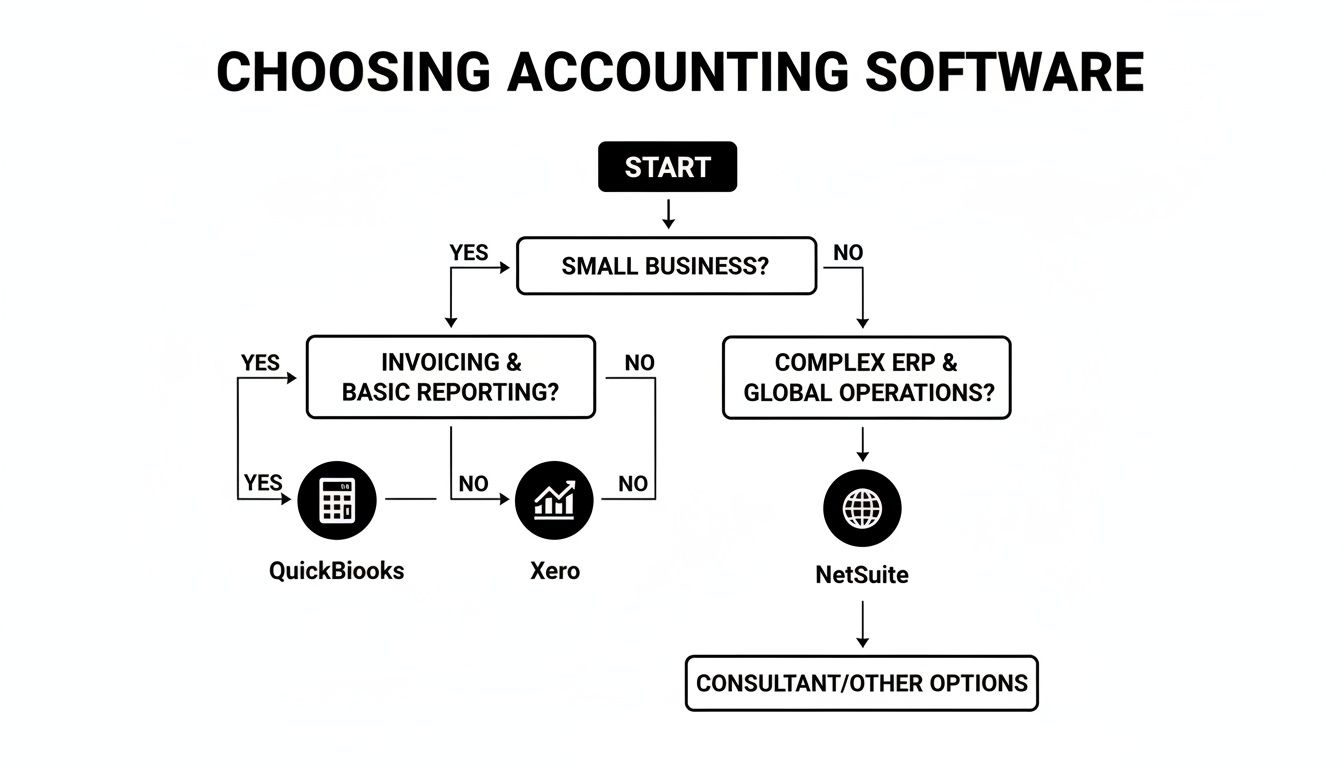
As the flowchart shows, once your operational complexity and scale really take off, the need for a truly integrated system like NetSuite becomes unavoidable.
When your revenue hits seven figures and beyond, you’re playing a different game entirely. You might be juggling multiple legal entities, selling in different countries, holding inventory in various warehouses, and untangling complex multi-currency transactions. This is where the QuickBooks/Xero stack starts to creak under the weight.
At this level, managing your money is everything, and our guide on how to manage cash flow offers strategies that work hand-in-hand with a powerful ERP.

Picking the right software is a huge step, but a clean transition is what really sets you up for success. Moving all your financial data can feel like open-heart surgery for your business. But if you're methodical, it's less of a daunting task and more of a strategic upgrade.
A solid plan is your best defense against data errors and costly downtime. This checklist breaks the whole process down into manageable phases, from cleaning up your old books to fine-tuning your new system after launch. Stick to these steps, and you'll avoid the common pitfalls, ensuring your new platform delivers accurate, useful insights from day one.
Before you even think about moving a single number, you need to lay the groundwork. This first phase is all about getting your historical records in order and setting up a solid structure for the future. People who rush this part just end up bringing their old messes into a brand-new system.
Start by getting your current books squeaky clean. Reconcile all your bank and credit card accounts up to the last full month. Make sure your accounts receivable and payable are up-to-date, with every last invoice and bill properly logged. This is non-negotiable for getting your opening balances right.
Key Takeaway: The most critical pre-migration task is building an ecommerce-specific Chart of Accounts (CoA). A generic, out-of-the-box CoA just won't work. You absolutely need distinct accounts for sales channels like "Shopify Sales" and "Amazon Sales," separate lines for things like "Stripe Fees" and "FBA Fees," and properly detailed COGS accounts.
Finally, pick a hard cut-off date. This is the day you officially stop using your old system and flip the switch to the new one. A clean break, usually at the end of a month or quarter, makes transferring those final balances so much easier.
With a clean foundation in place, it’s time for the technical setup and data transfer. This is where you configure the new software to fit your business like a glove and move your historical financial data across. Accuracy here is everything—your future reports depend on it.
First up, configure the software's core settings. This means setting up sales tax rates for every state or country where you have nexus and customizing your invoice templates. Now is also the time to set up user roles and permissions for everyone on your team.
Next, import your finalized Chart of Accounts and your complete vendor and customer lists. Most platforms provide a CSV template to make this a bit less painful. After that, you'll enter the opening balances for all your accounts, effective as of your cut-off date.
Getting inventory right is another huge piece of the puzzle. For a much deeper dive on that, check out our guide to the best inventory management software for small business. You'll want a tool that integrates smoothly with your accounting platform.
Once you're live, the final phase is all about verification and training. Don't just assume everything is working perfectly. If you can, run both systems in parallel for a week or two. If not, at least perform some rigorous checks to make sure the data and workflows are solid.
Start by running key reports in both the old and new systems for the first month after migrating. Your Balance Sheet and Profit & Loss statements should match to the penny. If they don't, you need to find and fix the discrepancies immediately.
Finally, get your team trained up. A powerful new system is worthless if no one knows how to use it properly. Solid training ensures you get the maximum value out of your investment.
Making the leap to a new accounting system is a big deal, and it's totally normal to have some final questions nagging at you. Even after you've seen all the comparisons and checklists, there are always a few specific "what if" scenarios that pop into your head. This last section is all about tackling those common questions we hear from founders every day.
We're going to cut through the jargon and give you straight, practical answers. These are the real-world operational questions that can hold you back. Think of this as the final piece of the puzzle to help you move forward with total confidence.
Yes, but their job gets a massive upgrade. Modern ecommerce accounting software completely automates the tedious, soul-crushing data entry that used to eat up 80% of a bookkeeper's day. They’re no longer stuck manually keying in thousands of sales or spending hours trying to make sense of payout reports.
Instead of a data entry clerk, they become your financial strategist. A sharp ecommerce bookkeeper takes the perfectly organized data from your new software stack and uses it to give you high-level insights. They shift their focus to:
So, the software takes care of the what, freeing up your bookkeeper to help you understand the why and figure out what’s next.
Key Insight: Automation doesn't make your finance pro obsolete; it makes them more valuable. It lets them stop keeping score and start working on strategic projects that actually grow your bottom line.
This is a huge one, and it’s where a proper ecommerce accounting stack really proves its worth. A return or chargeback isn't just a simple reversal. It’s a whole chain reaction of events: you refund the customer, you might get payment gateway fees back (or not), and you have to adjust your inventory.
A solid system, like QuickBooks Online connected with A2X, handles all of this on autopilot. When a return comes through in Shopify, the system automatically logs everything:
Imagine trying to track those five things manually for every single return. It's a recipe for disaster. Good software makes it seamless, ensuring your P&L and your inventory counts stay perfectly in sync. Without it, you can't trust your own profitability data.
This is probably one of the most critical concepts to grasp. On the surface, a "direct integration" sounds better, right? More direct must mean simpler. For ecommerce accounting, that's almost never true.
Here's an analogy: a direct integration is like someone dumping a thousand loose receipts on your desk. A third-party connector neatly organizes them into a single, easy-to-read summary report. For any ecommerce brand doing real volume, the connector model is the only way to keep your books both accurate and manageable. It's the lynchpin of the best accounting software for ecommerce stack.
Ready to join a community that lives and breathes this level of operational excellence? Million Dollar Sellers is an exclusive network for top-tier ecommerce entrepreneurs who have mastered their financial systems and are focused on scaling to the next level. Learn more about how MDS helps serious sellers grow smarter.
Join the Ecom Entrepreneur Community for Vetted 7-9 Figure Ecommerce Founders
Learn MoreYou may also like:
Learn more about our special events!
Check Events