
Chilat Doina
January 21, 2026
Amazon listing optimization is all about fine-tuning your product pages to climb higher in Amazon's search results and, more importantly, to turn shoppers into buyers. It’s a delicate dance between using the right keywords, high-quality images, and persuasive copy to win over both the A9 algorithm and actual human customers.
To really get ahead on Amazon, you first have to understand the beast you're feeding: the A9 algorithm. Don't think of it like Google. A9 is a product-ranking engine with a single, laser-focused goal: maximize revenue per customer. It’s constantly asking, "Which product is most likely to make us money?"
Every single choice you make on your listing sends a signal to this algorithm. The whole system is a performance-based flywheel—more sales lead to better rankings, better rankings lead to more visibility, and more visibility leads to… you guessed it, more sales. Your job is to get that wheel spinning and keep it accelerating.
At its core, the algorithm looks at three things to decide where you rank: relevance, performance, and customer satisfaction. Nail these, and you're in the game.
This simple diagram breaks down how these three pillars—relevance, sales velocity, and satisfaction—all work in tandem to power the A9 algorithm.
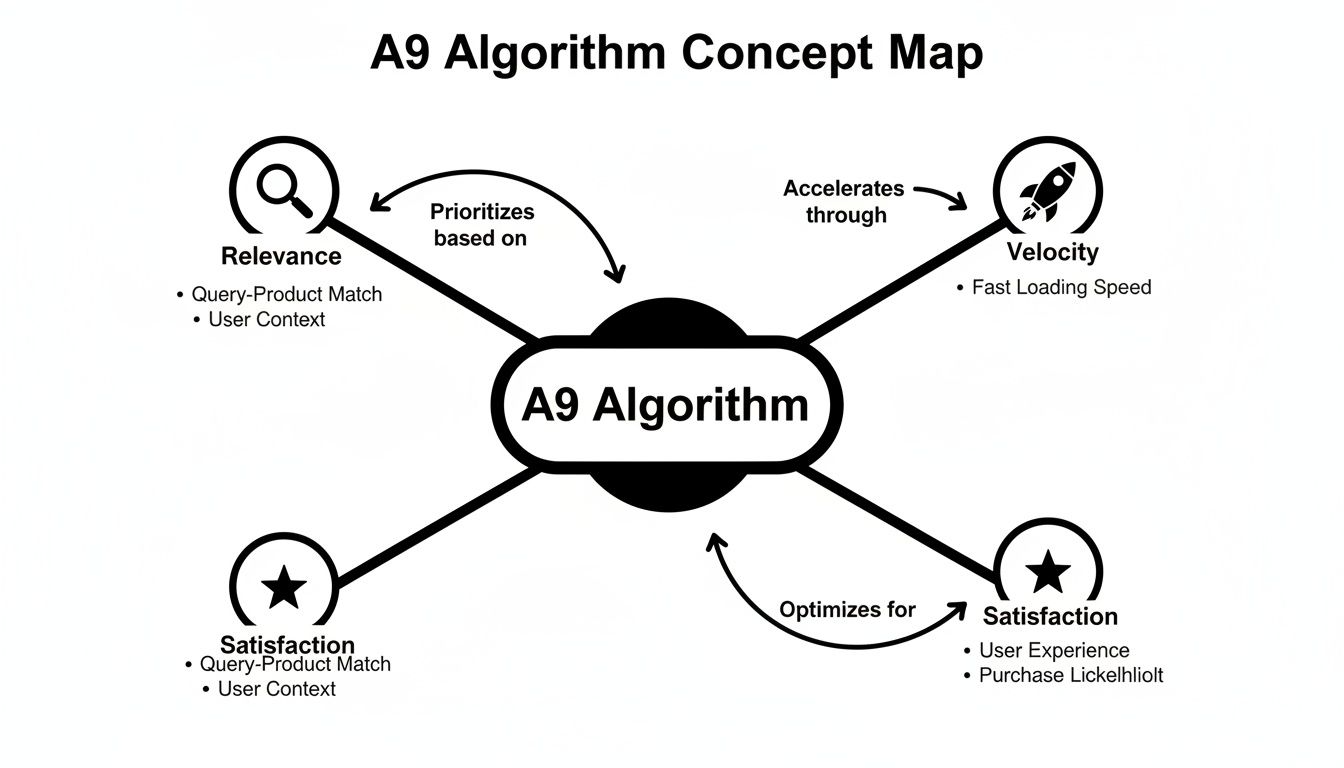
As you can see, it's not about acing just one element. A winning listing is a balanced strategy that feeds all three ranking factors at the same time.
Your listing must do two jobs perfectly: It needs to speak the language of the A9 algorithm for visibility and the language of your customer for conversions. Excelling at one without the other is a recipe for failure.
To give you a clearer picture of what to focus on, here's a quick breakdown of the primary signals A9 is looking for and how you can influence them.
Ranking FactorPrimary SignalKey Optimization LeverRelevanceKeyword MatchingStrategic keyword placement in title, bullets, description, and backend search terms.PerformanceSales Velocity & Conversion RateHigh-quality images/video, compelling copy, competitive pricing, and A+ Content.Customer SatisfactionReviews & Seller FeedbackExcellent product quality, responsive customer service, and proactive review generation.
Mastering these levers is the foundation of getting your products seen and sold.
The stakes are enormous. In 2023, Amazon’s net sales revenue hit a mind-boggling $574.78 billion, with 63% of shoppers now starting their product hunt right on the platform. And since a staggering 70% of those shoppers never click past the first page, your listing has just seconds to grab their attention before it’s lost in the crowd.
If you want to dig even deeper, this guide on Cracking The Code: Maximizing Product Visibility On Amazon With The A9 Algorithm is a fantastic resource. You can see how top sellers approach A9 and learn from the strategies they use to dominate their categories.

A killer listing is what separates the browsers from the buyers. It’s all about nailing the copy and visuals in a way that speaks directly to your ideal customer and Amazon's A9 algorithm. Get it right, and you'll see a real impact on your bottom line.
For instance, we've seen brands boost their click-through rates by 15% or more just by refining their title formula. It's not magic; it's a strategic blend of top keywords, crystal-clear benefits, and a dash of urgency.
We're going to break down every piece of the product page, showing you how to build:
Before you start writing, pinpoint your top three value propositions. These are the core promises you make to your customers. Your job is to weave them into every part of the listing, from the title right down to the A+ modules.
One brand we worked with tested different value props on their weekend traffic and managed to boost conversions by a whopping 18% during Prime Day. A tiny tweak can ripple out into thousands of extra orders.
Let's dive in, starting with the first thing a shopper sees: your title.
Gone are the days of stuffing your title with a long, rambling string of keywords. Shoppers are savvy, and they'll scroll right past anything that looks spammy. Today, clarity and relevance win.
A formula that works wonders starts with the main keyword or use case, highlights a key benefit, and then adds a unique detail. For example, a healthy snack brand saw a 20% lift in clicks after switching to “NutroBites Protein Clusters for Post-Workout Recovery.” It’s specific, benefit-driven, and clear.
Here’s how to approach it:
You're walking a tightrope here. Too many keywords and you look desperate; too few and you’re invisible. Use a tool like Semrush to see which terms are driving traffic for similar products and find that sweet spot.
Your bullet points are your rapid-fire sales pitch. This is where you answer a customer's unspoken questions and showcase why your product is the solution they've been looking for. The key is to blend benefits with specs.
Instead of just saying "waterproof," say "Waterproof material prevents damage during outdoor use." You've just painted a picture and solved a potential problem for the right audience. Using icons next to each bullet can also help draw the eye and make the key points scannable.
Stick to five bullets at the most. Any more than that, and you risk losing their attention.
In a marketplace where 76% of sellers are fighting over listing optimization, the details matter. It's a relentless game of nailing relevance, velocity, reviews, and price.
“Optimized listings are your 24/7 sales engine, not a static brochure.”
If your title and bullets are the hook, A+ Content is where you tell the full story. This is your chance to build a real brand connection using rich visuals and compelling copy.
A classic problem-agitate-solve framework works beautifully here. Show a common pain point, stir the emotion around it, and then present your product as the obvious hero of the story.
To make your A+ Content pop:
Think of your A+ modules as a mini landing page. They should flow logically, guiding the shopper through a narrative that ends with them feeling confident about clicking "Add to Cart." Amazon gives you up to five modules—use every single one.
Module TypePurposeStandard Image & TextHighlight a key feature with a supporting visual.Comparison ChartHandle objections and show your product's superiority.Brand Story ModuleBuild an emotional connection with your audience.
A truly optimized listing is more than the sum of its parts. It’s a symphony where the title, bullets, A+ Content, images, and price all work in harmony to drive conversions.
Your listing optimization efforts don't stop at Amazon's borders. To really scale, it helps to understand the broader principles of improving your ecommerce conversion rate, as many of the same concepts apply.
The final, and most critical, step is to test everything. Use Amazon's built-in Experiments tool to A/B test your changes, track your KPIs, and iterate relentlessly.
“Optimization is a continuous journey—keep measuring, keep refining.”
Schedule quarterly audits of your top listings. This is your chance to prune underperforming keywords, refresh your main image, and ensure you're still ahead of the competition. A little proactive maintenance goes a long way.
On Amazon, your product visuals are your single most powerful conversion tool. Period. Shoppers can't touch, feel, or test your product, so your images and videos have to do all the heavy lifting to build trust and create desire.
A strong visual stack can single-handedly boost your conversion rate, justify a premium price, and even slash your return rate.
Think of your seven image slots as a visual sales pitch. Each one needs to have a specific job, guiding a customer from a casual glance to a confident purchase. Wasting even one slot with a blurry or repetitive photo is a missed opportunity your competitors will happily capitalize on.
Your goal here is to build a visual narrative that answers every question a shopper might have before they even think to ask it. A killer image gallery makes reading the bullet points feel like an optional extra, not a requirement.
Here’s my go-to strategy for using each slot for maximum impact:
If you're looking to step up your visual game without shelling out a fortune, our guide on finding affordable product photography has some great, practical tips.
The best image galleries don’t just show what a product is; they show what it does for the customer. Every image should either solve a problem, answer a question, or create an emotional connection.
If your images are the sales pitch, your video is the live demo. It’s not uncommon for listings with video to see conversion rates jump by as much as 80%.
Video is your chance to show the product in action, explain a complex feature, or just tell your brand story in a much more engaging way. It doesn't need to be a Hollywood production, either. A well-lit, 30-60 second video shot on a new iPhone can work wonders if it’s focused on demonstrating value.
Try focusing your video on one of these angles:
A professional video signals quality and investment. It builds a level of trust that static images just can't match, and it’s a non-negotiable part of any serious listing optimization Amazon strategy.

A perfectly crafted listing is the price of entry, not the finish line. For high-volume brands, the real growth happens when you stop thinking about optimization as a one-time task and start treating it as a system of continuous, data-driven improvement. This is where you find the small, incremental gains that compound into a massive competitive edge over time.
Scaling your listing optimization on Amazon means shifting from one-off fixes to building a process. It's about getting serious with advanced tools, building a real testing culture, and thinking globally to unlock new revenue.
Guesswork is the enemy of scale. Seriously. One of the most underutilized tools in a seller’s arsenal is Amazon's own A/B testing tool, Manage Your Experiments. It's a goldmine for turning your optimization hunches into validated, data-backed decisions.
Instead of sitting in a meeting debating whether a benefit-led title will outperform a feature-led one, you can get a definitive answer from your actual customers. The tool lets you test key listing elements head-to-head to see which version drives a higher conversion rate, more sales, or better add-to-cart numbers.
Here are the elements you absolutely should be testing regularly:
The goal of experimentation isn't just to find one "perfect" listing. It's to build a culture of continuous improvement where your listings are always evolving based on what customers are actually responding to, not what you think they want.
Running a successful experiment means being methodical. Let your tests run for the recommended duration (usually 4-10 weeks) to gather enough data to be statistically significant. A 1% lift in conversion rate might sound small, but for a seven-figure ASIN, that's a massive revenue boost over a year.
Your backend search terms are your secret weapon for indexing. This hidden field is prime real estate for targeting all the keywords that don’t quite fit—or would look clunky—on your public-facing listing. Think of it as a home for synonyms, common misspellings, and long-tail phrases that would just clutter up your title or bullets.
The name of the game here is efficiency. You have a limited byte count (under 250 bytes), so every character is precious. And remember, there's absolutely no need to repeat keywords that are already in your title, bullets, or description. Amazon already indexes those.
Here’s a practical approach to maxing out this space:
Using this section properly ensures you show up for a much wider array of relevant searches without resorting to ugly keyword stuffing, which tanks the customer experience and your conversion rate.
Trying to manage a catalog of hundreds or thousands of ASINs by hand is a recipe for disaster. At scale, automation is non-negotiable for efficiency and consistency. This can be anything from using software to monitor for listing hijackers and suppressions to leveraging AI-powered tools that help generate and optimize copy across your entire product line.
At the same time, expanding into international marketplaces is one of the biggest growth levers for established brands. But just hitting "translate" and calling it a day is a guaranteed way to fail. True localization goes much deeper.
A well-optimized listing is also the bedrock of any successful paid ad campaign. This is especially critical now that over 70% of Amazon sellers are using advertising tools. A great listing can dramatically improve your Return on Ad Spend (ROAS) because you're sending high-intent traffic to a page that’s actually built to convert. You can explore how these two elements work together in our guide on building a winning Amazon advertising strategy. The synergy is undeniable; with sellers on the platform moving roughly 4.5 billion items in the US last year, it's the brands with optimized listings and smart ad campaigns that captured the lion's share.
Trying to optimize your Amazon listing without tracking the results is like driving with your eyes closed. You might be moving, but you have no idea if you're actually getting closer to your destination. To really get a handle on listing optimization, you absolutely need a clear, data-driven feedback loop. Every single change has to be measured.
Just looking at your sales numbers won’t cut it. A sudden spike could be from anything—a weekend promotion, a seasonal trend, or even a competitor going out of stock. You have to dig deeper and focus on the Key Performance Indicators (KPIs) that truly reflect how well your listing convinces shoppers to buy.
The single most important metric here is your Unit Session Percentage. This is Amazon's term for conversion rate, and you can find it right in Seller Central's Business Reports. It cuts through all the noise and tells you one simple thing: what percentage of people who landed on your page actually bought your product.
A rising conversion rate is a massive green light for Amazon's A9 algorithm. It signals that your product is a fantastic match for what shoppers are searching for, which often leads to better organic rankings. It's the ultimate report card for your listing's persuasive power.
Here’s how to do it right: before you touch a single word in your title or swap out an image, record your baseline Unit Session Percentage over a stable 30-day period. Then, after you push your changes live, let the listing run for at least two weeks to collect enough new data. Only then should you compare the before and after. This is the only real way to know if your efforts paid off.
Your goal isn't just more traffic; it's more profitable traffic. A high conversion rate means you're efficiently turning clicks into cash, making every dollar spent on advertising work harder for you.
While conversion rate is king, a few other metrics are crucial for diagnosing specific issues and giving you the full picture.
These metrics all work together to tell a story. Think of it this way:
MetricWhat It MeasuresWhat It Tells YouImpressionsHow often your listing is shownYour overall search visibility and keyword reach.Click-Through RatePercentage of impressions that get a clickThe effectiveness of your main image, title, price, and reviews.SessionsTotal visits to your product pageThe volume of traffic your listing is attracting.Unit Session PercentagePercentage of sessions that result in a saleThe persuasive power of your entire listing (copy, images, video, A+).
Tracking these KPIs together turns optimization from a guessing game into a calculated strategy. High impressions but a sad CTR? It’s time to work on that main image or title. Lots of traffic but a low conversion rate? The problem lies somewhere on your product detail page. This is how you stop guessing and start growing.
Even the sharpest sellers get tripped up by Amazon's constant changes. What was a killer strategy last year might be a total dud today. Let's dig into a few of the most common questions that pop up in our seller communities.
One of the biggest points of confusion? Backend search terms. I still see sellers making the rookie mistake of repeating keywords from their title or bullets in the backend. That’s a complete waste of valuable space. Amazon already indexes all your visible copy, so think of the backend as your secret weapon. It's prime real estate for all the terms you couldn't squeeze in upfront—common misspellings, foreign language equivalents, synonyms, and related search queries.
There's no single magic number here, but a "set it and forget it" approach is a surefire way to see your sales tank. For your best-selling products, you should be doing a full audit at least once a quarter. For your slower-moving items, a check-in every six months is probably fine.
That said, some events should have you jumping on an audit immediately:
Treat your listing like a living, breathing asset, not a static page. It needs consistent attention to perform at its best. I've found that small, regular tweaks almost always beat massive, rare overhauls that can mess with your sales velocity and ranking.
Please don't. The short answer is a hard no.
It might feel like you're grabbing attention, but using all caps is an old-school marketing tactic that just looks spammy and aggressive to today's buyers. It can actually hurt your click-through rate more than it helps.
A much better approach is to use standard Title Case for your main title. Focus on crafting a clear, benefit-driven message that tells the customer exactly what they're getting. If you really need to make a key feature pop, use a pipe (|) or a dash (-) to create some clean visual separation. It looks way more professional and is much easier for shoppers to scan, especially on a tiny mobile screen. Clarity and readability will always win over shouting.
Ready to join a community that lives and breathes this level of strategy? Million Dollar Sellers is an exclusive network where top e-commerce founders share the exact tactics they use to scale their brands. Apply for membership at milliondollarsellers.com.
Join the Ecom Entrepreneur Community for Vetted 7-9 Figure Ecommerce Founders
Learn MoreYou may also like:
Learn more about our special events!
Check Events