
Chilat Doina
August 16, 2026
Your order volume is climbing, but your operating week still runs on Slack messages, spreadsheets, inbox searches, and someone remembering to update the inventory file before lunch. Monday starts with a stockout risk, a missed PPC adjustment, a carrier exception, and support tickets that should have been routed automatically. You can keep adding people, but that only increases the number of handoffs your business has to manage.
The practical process automation benefits show up when software takes ownership of predictable work and your team handles exceptions, judgment, and growth. The right automation layer protects margin, shortens operating cycles, and lets a serious ecommerce brand scale without making the founder the default escalation point.
Most founders don't hit an operational ceiling because demand disappears. They hit it because every new order, marketplace, SKU, promotion, and customer issue creates another manual decision.
At first, the arrangement looks efficient. One person checks inventory, another updates listings, a contractor adjusts bids, and the founder reviews anything unusual. Then volume rises. The same tasks repeat across Shopify, Amazon, a warehouse platform, an accounting system, an email tool, and a help desk. Nobody sees the full process, so every handoff becomes a chance for delay or error.
The bottleneck is human bandwidth, not effort. Your team can work harder for a while, but people still need to copy data, wait for approvals, switch between systems, and remember rules that should have been encoded. A manual workflow also creates invisible management work. Someone has to check whether the first person completed the task, whether the second person used the current file, and whether the third person noticed the exception.
Founder rule: If a task happens frequently, follows clear rules, and affects cash or customer experience, it deserves an automation review before you hire around it.
Hiring can add capacity, but it doesn't remove the underlying friction. More staff may produce more updates, more credentials, more training, and more opportunities for inconsistent execution. A conveyor belt changes the economics more effectively than hiring another person to carry boxes between the same stations.
Process automation has become a leadership priority, not a niche IT project. SAPinsider research summarized by WiFiTalents reports that respondents rating process automation as “Extremely Important” rose from 40% in 2023 to 54% in 2024, while automating repetitive tasks to boost productivity became the top priority, selected by 76% in 2024 versus 59% in 2023. The important shift is strategic: operators increasingly treat automation as a way to improve visibility and employee productivity, not only as a cost-cutting measure.
Without an automation layer, scaling often means adding people to preserve a fragile process. With one, you can make the process repeatable before the next demand spike exposes every weak handoff.
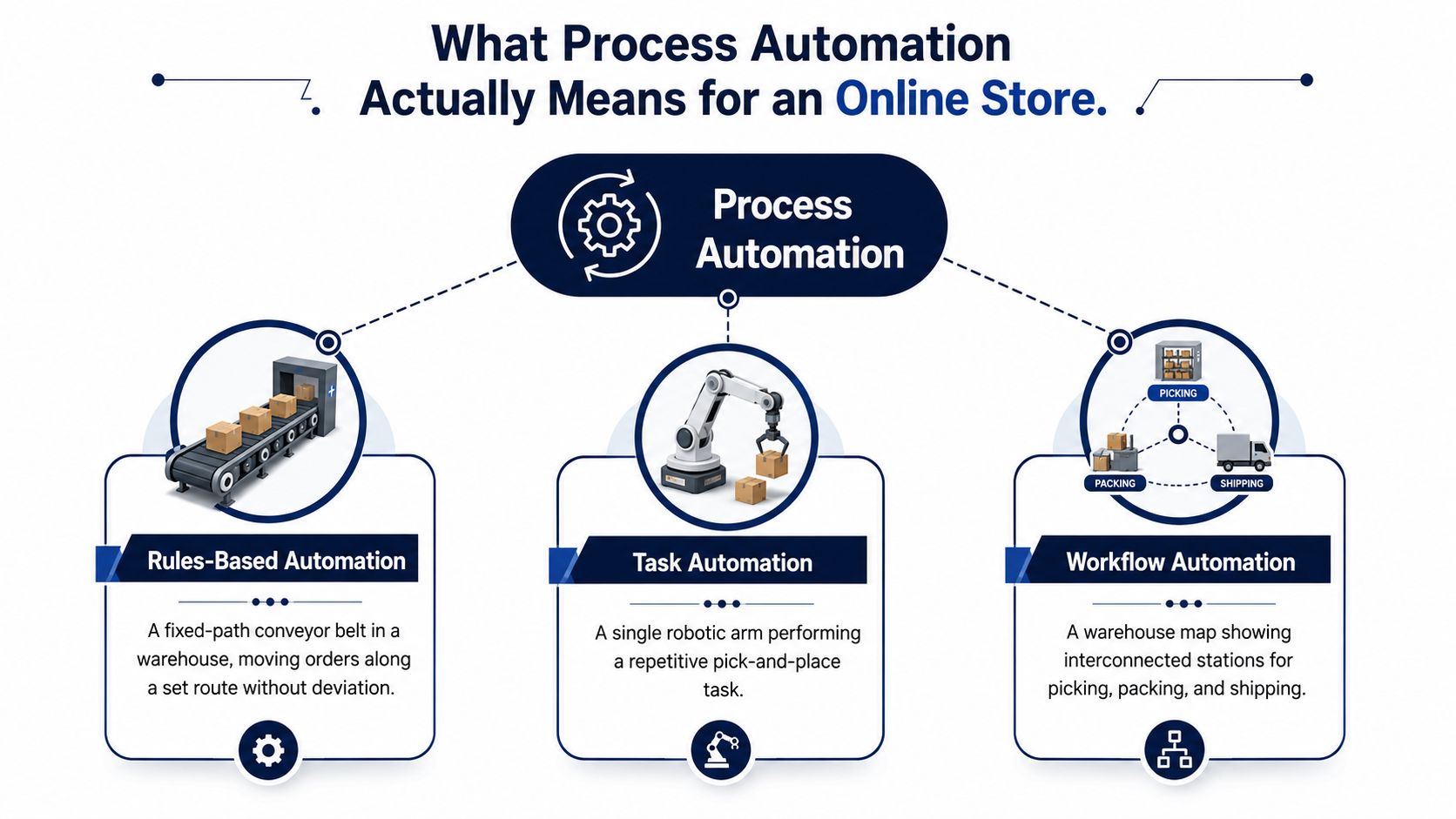
Process automation is software executing a recurring business process from trigger to outcome, with minimal manual intervention. In an online store, that might mean an inventory event updates multiple channels, a return gets classified, or a support ticket routes to the right queue without someone moving information by hand.
Rules-based automation is the conveyor belt. The input is predictable, the route is fixed, and the system performs the same action every time. A task automation handles one repetitive movement, such as copying a tracking number into an order record. A workflow automation connects several stations, such as order approval, warehouse release, shipping confirmation, and customer notification.
AI-driven automation is the routing system layered on top of the belt. It can evaluate signals such as demand patterns, ticket language, product context, or account performance, then recommend or execute a path that isn't limited to one fixed sequence. That doesn't mean AI should control every decision. It means you can reserve human attention for ambiguous cases instead of asking people to process every routine case manually.
Manually, an operator checks a spreadsheet, compares available stock with a reorder point, opens a supplier record, drafts a purchase order, and messages the purchasing lead. The process breaks when the spreadsheet is stale or the operator misses a low-stock variant.
An automated version starts with a stock event. When available inventory falls below the approved threshold, the workflow checks open purchase orders, supplier status, sales-channel demand, and any stock reserved for pending orders. It then creates a replenishment recommendation or routes the purchase order for approval. If the data is incomplete, it sends the case to a person instead of pretending certainty.
That distinction matters. A one-off script may update a field, and a chatbot may answer a question, but neither necessarily manages the full business process. A useful business process automation guide can help your team separate isolated task automation from end-to-end workflow design. For a broader explanation of how automation fits into business operations, review what business automation means.
Start with a workflow that has a clear trigger, a defined output, and an explicit exception path. If you can't describe those three elements in plain English, you're not ready to automate the process.
Generic automation advice stops at “save time” and “reduce errors.” That isn't enough for an ecommerce operator. You need to know where the gain appears in the P&L and which workflow creates it.
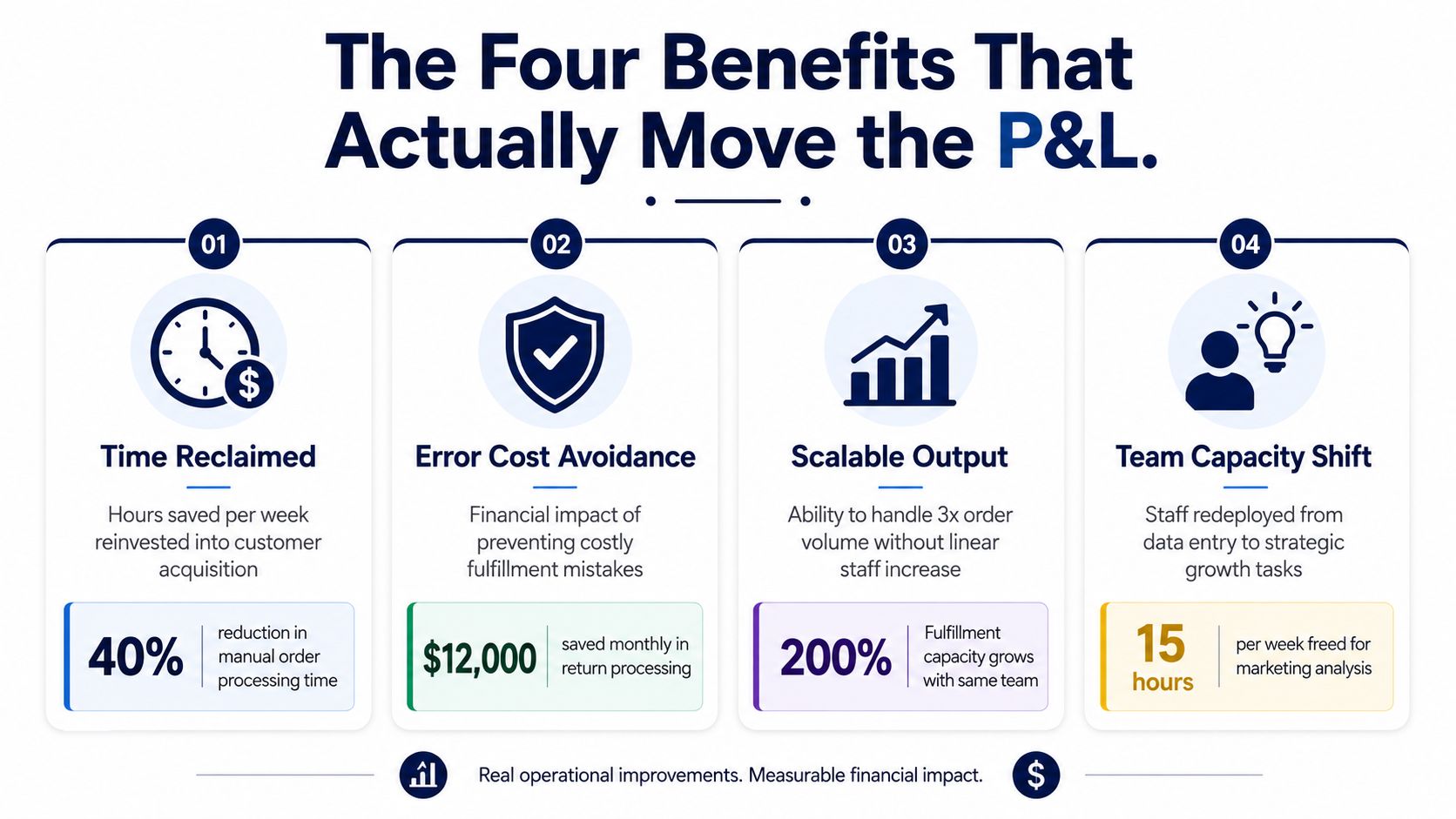
Automating order routing, invoice capture, or marketplace data updates removes repetitive work from the daily queue. The financial benefit isn't the existence of free time. It comes from what your team does with that time, such as improving product detail pages, analyzing PPC search terms, negotiating supplier terms, or fixing customer retention leaks.
One workflow automation study reported manual execution averaging 185.35 seconds, compared with 1.23 seconds for automated execution, an approximately 151 times reduction in execution time for the tested n8n workflows. The experimental study attributes the compression to fewer handoffs, wait states, and context switches. Treat that as a workflow benchmark, not a promise for every store.
Automation reduces the amount of labor and rework required for repeatable operations. A workflow automation benchmark summary from SeamPoint reports operational cost reductions of 20% to 30% for organizations implementing automation and says RPA can deliver ROI within 6 to 12 months. The same source reports that automated invoicing can reduce processing costs by 80% and that businesses can reclaim about 50% of time spent on routine data tasks.
For a brand, the best starting point is usually a high-volume back-office workflow with a measurable queue. Invoicing, purchase-order updates, and reconciliation are attractive because the savings are easier to isolate than a broad “productivity” project.
A fulfillment mistake can create reshipping costs, refunds, support work, marketplace consequences, and a disappointed customer. Automating address validation, SKU mapping, order holds, and return classification doesn't eliminate every error, but it removes predictable manual failure points.
A 2026 enterprise study reported an average 28% increase in production efficiency, alongside lower error rates and improved resource allocation, after companies implemented new automation technologies. The study connects the result to standardized execution and moving rules-based work into software. For ecommerce, measure the avoided defects directly, not just the number of automated tasks.
Speed matters when it improves a commercial decision. Faster inventory updates can reduce overselling risk. Faster PPC rule execution can stop waste sooner. Faster support triage can preserve a sale or prevent a cancellation.
The SeamPoint summary also reports a 15% increase in annual revenue growth among companies using automation. That figure is a benchmark, not a guaranteed outcome. Your revenue impact depends on whether automation improves a constraint that limits demand, such as replenishment availability, ad efficiency, listing velocity, or customer response time.
The correct framing is simple: automation is a margin and growth lever. Don't approve it because it sounds modern. Approve it when you can connect a workflow to labor, error, cash conversion, or revenue.
Don't automate the easiest task. Automate the workflow that repeats often, creates expensive mistakes, and has a clean trigger. For most ecommerce operators, the first wave should follow this order.
| Workflow | Trigger | Automated Output | Tool Category |
|---|---|---|---|
| Inventory sync and reorder triggers | Stock falls below an approved threshold or channel inventory changes | Update available stock, flag replenishment, route purchase-order approval | Inventory planning and integration platform |
| Product listing and catalog updates | A product attribute, price, image, or compliance field changes | Push approved data to relevant channels and log the change | PIM, marketplace connector, or commerce automation |
| PPC and advertising bid management | Spend, conversion, ACOS, or campaign performance crosses a rule | Adjust bids, pause wasteful targets, or create a review task | PPC management and reporting platform |
| Fulfillment and shipping exceptions | Order hold, delayed scan, address issue, or carrier exception appears | Route the case, notify the customer, and create a resolution task | WMS, shipping platform, and ticketing system |
| Customer service triage | A ticket arrives with a known issue type or urgency signal | Assign queue, apply tags, send approved response, escalate when needed | Help desk and AI-assisted support platform |
Inventory sync is usually the highest-impact first workflow because stale availability affects multiple channels at once. The trigger should combine available units, reserved units, inbound stock, and channel commitments. The output should update selling status and create a replenishment action, not merely send another alert.
Before building, define who approves a purchase order, what happens when supplier data is missing, and which channel gets priority during constrained supply.
Catalog updates become painful when every channel has its own fields and approval habits. Establish a source of truth for titles, attributes, imagery, compliance details, and pricing rules. When an approved record changes, automation should distribute the update and retain an audit trail.
If your warehouse and commerce systems don't share reliable identifiers, read this overview of warehouse management systems before connecting more tools.
PPC automation should act on explicit conditions, not vague instructions such as “optimize aggressively.” Define the metric, observation window, minimum data requirement, maximum bid movement, and human review threshold. A good workflow can pause obvious waste while sending uncertain cases to an operator.
Fulfillment automation earns its keep when something goes wrong. Route delayed scans, damaged parcels, address mismatches, and order holds to the correct queue. Make the customer notification part of the workflow, but keep refunds and unusual resolutions behind an approval rule.
Classify tickets by intent, order status, sentiment, and urgency. Automate tags, assignment, and approved responses first. Leave refunds, product complaints, and policy exceptions to trained staff until the workflow has earned trust.
When internal capability is limited, use pre-vetted ecommerce engineers to connect systems and document the exception logic. The implementation partner matters less than the quality of the process map and the ownership after launch.
The following are planning scenarios, not reported case studies. They show how to model ROI without pretending that a benchmark belongs to your brand.
| Scenario | Workflows Automated | Hours Reclaimed / Month | Estimated Cost Impact | Payback Period |
|---|---|---|---|---|
| DTC apparel brand | Inventory sync, returns triage, post-purchase flows | Measure from baseline | Model labor, reshipping, and avoidable support work | Target a payback within the benchmark range |
| Amazon-native brand | PPC rules, replenishment, marketplace case management | Measure from baseline | Model bid waste, stockout exposure, and support workload | Target a payback within the benchmark range |
Assume a Shopify apparel brand has recurring work across inventory updates, return classification, and post-purchase messaging. The founder's first move shouldn't be buying a broad automation suite. It should be measuring how many monthly hours the team spends collecting order data, assigning return reasons, answering tracking questions, and escalating delivery problems.
The automation then handles the predictable path. A return with a known product and policy match receives the correct tag and queue. A shipment event triggers an approved customer message. A stock change updates the connected sales channels. The team still handles damaged goods, policy exceptions, and unusual customer requests.
The financial model should include labor hours, reshipments, refunds caused by missed intervention, and support capacity. If the expected savings fit the 6 to 12 month RPA ROI window reported in the SeamPoint benchmark, the project deserves approval. If the model depends on unmeasured “strategic time,” keep auditing.
An Amazon operator can apply the same discipline to PPC bid rules, replenishment signals, and case management. The workflow pauses or adjusts campaigns only when the defined performance conditions are met. Replenishment logic checks sales velocity and available supply, while case automation gathers order and listing context before routing the issue.
Don't promise a specific ACOS improvement or avoided hire without baseline data. Track wasted spend, stockout days, unresolved case age, and operator hours before launch. The founder's week improves when routine decisions disappear from the calendar, but the P&L improves only when the saved capacity changes spend, availability, or labor requirements.
Treat the first 90 days as a controlled operating project, not a technology transformation. Pick one workflow, prove the economics, and expand only after the process survives real exceptions.
List the top 10 recurring workflows that consume team time or create costly defects. Score each by volume, decision complexity, error cost, data quality, and ease of measurement. Choose one pilot with a clear trigger and output, preferably inventory sync, order routing, or support triage.
Document the current process, including every handoff and exception. A strong standard operating procedure framework helps expose the steps your team performs from memory.
Decision gate: Go if the workflow has stable inputs, an owner, and a measurable baseline. Fix the process if the rules are inconsistent. Kill the project if nobody can define the desired outcome.
Build the smallest useful version. Connect only the systems required for the pilot, log every decision, and run the automation beside the manual workflow. Don't cut over while the system is still producing unexplained results.
Have an operator compare automated recommendations with manual outcomes. Record false positives, missed exceptions, duplicate actions, and data gaps. This phase tells you whether the workflow is ready for trust.
Decision gate: Go when the exception queue is understandable and the owner can explain each failure. Fix the rules when the automation works only on ideal inputs. Kill it when manual review takes as much effort as the original process.
Retire the manual backup for the pilot, but keep a visible audit trail and escalation path. Add two adjacent workflows only after the first one has a stable review cadence. Review cycle time, error rate, labor hours, and financial impact with the owner each week.
Skip the six-month strategy offsite. Spend that time cleaning identifiers, testing exceptions, and teaching the team what the automation does.
Automation projects rarely fail with a dramatic outage. More often, they create a small amount of value while leaving enough friction behind to make the investment feel disappointing.
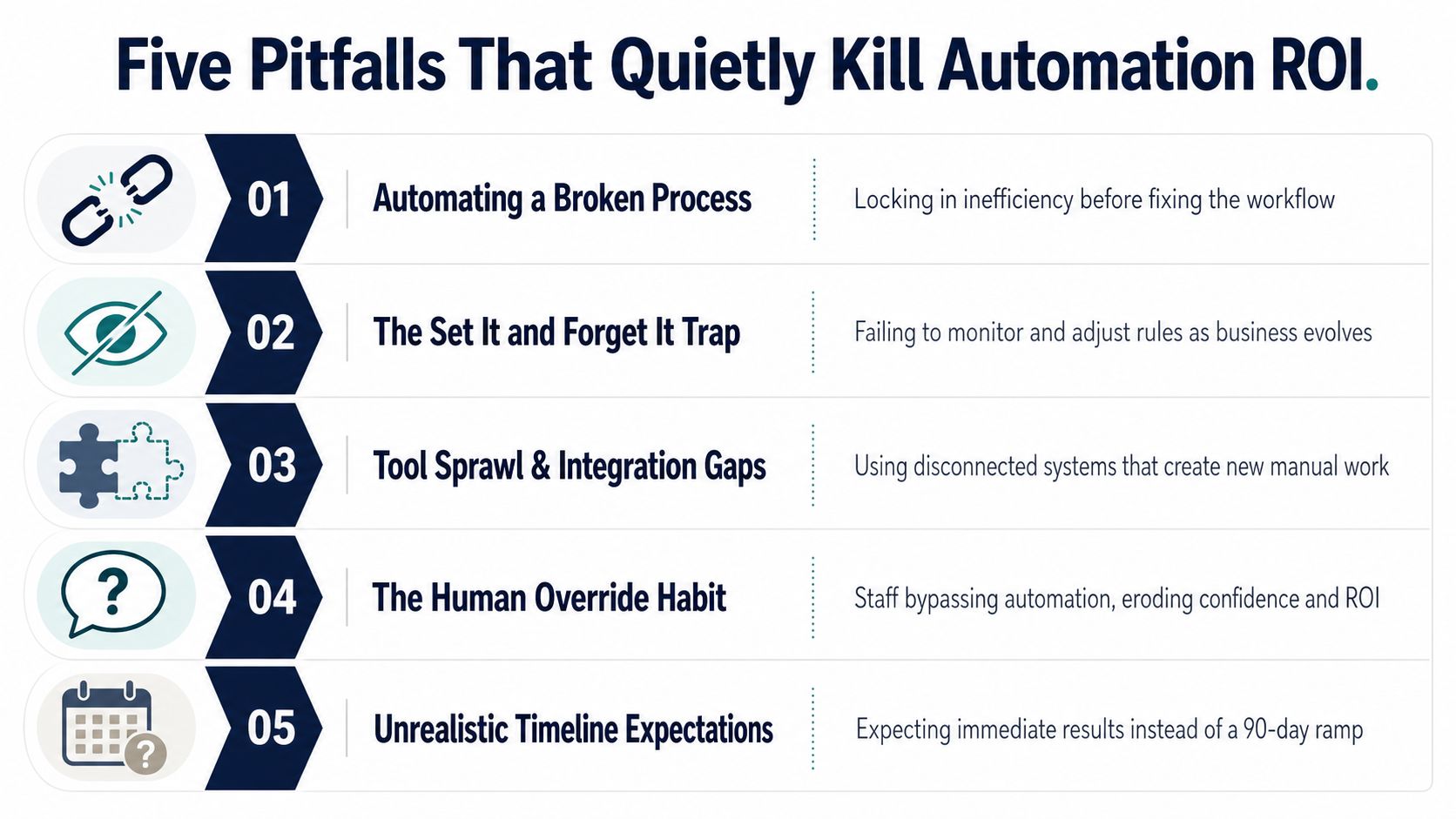
The contrarian point: You don't need more automation. You need fewer high-pressure decisions that require a human to remember a rule.
A 2025 to 2026 industry discussion on the benefits of business process automation argues that durable gains increasingly come from combining automation with process mining, predictive AI, and better data quality. It also reports expected average cost reductions of 22% and revenue growth of 11% over three years among businesses adopting intelligent automation. Use those figures as external context, not as a forecast for your store.
Automation is healthy when it changes operating performance, not when a dashboard shows more completed tasks. Track five measures for every workflow:
Add one dashboard widget on Monday: manual exceptions by workflow, with cycle time and financial impact beside each count. That view tells you whether automation is removing work or just moving it into an unseen queue.
Then choose one workflow and write its trigger in plain English. Define the normal output, list the exceptions, identify the data owner, and assign one person who can approve changes. Don't start with a chatbot because it looks visible. Start with the process that repeatedly touches inventory, fulfillment, PPC, cash, or customer retention.
The durable process automation benefits come from building an operating system your team can trust. Rules handle the predictable path, people resolve ambiguity, and the founder stops acting as the connection between every tool and department. That is the lever you need before the next growth phase.
Million Dollar Sellers offers an invite-only peer network for serious ecommerce founders, along with strategy sharing, mastermind discussions, and vetted service recommendations that can help you pressure-test automation decisions. Visit Million Dollar Sellers to connect your operating questions with founders managing complex Amazon, DTC, and omnichannel businesses.
Join the Ecom Entrepreneur Community for Vetted 7-9 Figure Ecommerce Founders
Learn MoreYou may also like:
Learn more about our special events!
Check Events