Chilat Doina
July 21, 2026
You're staring at a messy dashboard, three shipping exceptions, a pile of manual refund checks, and another Slack message asking why yesterday's inventory number doesn't match Shopify. That's the moment most brand managers start asking what is business automation really doing, and whether it can take some pressure off without breaking the business. The short answer is that it can, but only if the process is understood first, the infrastructure is ready, and the rules are clear enough for software to follow.
For e-commerce teams, automation isn't a buzzword or a shiny app category. It's a way to move repeatable work out of people's heads and into systems that can do it consistently, so your team can focus on exceptions, growth, and customer experience. The catch is that bad automation usually starts with a broken manual process, weak integrations, or both. The brands that win treat automation like operations design, not like a shortcut.
A brand manager closes one tab to answer a customer about a delayed order, opens another to fix a stock sync issue, then jumps into a third system to approve invoices. By noon, the day has turned into a relay race of tiny handoffs, and the work that grows the business has barely moved. Automation matters because it gives teams more room for merchandising, forecasting, creative testing, and customer retention instead of repeating the same admin loop.
The main pressure in e-commerce is inconsistency. Manual order processing creates delays, inventory updates drift across channels, and support queues fill with questions that could have been routed or answered automatically. Business automation reduces that friction by making routine actions happen the same way every time, which matters even more when the team is small and the margin for error is thin.
Automation only works well after the manual process is clear. If the team has not documented the steps, agreed on who owns each handoff, and confirmed that the systems can talk to each other, software usually speeds up the mess instead of fixing it. That is why governance matters at the start, with a simple checklist for process ownership, exception handling, data quality, integration health, and approval rules.
A good rule of thumb is simple. If a task happens often, follows rules, and causes stress when it goes wrong, it is a candidate for automation. If the team still needs to debate the steps every time, the process needs cleanup first, much like a warehouse lane needs marked paths before forklifts can move faster without collisions.
The right order matters. First master the process by hand, then automate the stable parts, then review whether the system is still producing the result the team expects. For brands comparing tools, how to choose the right accounting automation is a useful reminder that software choice should follow process clarity, not replace it. Teams also need to be ready for the infrastructure side, which is why a practical guide to AI tools for e-commerce can help leaders assess fit, data readiness, and workflow ownership before they add another layer of technology.
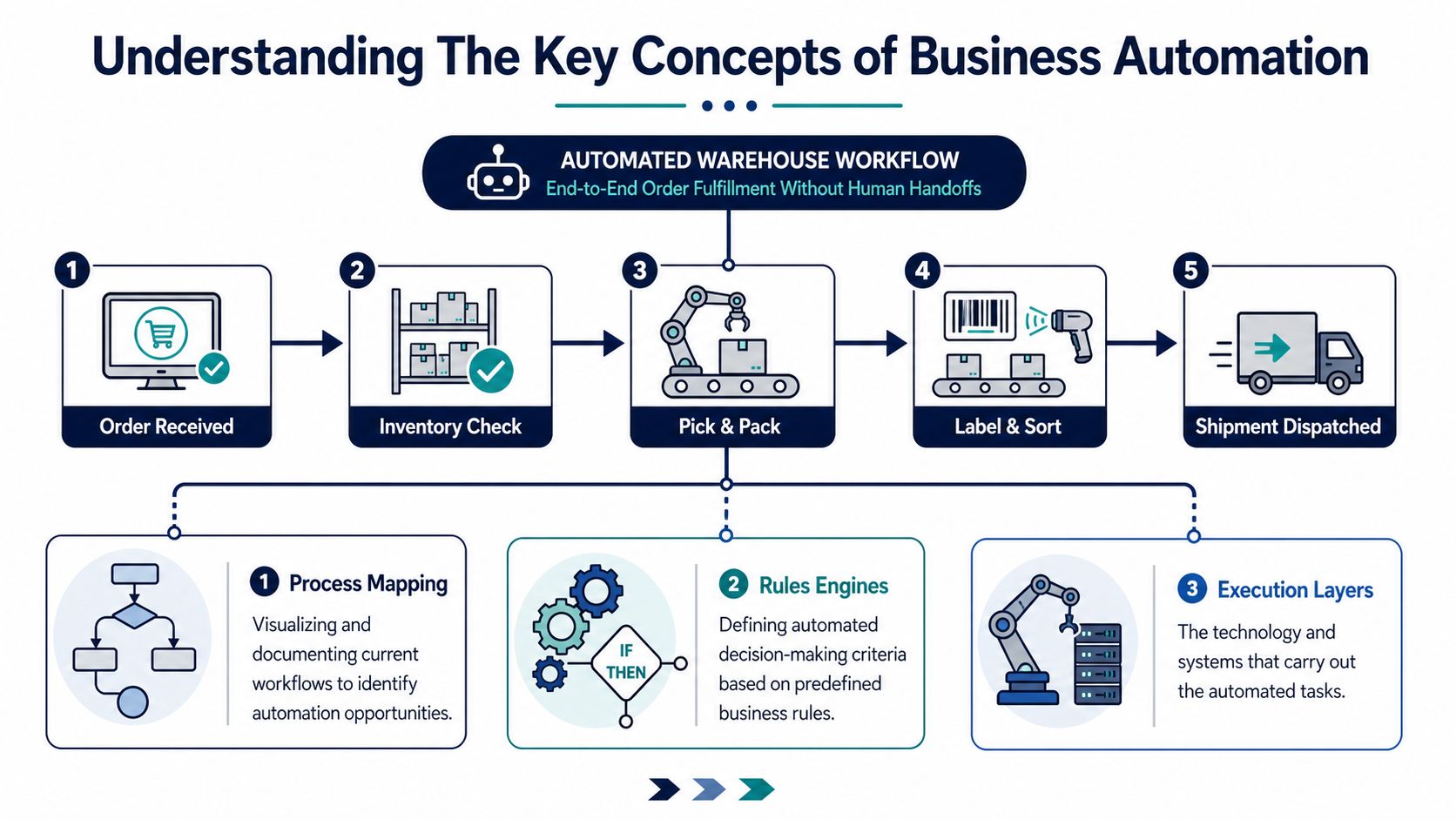
Think of an automated warehouse lane. An order comes in, the system checks the rules, sends the right instruction to fulfillment, updates the stock record, and notifies the customer without a human carrying the file from desk to desk. That's the clearest mental model for business automation, because the essence of the job is not “using software,” it's designing a workflow where software can move the work forward without constant handoffs.
The technical definition matters because it clarifies what belongs in automation and what doesn't. Business automation is the strategic alignment of Business Process Management and Business Rules Management with modern application development, so systems can execute repetitive, rules-based tasks with minimal human intervention by connecting software, APIs, and middleware to prevent data silos (Red Hat). In plain English, the process is mapped, the decision rules are written down, and the tools are connected so the same task doesn't have to be retyped in three places.
Process mapping is where the work starts. You document the current flow, from the first trigger to the final handoff, and identify where time gets lost, where errors happen, and where a human decision is needed. For e-commerce brands, that might mean mapping returns approval, purchase order creation, or customer support escalation before touching any software.
Rules engines decide what happens next. If the order value is high, route it differently. If stock is low, trigger replenishment. If a ticket contains a damaged-item claim, send it to a specific queue. The rules must be explicit, because software can only act on what's been defined.
Execution layers do the actual work. That can include workflow tools, APIs, middleware, or connectors that keep Shopify, your ERP, your help desk, and your accounting platform exchanging data cleanly. If you're comparing tools for the finance side of your stack, how to choose the right accounting automation is a useful lens because it forces you to ask whether the tool fits your process, not just whether it looks sleek in a demo.
Scripting, RPA, and AI aren't the same thing. Basic scripting handles a narrow set of actions. RPA mimics human clicks and copy-paste behavior. AI-powered workflows can classify, predict, or route based on patterns, but they still need guardrails. If you're deciding where AI fits next to automation, the overview in MDS's guide to AI tools for e-commerce helps separate useful augmentation from hype.
If a tool can't explain how it connects systems, handles exceptions, and logs activity, it's not solving an automation problem. It's just adding another interface.

A practical automation program starts with a simple question, which manual process is slowing the business down the most, and why? For e-commerce teams, the answer is usually found in work that still depends on memory, inbox follow-up, or repeated copy-and-paste between systems. Once those steps are mapped clearly, automation can turn a fragile handoff into a process that behaves the same way every time. That consistency matters because a missed order update, a late invoice, or a support delay can spill into customer frustration and extra work across the team.
The financial case is strongest when the workflow is stable and the infrastructure is ready for it. Analysts at Thunderbit report that organizations investing in automation have reduced operating costs by an average of 22% within three years, and 60% achieve a full ROI within the first 12 months. Those figures do not guarantee a quick win for every project, but they do show why automation often shifts from a nice-to-have tool to a real operating advantage once the process is well defined and the exceptions are under control.
Before automation saves time, the manual process has to be understood well enough to document it. That usually means checking whether the team already knows the exact trigger, the approval rule, the exception path, and the system that owns the record. If any of those pieces are fuzzy, software will only repeat the confusion faster. A good governance checklist asks whether the process is repeatable, whether the data fields are reliable, whether someone owns exceptions, and whether the downstream system can accept the output without creating another cleanup job.
The first visible change is usually capacity. Team members stop spending their day on repetitive checks, rekeying data, and chasing updates across systems, which gives them more room for supplier negotiation, conversion-rate work, better reporting, or customer retention programs.
Accuracy improves because software applies the same rule the same way each time. Cycle times improve because tasks do not sit in an inbox waiting for someone to notice them. Customer experience improves because the brand responds faster and with fewer missed handoffs. For brand managers, those outcomes matter more than the number of tools in the stack.
A useful way to judge an automation project is to look at the pain point it removes. If the bottleneck is order reconciliation, automate reconciliation. If the bottleneck is order status questions, automate the status pull and response. If the bottleneck is approvals, automate the routing and escalation logic. Order operations and inventory control often benefit first, because stock data has to stay dependable across storefronts, warehouses, and marketplaces, and a fragmented stack makes that harder. For teams comparing system support on the operations side, warehouse management systems are worth examining because they show how the control layer keeps records aligned. Marketing workflows also improve when campaign triggers, segmentation, and follow-up sequences draw from the same customer data, and unified commerce marketing strategies help keep that coordination intact.
The cleanest automation roadmap usually starts with the parts of the business that already create visible bottlenecks. In e-commerce, that often means order operations, inventory, marketing, finance, and support. These areas aren't isolated, either. A stock issue can affect marketing promises, a support ticket can expose a fulfillment delay, and an invoice error can create downstream reconciliation work.
Order operations are the backbone. If order intake, fraud review, fulfillment handoff, and shipping updates are manual, the whole operation slows down. Inventory management is the other half of the same system, because stock data has to stay reliable across storefronts, warehouses, and marketplaces. If your team is still working through a fragmented stack, the warehouse management systems overview is a useful reference point for understanding how operational software supports that control layer.
Marketing workflows benefit when campaign triggers, segmentation, and follow-up sequences run from the same customer data. That's where a resource like unified commerce marketing strategies becomes helpful, because it emphasizes coordination instead of treating each channel as a separate campaign island. Finance automation tends to focus on invoicing, reconciliation, and payment status, where consistency matters more than speed alone.
Customer support is the last major category, but it often has the clearest payoff. Automated routing, templated responses, and self-service status updates can keep simple requests from clogging the queue. The goal isn't to replace agents, it's to reserve them for the issues that require judgment.
A good prioritization rule is simple. Start where work is frequent, repetitive, and expensive when it fails. That usually gives you the clearest early win and the least resistance from the team.

A direct-to-consumer brand selling consumables had a familiar problem, orders were being queued by hand, exceptions were handled in spreadsheets, and shipping updates lagged behind actual warehouse movement. The team mapped the workflow, then automated the most repetitive fulfillment steps so orders could move through the system with fewer handoffs. The result was a smoother dispatch process and fewer chances for a package to sit in limbo because someone missed a manual step.
An Amazon seller with repeat-purchase products had a different issue, strong acquisition but weak follow-up. The seller used marketing sequences to respond to customer behavior instead of sending one-size-fits-all campaigns, which made the post-purchase journey more consistent and easier to manage. The lesson wasn't that automation sold more on its own, it was that the brand stopped relying on ad hoc reminders and started using structured follow-up logic.
The third example is a multi-channel retailer that was drowning in invoicing and reconciliation across systems. Instead of expanding headcount, the team automated the invoice flow, built clearer approvals, and reduced the number of times staff had to re-enter the same information. That kind of improvement matters because finance mistakes don't stay in finance, they affect customer trust, vendor relationships, and cash visibility.
If you're thinking about chargebacks and disputes as part of the same operational picture, Protecting Shopify stores from disputes is worth reviewing because payment operations and automation design often overlap more than teams expect.
The common thread across these stories is simple. Each business automated a process that was already understood, and each one kept humans involved where judgment still mattered.

A rollout goes better when the team can run the process by hand first. A brand manager who can walk through every handoff, approval, and exception is far better positioned to automate it than a team that is still guessing how the workflow behaves under pressure. Start with the work as it exists today, then check whether the systems, data, and controls can support automation without creating new failure points.
The easiest way to miss that preparation is to focus on software before the operation is ready. A process that looks simple on a whiteboard can hide missing data, unclear ownership, or integrations that only work part of the time. The internal checklist in how to automate business processes is useful here because it pushes teams to define the workflow before they try to scale it.
Manual process documentation. Map the current flow step by step, including who touches it, what system they use, and where delays happen. If a step cannot be described clearly, it is too early to automate. For e-commerce teams, this usually means checking order intake, stock updates, customer notifications, and any approval that still depends on a person remembering to act.
Root-cause analysis. Ask why the problem exists, not just where it appears. A slow approval queue may come from missing data, unclear ownership, or a broken handoff. Fixing the visible delay without tracing the cause usually leaves the same issue in place, only faster.
Infrastructure readiness checks. Confirm the basics first, including system connectivity, integration support, data access, and security controls. Smaller teams often overlook these setup questions, then find that the automation cannot pass clean data between tools or cannot be monitored properly once it is live. MaxxPotential has pointed out how often SMBs miss automation opportunities because the foundation is not ready.
Pilot program. Choose one process with clear volume and low blast radius. Keep the scope tight so you can see failure points without disturbing the whole operation. A good pilot behaves like a test lane in a warehouse, it shows where the conveyor jams before the full floor is running.
Full-scale rollout. Expand only after the pilot proves stable. Add monitoring, training, and ownership before broad deployment. If one team understands the logic but no one owns exceptions, the workflow will drift as soon as real orders, refunds, or edge cases start hitting it.
The most common failure is skipping the manual stage and treating automation as a shortcut. A LinkedIn article on AI automation argued that teams often stumble when they do not understand each workflow step before they automate it, which is why a Manual First approach matters (LinkedIn article on AI automation). Get the process working by hand, learn where exceptions appear, then automate around that knowledge instead of guessing.
Governance checkpoint: before rollout, confirm there is an owner for each automation, a fallback path for outages or bad data, and a metric that shows whether the workflow is actually helping.
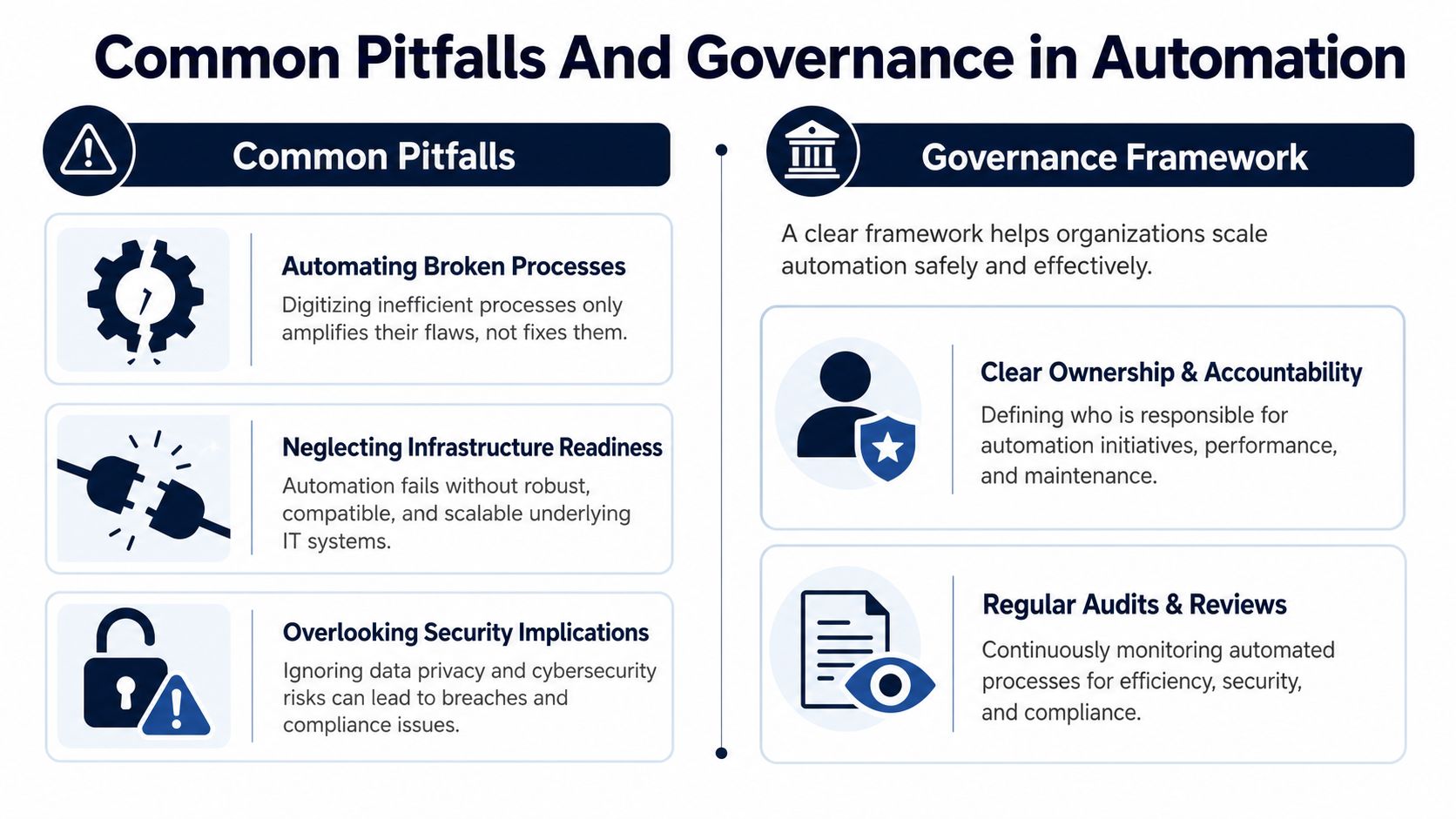
A common scene in e-commerce operations is a team automating a process that still has unclear handoffs, missing fields, and no agreed owner. The software may make the workflow look tidier for a while, but it cannot fix a process that the team has not learned to run well by hand first. The same problem shows up when the system stack is not ready, especially in smaller teams that are still stitching together tools that do not share data cleanly.
Automating a broken process only makes the flaw run faster. If the underlying steps are inconsistent, the workflow will keep repeating the inconsistency at machine speed. Infrastructure gaps create a different failure mode, because one broken connector or changed field can stop a workflow that looked fine during setup.
Security is the other quiet failure. Automation often touches customer data, financial records, and internal permissions, so access rules need to be set before launch, not after the first exception appears. If nobody defines who can see, change, or approve each step, the workflow becomes harder to trust the moment a real order, refund, or edge case comes through.
A basic governance framework solves most of this. Assign one owner to each automation, so there is a clear person responsible when a workflow fails or starts drifting. Keep a monitoring view that shows failures and exceptions, and review it on a regular cadence so small issues do not turn into repeated operational noise.
Version control matters too. Workflow logic, scripts, and rule changes should be tracked so the team can see what changed, who changed it, and why. That is the difference between a controlled process and a hidden tangle of one-off fixes.
The same discipline applies when things go wrong. Every automation should have a fallback procedure for outages, bad data, or ambiguous cases, plus a notification path that tells the right people when a process stops behaving as expected. If the team cannot answer those questions before launch, the automation is not ready for real volume.
A comparison from MaxxPotential makes the setup gap easy to see. Some SMBs miss automation opportunities because their foundational infrastructure is not ready, and the work they keep doing by hand often includes data entry, onboarding, and report generation (MaxxPotential). The answer is not to force a tool into place. It is to make the manual process stable first, then automate the parts that behave predictably.
A governance checklist keeps the work practical:
Business automation is not a single tool, and it's not a shortcut around operations discipline. It's a system for moving repetitive work out of manual hands and into reliable workflows, which only works when the process is understood, the infrastructure is ready, and the governance is in place. The brands that get value from it don't start with software, they start with process clarity.
If you're deciding where to begin, audit the workflows that create the most repeat work, the most errors, or the most delays. Map one process manually, check whether your systems can support automation, then pilot the smallest useful version before you scale. Keep the Manual First principle in front of the team, because it prevents you from automating confusion.
If you want a sharper benchmark for your next move, compare your current workflow against the automation areas above and ask where the business is still paying for avoidable handoffs. Then get advice from operators who've already done the hard version of the work.
A CTA for Million Dollar Sellers.
Join the Ecom Entrepreneur Community for Vetted 7-9 Figure Ecommerce Founders
Learn MoreYou may also like:
Learn more about our special events!
Check Events