
Chilat Doina
May 9, 2026
You know the moment when your Amazon account is technically working, but your business isn't really moving forward. Orders are coming in. Listings are live. You've proved there's demand. But every attempt to grow runs into the same wall.
You want to launch more SKUs without building them one at a time. You want cleaner reporting than a basic view inside Seller Central. You want your PPC manager or agency to plug into your account properly. You want to stop watching competitors take the Buy Box while you're stuck with manual workflows that belong in a side hustle, not a brand.
That's usually when the amazon professional selling plan stops looking like a simple subscription and starts looking like infrastructure.
Too many sellers frame the decision around the monthly fee alone. That's incomplete. The actual issue is whether you're still operating like a casual seller while trying to compete with sellers who have bulk tools, API connections, ad access, better reporting, and category options you can't even touch from an Individual account. Once you're trying to build repeatable systems, the plan type becomes an operating decision, not just a billing choice.
The most common trap is thinking 40 sales a month is a milestone to celebrate, when in practice it often exposes the limitations of your setup.
A seller starts with one or two products, lists manually, and keeps the business lean. That works for testing. Then volume picks up. More orders should feel like progress, but daily work gets messier. Updating listings takes too long. Inventory gets checked too manually. Product research is based on partial information. Sales are inconsistent because there's no serious ad engine behind the account.

That's where a lot of ambitious sellers get stuck. They aren't beginners anymore, but they're still using a plan built for beginners.
The pain usually shows up in predictable ways:
Practical rule: If your business needs systems, delegation, or repeatable acquisition, you've already outgrown the Individual plan even if your unit volume is still modest.
The obvious math gets attention because it's simple. But in practice, serious sellers usually feel the operational ceiling before the fee math becomes the main issue.
The Individual plan is fine for testing a concept, clearing occasional inventory, or learning the platform. It's not built for brand owners trying to create stable catalog management, advertising loops, and portfolio-level decision making. Once your store needs reliable workflows instead of improvisation, staying on the wrong plan starts costing more than the subscription would.
That's why sellers often describe the switch as a relief. Not because the monthly charge is exciting, but because it provides the basic conditions for running Amazon like a business.
At the surface level, the plans look like a pricing choice. In reality, they represent two very different operating models.
The Individual plan is for sellers who are testing, dabbling, or moving low volume without needing serious systems. The Professional plan is for sellers who need Amazon to function like an actual sales channel with scalable workflows, reporting, and growth levers.
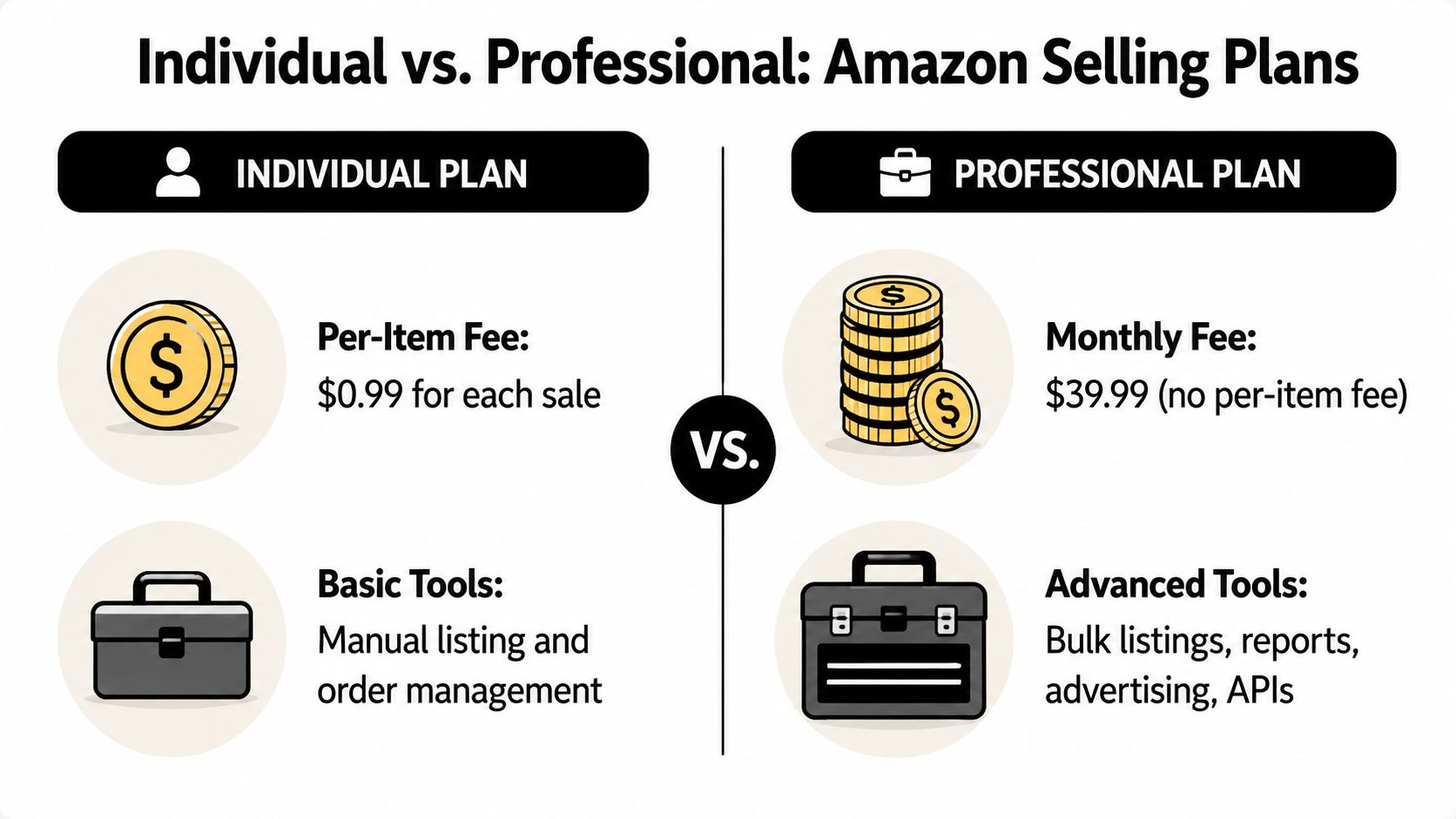
| Feature | Individual Plan | Professional Plan |
|---|---|---|
| Pricing structure | $0.99 per item sold | $39.99 monthly fee, no per-item fee |
| Best fit | Casual sellers and low-volume testing | Brand builders and scaling operators |
| Listings | Manual workflows | Bulk listing tools available |
| Advertising access | Limited compared with Professional capabilities | Built for sellers using Amazon growth tools |
| Buy Box access | More restricted | Eligible for Buy Box advantages |
| Reporting depth | Basic | Advanced dashboards and analytics |
| API access | Not available for serious software workflows | Available for third-party tools and automation |
| Restricted categories | More limited | Access to categories unavailable to Individual sellers |
| Team operations | Limited for business use | Better fit for multi-user workflows and agencies |
One of the clearest dividing lines is the fee structure itself. The Professional plan costs $39.99 per month and removes the $0.99 per-item fee, which creates a break-even point at 41 items sold per month. The same source also notes that Professional sellers can see 25% to 40% higher sales velocity via Buy Box eligibility, and that winning the Buy Box correlates with 80% to 90% of unit sales in competitive categories according to Amazon's comparison of the Professional and Individual plans.
That's the philosophical difference that matters.
The Individual plan helps someone get started. It doesn't support a modern Amazon operation very well once complexity enters the picture. If you're building replenishment systems, running external software, working with an agency, or trying to optimize around keywords and profitability, you need infrastructure.
The Professional plan is what gives you that infrastructure. It provides access to the tools serious sellers expect to have, not because those tools are “nice to have,” but because they support real execution.
If you need a better grounding in how the platform itself is structured, this breakdown of what Amazon Seller Central is is worth revisiting before you make account-level decisions.
The easiest way to think about it is this. Individual helps you sell products. Professional helps you run an Amazon business.
The most important gains aren't cosmetic. They affect your ability to compete.
You gain access to bulk operations instead of repetitive manual listing work. You open the door to software that connects through Amazon's APIs. You move closer to data-driven management instead of gut-feel decisions. You also stop limiting yourself to the toolset Amazon reserves for hobbyist sellers.
For a serious operator, that distinction matters more than the monthly charge.
Most sellers stop the math too early.
They compare $39.99 per month on the Professional plan to $0.99 per item on the Individual plan, identify the break-even point, and call it done. That's useful, but it's not enough to make a good decision. A serious seller needs to measure true ROI, not just fee parity.
The simpler calculation tells you when the Professional plan becomes cheaper. It doesn't tell you what staying on the wrong plan is costing you in missed visibility, slower operations, weaker control over growth, or delayed access to proper ad infrastructure.
The clean fee logic is straightforward. The Professional plan becomes cost-effective after 40 items per month, and successful brands on that plan often reinvest 15% to 40% of total revenue back into Amazon advertising to defend and grow share, according to this breakdown of plan economics and Amazon ad reinvestment.
That last point matters more than many sellers realize. If you're building a brand that needs ongoing visibility, the monthly subscription is tiny compared with the broader growth budget required to compete well.
At this level, sellers often think they're still “too small” to care. I'd argue the opposite.
If you're already moving around the break-even threshold, your decision shouldn't be based only on a few dollars of fee difference. It should be based on whether you need tools that help you keep growing. At 50 units, you're often in one of two situations:
In either case, opportunity cost matters. If you can't run the workflow, reporting, and promotional motion you need, you're delaying the learning cycle that builds the business.
Margin check: The wrong plan doesn't just create a fee problem. It creates a decision-quality problem.
At this level, the conversation changes completely.
Now the question is no longer whether the Professional plan is cheaper. It plainly fits the business. The central issue is whether you're using the plan as overhead or as a strategic asset. Sellers at this stage need cleaner profit accounting, better delegation, better software connectivity, and a sharper view of contribution margin by SKU.
This is also where disciplined cost modeling matters. If you're tightening unit economics, a good companion resource is protecting margins with Amazon's fee insights, especially when you're layering subscription costs, fulfillment fees, referral fees, and ad spend into one profitability view.
For a broader view of platform costs, this guide on how much Amazon costs to sell helps frame the subscription fee inside the rest of the cost stack.
When evaluating the amazon professional selling plan, use this order:
Check your current monthly unit volume
Use the straightforward fee threshold as the starting line, not the finish line.
List the capabilities you need in the next stage
Ads, bulk uploads, analytics, API-connected tools, and delegated access usually matter before sellers expect them to.
Identify costs of delay
Manual work, slower testing, poor attribution, and missed category or promotional options all have a real business cost even when they don't show up as a line item.
Treat the subscription as infrastructure If the business depends on repeatable systems, the relevant question is whether the tools provided by the plan improve your decisions and execution.
The best operators don't upgrade because they want a lower fee. They upgrade because they don't want plan limitations shaping the ceiling of the business.
The strongest reason to move to the amazon professional selling plan is that it opens the toolset required to scale cleanly.
That starts with access to information you can act on. Professional sellers get the Search Query Performance dashboard, which shows the exact keywords customers use to find products, and they get API access that lets third-party software connect for PPC, inventory management, and other automations. The same source notes that 64% of Amazon sellers become profitable within 12 months, which gives context for why better tooling matters early in the journey, as explained in this overview of Professional plan capabilities.

Once you can see the customer language behind demand, a lot of guesswork disappears.
Search Query Performance isn't just an SEO feature. It informs product development, listing updates, PPC structure, creative angles, and even bundling logic. If shoppers repeatedly find a product through terms you didn't expect, that's not trivia. That's market intelligence.
Use it in practical ways:
This is the dividing line between basic selling and business-grade execution.
With API access, your account can connect to repricers, inventory tools, analytics platforms, and agency systems. Without it, a lot of scaling work becomes slow, manual, or error-prone. If your team depends on software to manage stock levels, coordinate ad changes, or analyze catalog performance, API access isn't optional.
That's also why curated software choices matter. If you're evaluating what should connect to your account, this list of best Amazon seller tools is a useful place to compare categories of software serious sellers rely on.
If a business depends on copy-paste workflows and one person's memory, it doesn't have systems yet.
Manual listing has a place. It's just not in a scaling catalog.
Bulk listing tools and file-based updates help when you're managing multiple ASINs, parent-child variations, or widespread attribute changes. The point isn't just saving clicks. It's reducing friction in tasks that otherwise stack up across the week and steal attention from work that truly moves margin.
That includes common workflows like:
A short walkthrough can help if you want to see how experienced sellers handle that transition in practice.
A lot of sellers wait too long to formalize account access. They share logins, keep permissions too broad, or avoid adding specialists because the account setup isn't ready for it.
That approach creates avoidable risk. Once you're working with a VA, PPC manager, bookkeeper, ops lead, or agency, controlled access matters. The Professional environment fits delegated work better because it aligns with how a real team operates. Different people need different permissions, and not everyone should touch the entire account.
What works is building a stack around actual bottlenecks. If stockouts are hurting you, connect inventory tools first. If decision-making is weak, start with reporting and analytics. If campaign execution is the issue, fix software access and workflow clarity.
What doesn't work is upgrading and then continuing to operate manually. The plan enables capability. You still have to implement it.
Once you've got the tools, the next question is how to turn them into durable advantage.
The amazon professional selling plan gives sellers access to levers that affect market share, defensibility, and category positioning. Used well, these features do more than make operations smoother. They help you shape the kind of business you're building.
Serious sellers don't treat Amazon ads as a side channel. They treat them as a control system.
Professional access matters because it allows a brand to build a deliberate paid strategy around launches, rank defense, competitor conquesting, branded search capture, and lifecycle management. Sponsored Products and brand-level placements become tools for steering visibility, not just buying random clicks.
This is especially important when a listing is already converting and needs more qualified traffic. In that scenario, the advertising engine doesn't just drive revenue. It accelerates learning around search terms, price elasticity, and which products deserve more inventory commitment.
A seller who can test offers, keywords, and ad structure quickly usually outlearns the seller with the cheaper product but weaker systems.
Promotions are often treated as tactical. In practice, they can be strategic when they're tied to rank goals, review velocity, inventory movement, or seasonal timing.
Coupons and deal structures can support new product traction, help recover a slowing ASIN, or give a strong product the extra velocity needed to improve organic positioning. What matters is intent. Promotions work best when they're attached to a broader plan instead of being used as a reflex every time sales soften.
Used badly, they compress margin without building anything. Used well, they create momentum at moments where momentum matters.
One of the most overlooked advantages of the Professional plan is access to restricted categories that Individual sellers can't enter, including categories such as beauty and collectibles. That access can become a structural advantage because those categories often have lower seller density and stronger margins precisely because casual sellers are locked out, as noted in this analysis of Individual versus Professional selling plans and restricted category access.
That's the kind of advantage experienced operators pay attention to.
Instead of asking only, “When should I upgrade?” a better question is, “What markets become available once I do?” In some cases, the upgrade isn't about scaling the current catalog. It's about entering a better one.
That's why Professional access matters at the strategy level. It changes what you can sell, how you can promote it, and how aggressively you can defend the position once you find traction.
The switch itself is usually straightforward. The hard part is deciding you're done tolerating the limitations of the Individual plan.
Log in to Seller Central
Use the main account owner login, not a limited user profile.
Go to your account settings
Look for the area where your current selling plan is listed under account information or subscription details.
Select the Professional plan option
Amazon will show the updated billing structure before you confirm the change.
Review the fee details carefully
Confirm that you understand the monthly subscription and when it will be charged.
Submit the change and wait for confirmation
Once processed, your account should reflect the new plan inside Seller Central.
Before upgrading, make sure your account information is current. That includes billing details, business contact information, and any internal notes about who will need access once the upgrade is active.
If you're planning to use the Professional plan properly, this is also the right moment to decide what gets enabled first. That might be ad setup, bulk file use, agency access, inventory software, or better reporting.
Don't expect every useful feature to become part of your business overnight just because the account setting changed.
Some tools require setup. Some reports need fresh data to become useful. Some team processes need to be rebuilt now that the right permissions and integrations are possible. The account upgrade is immediate enough. The operational payoff comes from what you implement next.
If you're still thinking about the amazon professional selling plan as a simple fee decision, you're probably underselling the choice.
The question is whether your current plan supports the business you're trying to build. If you're testing casually, keeping volume low, and don't need advanced tooling, the Individual plan can still make sense. But if you're trying to scale catalog breadth, improve decision quality, run ads intelligently, connect software, or compete in less accessible categories, you've likely outgrown it.
The Professional plan works best when you treat it as infrastructure. Not as a magic fix. Not as a vanity upgrade. Infrastructure.
A lot of sellers wait too long because the old setup still “works.” That's rarely the right test. The better test is whether the current setup helps you operate at the level your goals demand. If the answer is no, upgrading isn't an expense to avoid. It's the next clean move.
Yes, sellers can switch plans later. The practical caution is operational. If you downgrade after building workflows around ad access, software integrations, bulk tools, or category permissions, you may disrupt parts of the business you now rely on. Make the decision based on your operating model, not just a temporary dip in sales.
Not necessarily. Many sellers start before the business is fully built out administratively. But the Professional plan is a better fit when the operation starts behaving like a real company with outside help, recurring processes, and channel complexity.
That's especially true if you need delegated access. The Professional setup supports multi-user permissions and multi-channel fulfillment integration, and one source notes this can cut operational overhead by 40% through automated inventory feeds for sellers syncing with platforms like Shopify. That's covered in this look at the operational advantages of the Professional plan.
In many businesses, seller platform subscriptions are treated like standard operating expenses. Tax treatment depends on your jurisdiction, your entity structure, and how your books are managed. Handle it with your accountant, not guesswork.
No. The plan gives you better tools and more strategic options. It doesn't rescue a weak product, bad pricing, poor inventory discipline, or sloppy ad execution. Sellers improve results when they use the added visibility and automation to make better decisions.
Start with the area creating the most friction right now.
If your account is flying blind, prioritize reporting and keyword intelligence. If stock problems are hurting you, connect inventory tools. If growth is stalled, get your advertising foundation in place. If a team or agency is involved, clean up permissions immediately.
No. Some sellers need it before they become high volume because their model requires the infrastructure. Brand builders, multi-SKU sellers, and operators entering more complex categories often benefit from the Professional plan before volume alone forces the decision.
If you're already operating at a level where better systems, sharper strategy, and peer-tested execution matter, Million Dollar Sellers is where serious founders compare notes behind the scenes. It's built for operators who want better answers than the public Amazon playbook usually offers.
Join the Ecom Entrepreneur Community for Vetted 7-9 Figure Ecommerce Founders
Learn MoreYou may also like:
Learn more about our special events!
Check Events