
Chilat Doina
August 11, 2026
You're probably living in the same mess I see in a lot of fast-growing ecommerce businesses. One tab has Shopify orders, another has Amazon Seller Central, Meta is segmenting audiences one way, the ERP is telling you something else about inventory, and your email or SMS tool is happily firing off messages without a clean view of who bought what, where, and why. At that point, a CRM isn't a “nice to have,” it's the only way to stop customer data from becoming expensive folklore.
A CRM implementation gives you a system of record that can survive omnichannel chaos. The work is not just picking software, it's deciding how customer identity, pipeline stages, lifecycle automations, and reporting all fit together when Amazon, Shopify, ads, support, and finance disagree. The playbook below is written for founders and operators who need the thing to work in the world, not in a vendor demo.
The failure pattern usually shows up before anyone admits there is a failure. The founder can name revenue by channel, the ops lead knows what sits in stock, the media buyer can point to ads that are converting, but nobody can answer one hard question, what does this customer's history look like across touchpoints? Once that answer is missing, fragmented systems start taxing margin, because every team keeps rebuilding the same customer view from different exports.
A CRM implementation gives those fragments one place to live. It should hold the customer relationship, not just the contact record, and it has to do that in a way sales, retention, and support can use without constant reconciliation. That matters even more for ecommerce brands that split demand across DTC and marketplaces, because Amazon behavior, Shopify behavior, and post-purchase behavior rarely tell the same story unless the system is designed to unify them.
Practical rule: if a manager needs three dashboards to understand one customer segment, the stack is already too fragmented.
CRM implementation also moved from side project to core operating capability. Historical industry research cited by Destination CRM shows implementation moved sharply between 2003 and 2010, with adoption rising from 53% to 75%, on-premises systems dropping from 85% to 47%, and SaaS CRM rising from 15% to 53%. The same source reports annual CRM software sales growing from $762 million in 1997 to $14 billion in 2007. The point is simple, CRM stopped being an infrastructure project and became a daily operational asset.
For larger businesses, it is close to table stakes. CRM.org reports 74% of U.S. businesses had implemented a CRM system, while other 2026 market summaries put adoption at about 91% among companies with 10 or more employees. If you are still stitching customer truth together by hand, you are not being lean, you are carrying avoidable operational debt.
The playbook below is written for founders and operators who need the thing to work in operations, not in a vendor demo. That means making trade-offs early, keeping the customer identity model clean, and planning the post-go-live governance layer that decides whether the CRM drives retention and LTV instead of becoming another admin-heavy repository.
If you want a practical shortlist before you go any further, use a best CRM for ecommerce guide to pressure-test fit against your channel mix and data complexity. Teams that want to choose for monday.com CRM should do it only if the workflow model and integrations hold up under Amazon, Shopify, ERP, and ads data, not because the interface looks easy in a demo.
The wrong CRM choice usually looks cheap for about five minutes. Then implementation starts, and the cost shows up in connector work, workflow gaps, duplicate cleanup, admin time, and the founder's attention disappearing into a tool that should've reduced friction. For ecommerce teams, the decision isn't “which CRM has the most features,” it's “which CRM fits how customers move across DTC, Amazon, paid media, and support.”
HubSpot is often the easiest place to start if the team wants a friendly UI, decent marketing alignment, and broad native integrations. Salesforce can go much deeper, but that depth only helps if you have the internal bandwidth or partner support to shape it correctly. Klaviyo CRM makes sense when lifecycle marketing is the center of gravity. Zoho can work for teams that want breadth without enterprise sprawl. Attio fits operators who care about flexibility and clean workflows. Pipedrive is still attractive for simple sales motions, but ecommerce brands with more channel complexity usually outgrow it faster.
The cheapest monthly fee is rarely the cheapest implementation. If your setup needs custom identity logic, ERP sync, channel-level attribution, or a lot of field mapping, the cost is time and error correction. That's why founders running lean should weigh time-to-value ahead of feature catalogs.
| CRM | Best for | Ecommerce Strength | Watch Out For |
|---|---|---|---|
| HubSpot | Growth teams that want usability and marketing alignment | Good for DTC lead and lifecycle workflows | Can get expensive as needs expand |
| Salesforce | Complex, multi-team brands | Deep customization and scale | Heavy implementation lift |
| Klaviyo CRM | Retention-first DTC brands | Strong lifecycle and messaging fit | Less natural for broad sales ops |
| Zoho | Cost-conscious teams needing breadth | Flexible across functions | Can feel less polished for operators |
| Attio | Teams that want adaptable relationship management | Clean data model and modern UX | May need more design discipline |
| Pipedrive | Lean sales-led teams | Simple pipeline management | Usually too narrow for omnichannel ecommerce |
A useful outside reference point is choose for monday.com CRM, especially if your team already works inside Monday for ops and wants a lighter handoff into CRM workflows. For a broader ecommerce-specific comparison, the internal guide on best CRM for ecommerce is worth keeping next to your shortlist.
Most CRM projects do not fail in configuration. They fail when nobody agrees on what the CRM is supposed to do. One team wants sales visibility, another wants retention, operations wants ERP parity, and marketing wants segmentation. In ecommerce, that confusion gets worse because the customer record is split across Shopify, Amazon, ERP, support, subscriptions, and paid media.
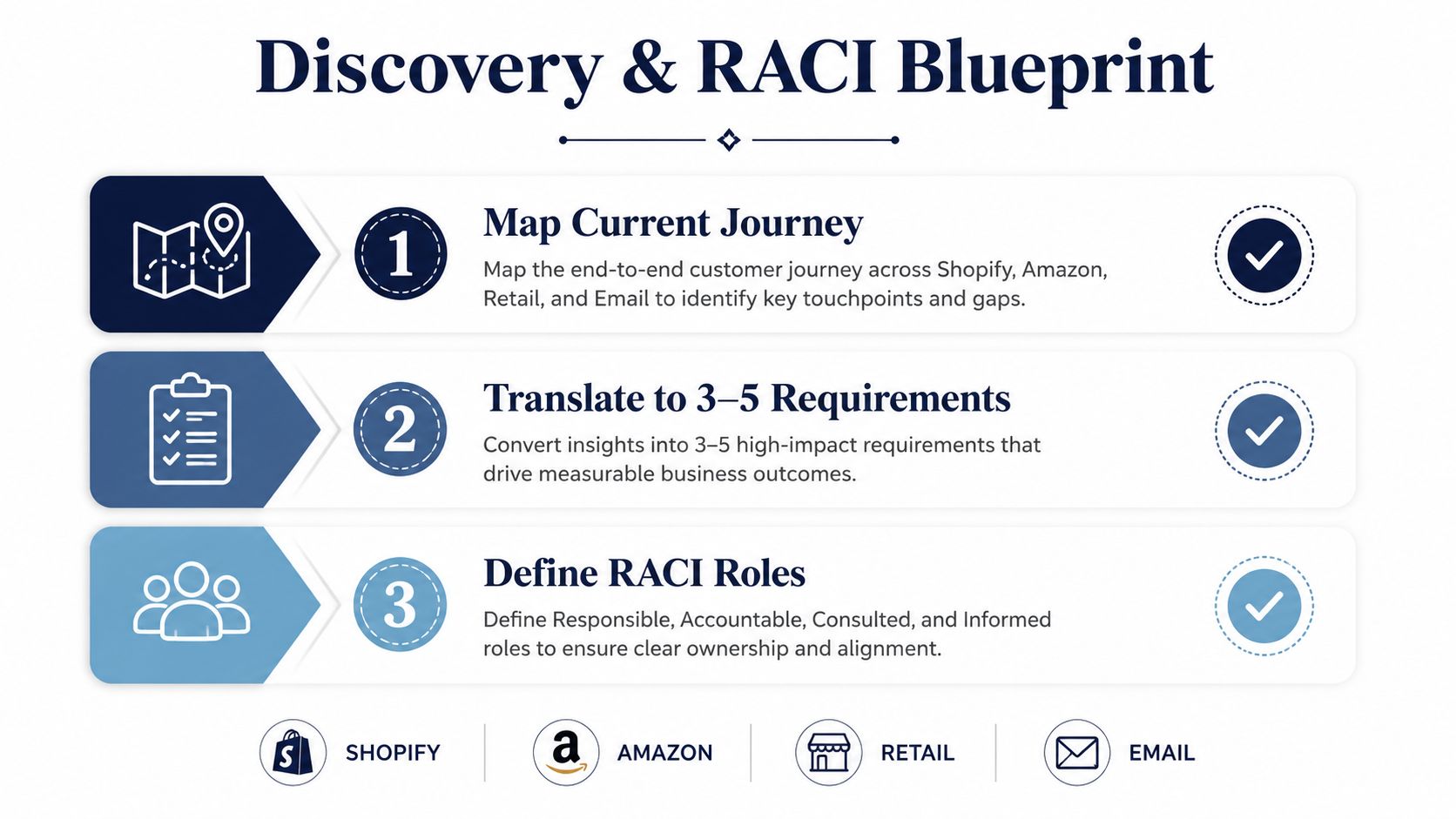
Start with the journey, not the fields.
Map how a customer moves across Shopify, Amazon, retail, and email before anyone argues about object design or automation rules. Then turn that map into 3 to 5 measurable objectives. Keep it tight. A CRM project with a long wish list will absorb every request that sounds reasonable in a meeting, then drift into a build that nobody can govern.
A useful discovery pack usually includes:
The first pass should also surface where reporting will live after go-live. If your team plans to reconcile CRM data with broader commerce reporting, the internal overview on what is data warehouse architecture helps frame how CRM records should align with downstream analytics instead of becoming a second source of truth.
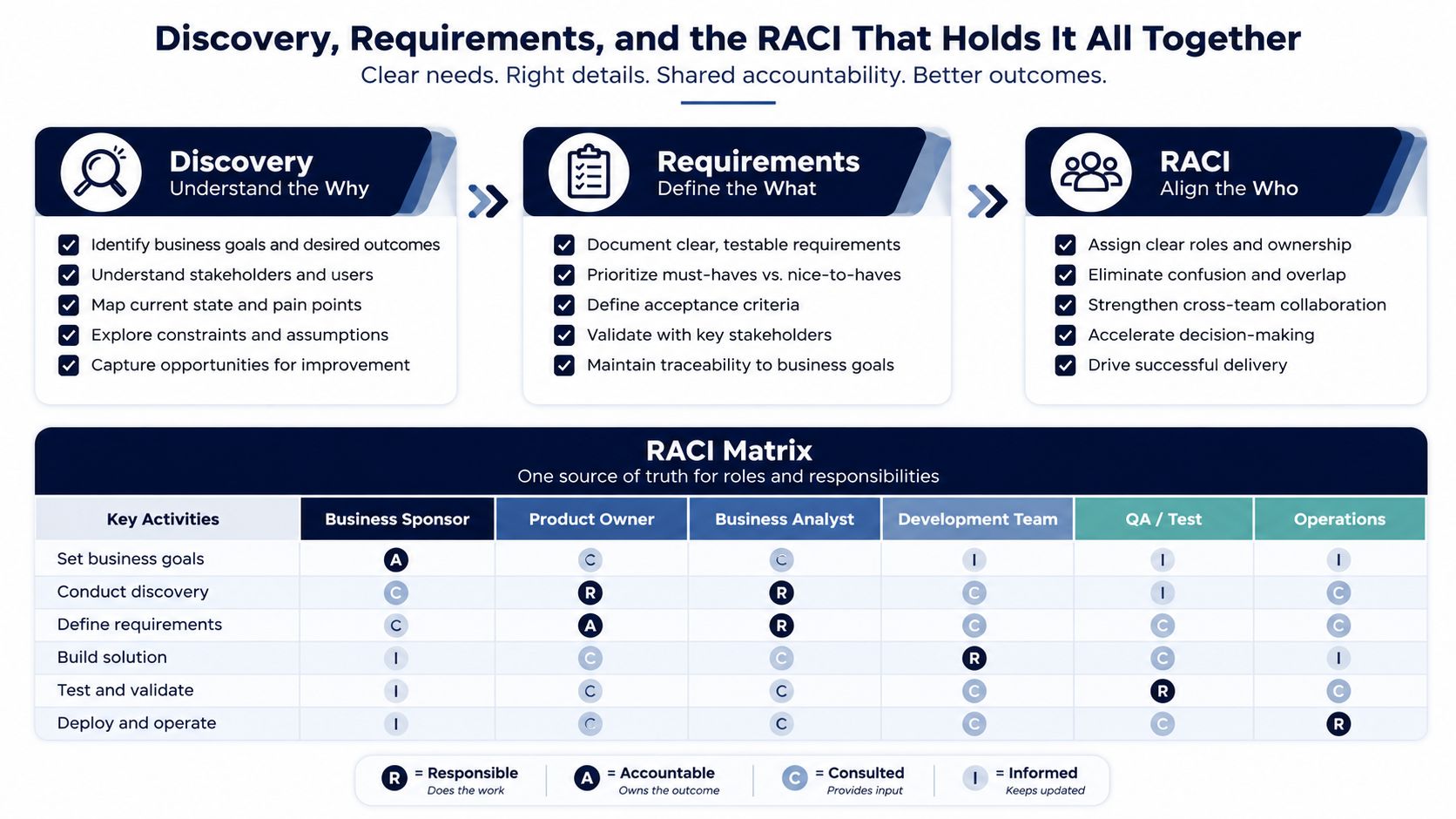
Build the RACI before configuration starts.
A CRM project needs a single executive sponsor, a real project manager, a CRM admin, a data lead, and a change-management owner. That is not bureaucracy. It is the only way to keep every issue from landing on the founder's desk. The sponsor clears blockers. The PM runs the timeline. The admin owns the build. The data lead protects data quality. The change owner makes sure the team does not treat the CRM like a punishment.
No one should be allowed to say, “I thought someone else owned that.”
The handoff between roles should be written down in plain language. If a field definition changes, who approves it. If a lifecycle rule conflicts with an ERP status, who decides. If support wants a different customer view than marketing, who gets the final call. Those decisions sound small until they are missing, then every department starts creating its own version of the truth.
The CRM can look finished and still be unusable if the data is messy. That happens fast in ecommerce, where a single customer may show up in Shopify, Amazon, ERP, ads platforms, support tools, and a legacy spreadsheet with slightly different names, emails, or lifecycle labels. The rollout may go live, but the team stops trusting what they see. Once that trust breaks, adoption slides and nobody wants to make decisions inside the system.

Start with a hard audit of every source system. Pull order history, customer records, support tickets, subscriptions, ad audiences, and the legacy files the team still relies on. Standardize formats, remove duplicates, fill the gaps that affect matching, and agree on how conflicting records should merge before anything moves into the CRM SMB CRM.
If you skip that work, the CRM becomes a fast way to spread bad data. Bad records get reused in segmentation, automation, and reporting, then people start working around the system instead of through it. Clean input matters more than fancy fields. No migration tool can rescue inconsistent source data.
The same discipline should shape the reporting layer. A practical what is data warehouse architecture guide helps teams separate CRM usability from analytics storage, so the CRM does not turn into the only place where business truth lives. For brands that also need ERP decisions tied back to customer records, it is worth being able to browse enterprise ERP solutions without blurring ownership between operational systems and customer-facing workflows.
A staged migration is the safer route. Use a pilot slice that covers roughly 10% to 20% of the user base, enough to surface mapping mistakes without turning cleanup into a company-wide fire drill. Test whether a Shopify customer, an Amazon buyer, and a support contact collapse into the right identity. Test whether historical orders land on the correct timeline. Test whether the fields used in automation populate SMB CRM.
A healthy migration feels dull. Records show up where they should, duplicates are handled the same way every time, and the retention team can open a profile without spotting obvious contradictions. A bad migration feels loud, because everyone is asking why the CRM says one thing while the warehouse, support desk, or order system says another. If you are building a CRM that has to survive ecommerce complexity, that mismatch is what kills confidence.
Run the pilot before full cutover, then review the errors with the people who will live in the system every day. If a field does not support a daily workflow, leave it out even if it exists in the old stack. Old systems collect junk over time, and moving all of it into the CRM just recreates the mess with a better interface. Keep the migration tied to how the team sells, supports, and retains customers, not to how the legacy database happened to be structured.
A CRM is only useful if the rest of the stack can feed it cleanly. The mistake is treating integrations like plug-ins you toggle on after selecting a vendor. In ecommerce, the integration layer is architecture. If it's sloppy, the CRM becomes another silo with a prettier interface.
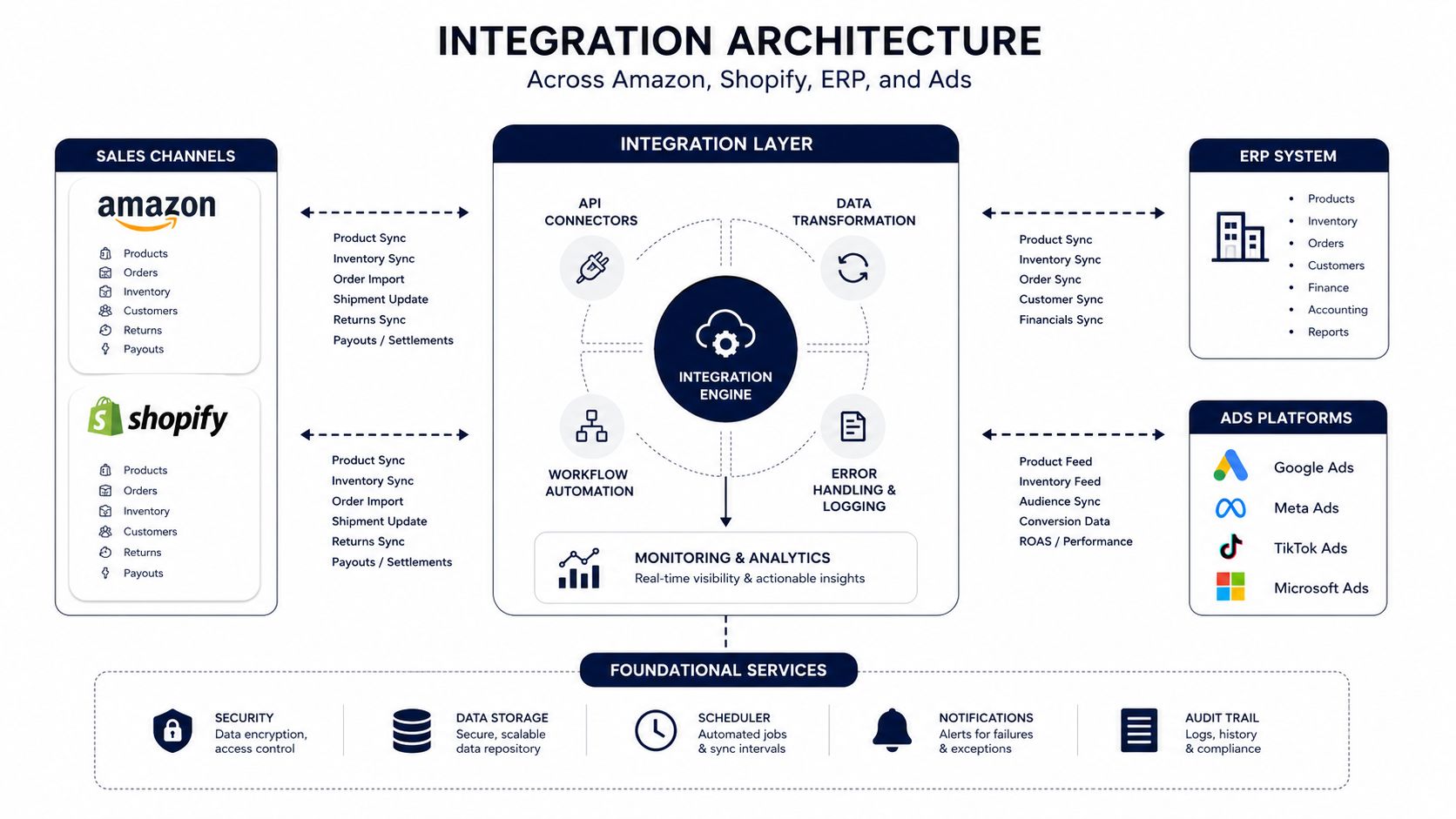
A sane setup usually starts with Shopify and Amazon SP-API feeding customer, order, and fulfillment signals into the CRM or an integration layer. The ERP should remain the authoritative source for inventory and financial truth, which means the CRM should receive status updates rather than trying to own stock logic. Klaviyo or another ESP should receive audience and event data from the CRM, while Meta Ads and Google Ads should be informed by segment logic, not allowed to define identity on their own.
That's where direct connectors work well. Native integrations are usually fine for straightforward syncs, basic activity capture, and simple customer record updates. The moment you need identity resolution across Amazon and DTC, or you need inventory-aware automation, you're in middleware territory. A CDP or iPaaS earns its keep when the stack needs transformation rules, deduping logic, or routing that the CRM shouldn't be doing manually.
For more context on channel sync problems, the internal guide on amazon shopify integration is useful because that connection often reveals the first identity and order-history conflict.
The first break point is inventory. If the CRM starts making promises without a reliable feed from ERP or warehouse systems, support teams end up cleaning up false expectations. The second is identity resolution. A customer can be one person across your brand and still look like multiple records across Amazon and Shopify unless you define merge rules, matching logic, and exceptions before launch.
If the system can't tell whether two records are the same person, every downstream workflow becomes probabilistic.
If you're evaluating ERP support and integration readiness, a practical place to start is to browse enterprise ERP solutions so the CRM doesn't end up carrying responsibilities it shouldn't own. The best architecture is usually boring on purpose, one source of truth per job, and a clear rule for what gets written where.
A CRM that only stores records is a database with extra steps. The money shows up when the system helps the team trigger the right message, task, or escalation at the right moment. That said, most ecommerce brands try to automate everything at once and end up with brittle logic nobody wants to touch.
The most useful automations tend to be the ones that remove repetitive work and protect follow-through. That means welcome flows, abandoned cart, post-purchase education, replenishment, VIP or loyalty handling, and win-back. The trigger should be obvious, the data requirement should be explicit, and the exclusion rules should be conservative enough that you don't spam the wrong customer.
Here's how to think about each one:
For teams that want to narrow the initial build to high-impact messaging, the guide to Shopify SMS automation is a practical companion for understanding how lifecycle workflows can support retention without bloating the first release.
The temptation is to launch with every conceivable branch, but the better move is to focus on one measurable bottleneck at a time. If follow-up speed is the issue, automate task creation. If lead routing is the issue, automate assignment. If retention is weak, build the win-back and replenishment paths first.
Automation should reduce manual mistakes before it tries to be clever.
That rule keeps the first wave useful. Once the team trusts the workflows, you can add nuance. Until then, simple beats complex.
The software choice gets too much credit for success and too much blame for failure. In practice, the post-go-live period decides whether the CRM becomes a revenue system or a place where half the team updates records only when reminded. That is why the operating rhythm after launch matters more than the launch itself.
QA should cover integrations, automations, permissions, and field behavior. Do not just confirm that a lead appears in the CRM. Confirm that the right owner gets assigned, the right lifecycle sequence starts, the support team can see what it needs to see, and the wrong people cannot edit what they should not touch. Then run a 48-hour hypercare period after each pilot wave, which gives you enough time to catch broken handoffs before the next group goes live.
The user training needs to be role-based. Founders need visibility and decision logic. Sales needs pipeline discipline. Retention needs lifecycle rules. Ops needs data hygiene and escalation paths. Generic feature tours are a waste because they teach menus, not behavior.
The first month should be about stabilization. Weekly data quality reviews catch duplicate drift, missing fields, and broken syncs. The second month should add coaching around pipeline hygiene and lifecycle metrics. The third month should reset automations where customer behavior, product catalog changes, or channel mix have made the original logic stale.
That cadence matters because implementation failures are usually people-related, not technical. Huble cites that over 60% of CRM failures are attributed to people-related issues rather than technology. Centric Consulting makes a similar point, tying failure to misaligned leadership, weak adoption, and unclear ownership Centric Consulting. The message is blunt, a CRM can launch cleanly and still underperform if nobody owns the operating model after go-live.
Login rates are vanity if they do not change customer outcomes. Lemon Learning warns to measure adoption by its impact on business results, not usage alone. MarketsandMarkets also recommends starting from daily pain points and translating them into measurable objectives, with baseline targets for repetitive work like follow-ups, data entry, lead routing, and activity logging MarketsandMarkets.
Track metrics that speak to retention and LTV, not just activity. That means:
A realistic 12 to 16 week timeline is a better benchmark for a mid-market ecommerce team than a rushed launch Lemon Learning. The budget should account for licensing, implementation services, data migration, training, and contingency, which is why the earlier reserve matters. A project that skips QA or training to save money usually pays for that decision later in cleanup, lost trust, and rework.
The execution checklist is simple enough to pin to a wall:
If you are about to run a CRM rollout, bring the conversation back to operations, not software vanity. Million Dollar Sellers gives ecommerce founders a room full of operators who have already solved the ugly parts of growth, from omnichannel data chaos to post-launch governance. Visit Million Dollar Sellers if you want a peer network that talks about what works when the CRM has to earn its keep.
Join the Ecom Entrepreneur Community for Vetted 7-9 Figure Ecommerce Founders
Learn MoreYou may also like:
Learn more about our special events!
Check Events