Chilat Doina
October 6, 2026
You've got a purchase order in transit, FBA inventory showing a healthy-looking quantity, and ads still running against your hero SKU. Then the sales velocity accelerates. A closer look reveals that part of the stock is reserved, some units are inbound, and another portion is unfulfillable. Your third-party dashboard still labels the total as “available.”
That's how a fast-growing Amazon brand loses momentum while believing its inventory is under control. The problem usually isn't a lack of data. It's the failure to define which inventory can actually be promised to a customer, then synchronize that definition across Amazon, your warehouse, your ERP, and every sales channel.
For a serious seller, an Amazon inventory management system must do more than display unit counts. It needs to reconcile Amazon's native states, account for inbound and external stock, reserve units before orders oversell them, and explain why the number changed.
| Inventory system approach | Works well for | Where it starts to fail |
|---|---|---|
| Seller Central and spreadsheets | Small catalogs with one fulfillment model | Manual updates, weak reconciliation, limited channel control |
| FBA replenishment software | Brands focused primarily on Amazon restocking | Limited warehouse routing, accounting, and multichannel logic |
| Multichannel inventory platform | Amazon, DTC, wholesale, and multiple warehouses | More configuration and integration ownership |
| ERP inventory module | Complex operations with purchasing, accounting, and logistics teams | Higher implementation effort and risk of overbuilding |
A brand enters its most important selling period with what appears to be enough inventory. The dashboard shows units in Amazon's network, the replenishment recommendation says the next purchase order can wait, and advertising continues at full pace.
The founder checks the detail too late. A meaningful portion of the balance is reserved against existing orders. Another portion is unfulfillable, while the rest is still moving through the inbound process. The quantity that can be promised to a new customer is far lower than the headline number.
The result isn't limited to a temporary “out of stock” label. The brand misses orders, wastes spend on ads that can no longer convert, and has to rebuild sales velocity after replenishment arrives. The exact commercial impact varies by product, timing, margin, and campaign structure, but the operational pattern is consistent: bad stock logic turns demand into an avoidable fulfillment problem.
A useful primer on correcting the underlying process is this guide to improving inventory accuracy. Accuracy starts with definitions, not with a prettier dashboard.
Most early-stage operators track one number because one number feels manageable. They look at on-hand FBA inventory, subtract recent sales, and estimate when to reorder. That method breaks once Amazon separates units into operational states that have different commercial meanings.
A reserved unit may already be committed to an order or held within Amazon's fulfillment process. An inbound unit may be owned by the seller but not yet usable for immediate customer demand. An unfulfillable unit may still appear in a broad inventory total while being unavailable for sale.
A third-party system should therefore calculate available to sell, not just repeat Amazon's aggregate inventory. That calculation should be visible at SKU and marketplace level, with the ability to trace every deduction and addition.
Practical rule: Never approve a purchase order from a total inventory figure you can't reconcile to sellable, reserved, inbound, damaged, returned, and unfulfillable states.
The hidden cost also appears in working capital. If the system understates usable stock, you may place unnecessary orders, tie up cash, and create storage pressure. If it overstates usable stock, the business may delay replenishment while the listing continues to consume advertising budget.
A capable platform should show the difference between physically owned inventory, inventory inside Amazon's network, and inventory available to promise. It should combine those states with purchase orders, transfer timing, warehouse stock, returns, and channel reservations.
Look for these capabilities:
A spreadsheet can support a review process. It shouldn't be the system of record once multiple people, warehouses, marketplaces, and fulfillment methods influence the same stock pool.
Amazon's inventory data is not a single ledger with one universally useful quantity. The Selling Partner API supports separate operational functions for inbound shipment planning, marketplace inventory snapshots, outbound fulfillment, shipment tracking, returns, reports, and notifications. A platform that imports only a periodic stock total misses the events that explain why the balance changed.
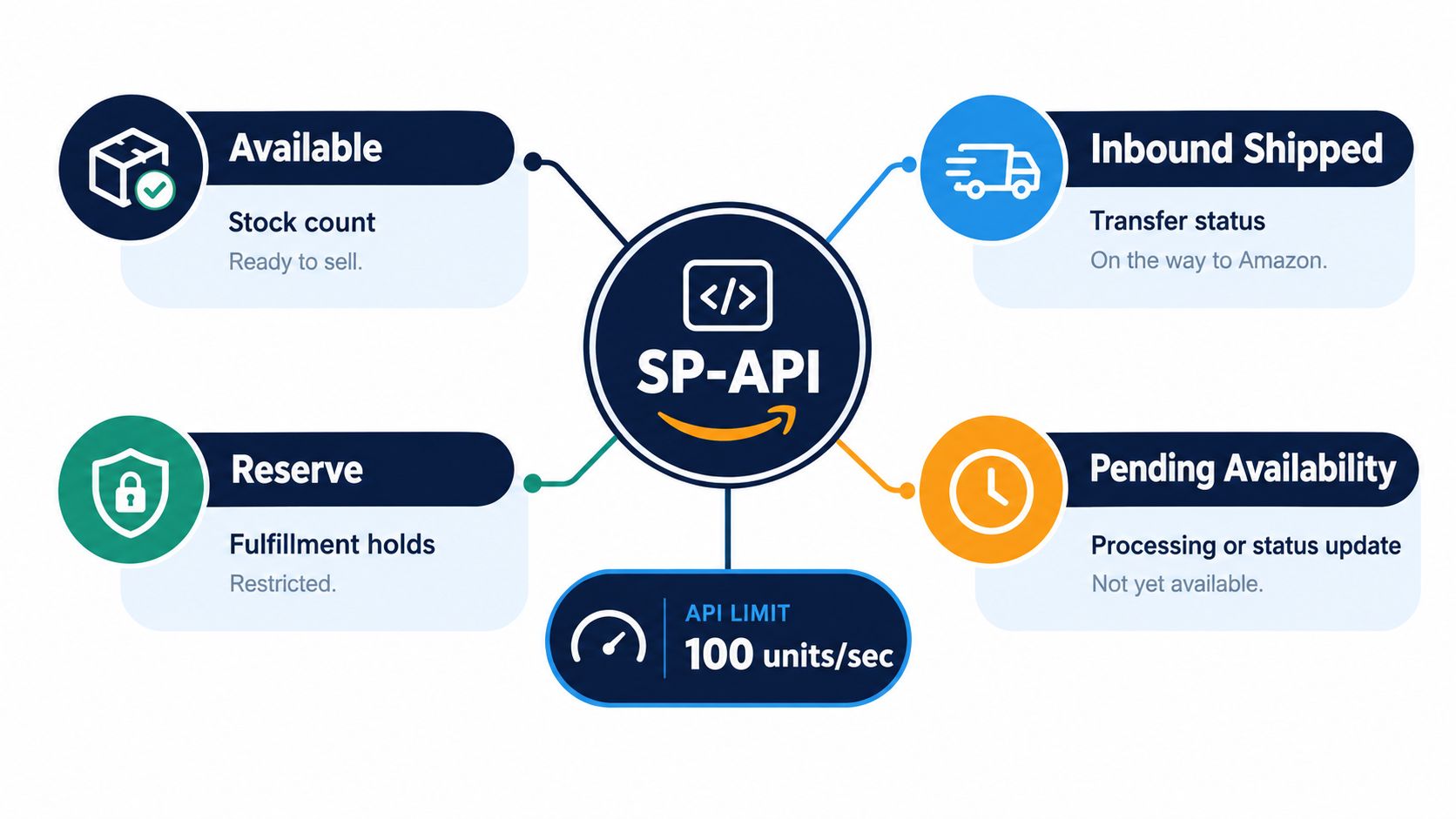
The critical distinction is between sellable stock and stock that exists somewhere in the broader fulfillment process. Sellable units can support a customer promise. Reserved units may be temporarily committed or held. Inbound units are part of future supply, but their timing and destination matter. Unfulfillable units may require removal, investigation, or another operational action before they can contribute to availability.
Amazon's Multi-Channel Fulfillment API documentation describes interfaces for inbound shipments, inventory snapshots, fulfillment orders, tracking, returns, and inventory-change notifications. That structure supports a more reliable event-driven design: react quickly to changes, then reconcile the local system against a complete snapshot.
Amazon's documented best practice is to subscribe to FBA_INVENTORY_AVAILABILITY_CHANGES and call getInventorySummaries once daily for a full inventory snapshot. The event stream gives an order-management system low-latency awareness, while the scheduled snapshot corrects for missed, delayed, duplicated, or out-of-sequence events.
That combination matters because an inventory integration can appear healthy while its local quantity gradually drifts from Amazon's record. An order cancellation, adjustment, transfer, return, or delayed notification can change the result without creating a clean sequence of updates in your own database.
A well-structured design maintains separate fields for:
The system then applies a channel policy. It may reserve safety stock for Amazon, exclude uncertain inbound units from immediate promises, or allocate external inventory to a DTC order before publishing the remainder to another marketplace.
Amazon distinguishes between marketplace-level FBA availability and location-level external fulfillment inventory. The SP-API models documentation also documents a batch inventory operation that can handle up to 10 inventory requests per call, with each successful response returning the count for a specified SKU and location pair.
Batching reduces request overhead, but it doesn't solve integration quality by itself. Your developer or vendor still needs idempotent updates, rate-limit handling, retry logic, event ordering controls, and reconciliation jobs. For a large catalog, those details determine whether the system remains trustworthy during a promotion, a bulk receipt, or a marketplace synchronization failure.
Amazon also separates operational reporting. GET_FBA_MYI_UNSUPPRESSED_INVENTORY_DATA provides active inventory details such as condition, quantity, and volume, while GET_LEDGER_SUMMARY_VIEW_DATA supports end-to-end reconciliation across receipts, orders, returns, adjustments, removals, and ending inventory.
Use notifications for responsiveness, daily summaries for completeness, and ledger data for investigation. If a platform can't tell you which of those layers it uses, it's probably presenting a simplified number rather than managing inventory.
The right architecture depends less on the size of your catalog than on the number of operational decisions your inventory system must make. A brand with a focused FBA catalog may need excellent replenishment logic and little else. An omnichannel business needs allocation, warehouse routing, purchasing, bundle handling, and accounting integration.
| Architecture tier | Core strengths | Ideal for | Primary limitations |
|---|---|---|---|
| Lightweight FBA replenishment tool | Forecasting, reorder alerts, lead-time planning, FBA-focused monitoring | Amazon-first brands with a straightforward fulfillment model | Weak support for multiple warehouses, complex bundles, and deep accounting workflows |
| Mid-market multichannel aggregator | Channel synchronization, inventory allocation, order routing, warehouse connections | Brands selling through Amazon, DTC, wholesale, and third-party logistics partners | Requires careful SKU mapping and may need external tools for manufacturing or finance |
| Enterprise ERP module | Purchasing, landed-cost workflows, warehouse operations, accounting, approvals, and auditability | Complex organizations with multiple entities, warehouses, and operational teams | Expensive to configure, slower to change, and easy to overbuild for a simpler business |
An FBA replenishment platform can be the best choice when Amazon is the dominant channel and the main operational question is, “When should we reorder this SKU?” It should ingest sales history, account for supplier lead time, model seasonality qualitatively, and distinguish Amazon's usable inventory from units that are merely present in the network.
The trade-off is depth. Many focused tools don't manage kit assembly, warehouse transfers, wholesale allocations, landed costs, or accounting rules. That isn't automatically a flaw. It becomes a problem when the brand starts asking the tool to behave like an ERP through manual workarounds.
A multichannel aggregator becomes more valuable when the same SKU is sold through Amazon, a DTC storefront, wholesale accounts, and perhaps several regional marketplaces. Its central job is to create a controlled stock pool, reserve units as orders arrive, and publish channel-specific availability without allowing one channel to consume another channel's commitments.
This architecture works when the business needs a practical operating layer rather than a full financial backbone. It should support location-level quantities, warehouse routing, bundles or multipacks, order holds, returns, and exception queues. It also needs reliable integrations with the systems that receive and ship inventory.
EDI may become relevant when wholesale partners require structured purchase orders, invoices, shipping notices, or catalog data. Before choosing a platform, review what EDI integration means for ecommerce operations, then confirm whether the proposed system owns that workflow or merely hands it to another provider.
An ERP inventory module makes sense when purchasing, finance, warehouse operations, and leadership need one governed data model. It can connect supplier orders to receipts, allocate inventory by entity or location, support approval workflows, and reconcile operational movements with accounting.
The danger is implementing a large system before the business has agreed on basic definitions. If “available,” “reserved,” “in transit,” and “committed” mean different things to finance, operations, and the Amazon team, an ERP will preserve the disagreement at a higher cost.
Evaluate each architecture against four questions:
The strongest choice is the smallest architecture that answers all four questions reliably.
Software features matter only when they remove a specific operational bottleneck. An FBA-only private label brand has different requirements from a hybrid seller that uses FBM as a pressure-release valve, and neither should copy the stack of an omnichannel brand with wholesale commitments.

For a brand sourcing overseas and sending most product to FBA, the system should connect demand planning to purchase orders and inbound milestones. The forecast should use SKU-level sales velocity, promotional plans, supplier lead-time history, production status, freight status, and Amazon's current sellable balance.
The platform should not treat an open purchase order as available stock. It should show ordered, produced, shipped, received, and sellable stages separately, then let the operator choose which stages influence a reorder recommendation.
The most useful workflow is an exception queue. Instead of forcing an operator to inspect every SKU, the system should highlight a hero product with declining available-to-sell cover, an inbound shipment with an unresolved delay, or a supplier order whose expected receipt no longer protects the planned demand window.
A hybrid FBA and FBM seller needs a deliberate fallback policy. When FBA availability falls, the system shouldn't automatically expose every unit in a third-party warehouse to Amazon. It must check warehouse processing time, handling capacity, channel commitments, shipping promises, and the cost of fulfilling the order outside FBA.
A practical setup may keep a protected quantity for DTC orders, allocate another pool to wholesale commitments, and publish only the remainder to Amazon. Multi-pack variations require additional care because one component-level unit can support multiple sellable configurations. The system needs a bill of materials or bundle rule so it doesn't promise a pack that can't be assembled.
Warehouse control becomes central here. A warehouse management system guide can help frame the difference between a stock database and an execution layer that receives, scans, picks, packs, and adjusts inventory.
An omnichannel brand shouldn't ask Amazon to serve as the master record for every channel. Amazon remains a critical fulfillment and marketplace system, but the company needs a broader inventory model that includes DTC orders, wholesale allocations, returns, purchase orders, and external locations.
That model should support:
If the goal is to reduce costs with stock control, start by making the stock rules explicit. Cost control comes from knowing which units can generate revenue, which units are trapped, and which units should never have been purchased in the first place.
An inventory migration can disrupt sales even when the new platform is technically sound. The risk usually comes from bad master data, unclear ownership, duplicate updates, or a cutover that happens before the team understands the new available-to-sell calculation.
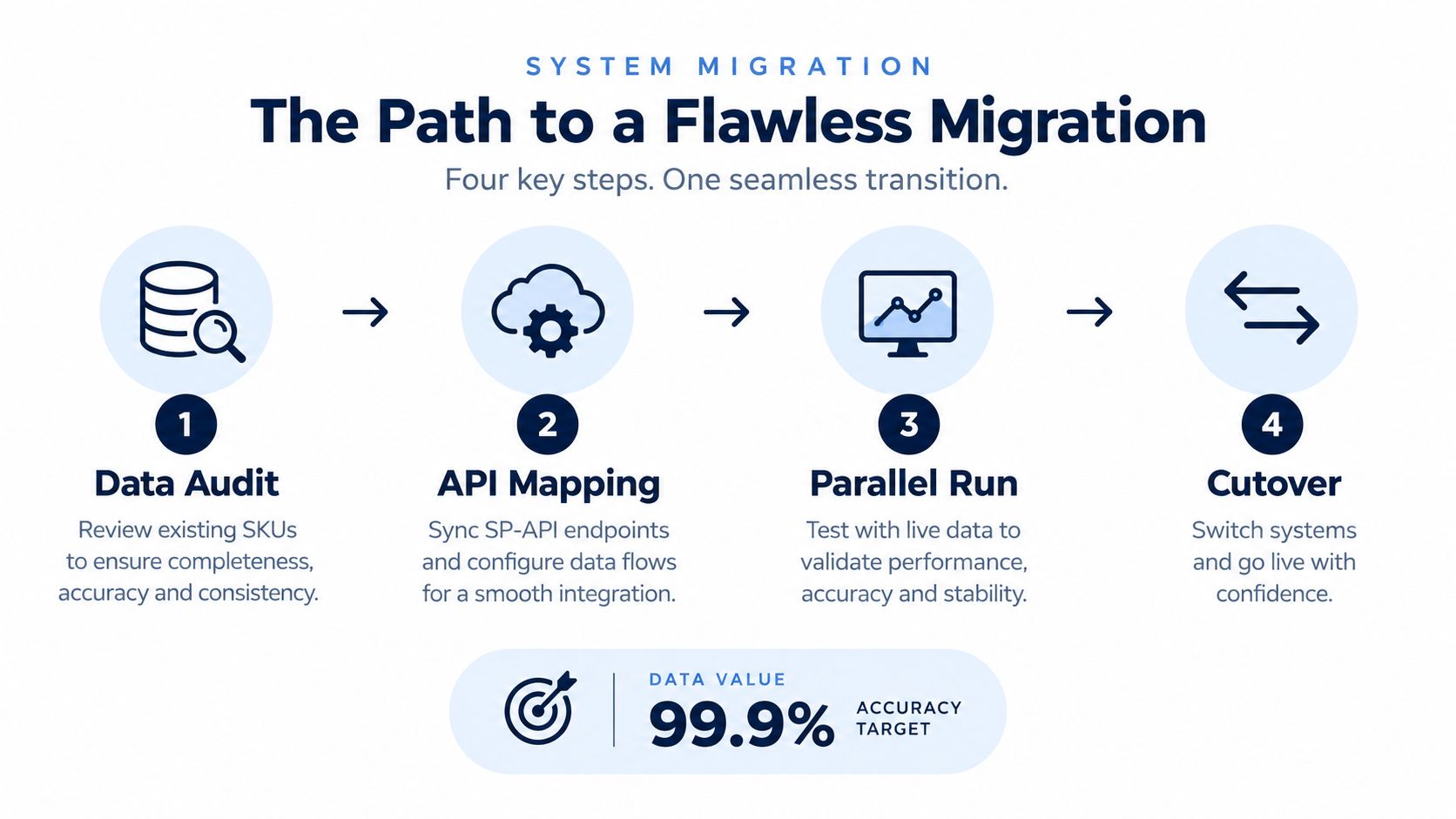
Create an authoritative SKU list before connecting live inventory. Match Amazon SKUs, ASINs, parent-child variations, supplier SKUs, warehouse codes, bundle components, and marketplace identifiers. Remove duplicate records and document every transformation instead of relying on an undocumented spreadsheet correction.
Then reconcile the opening balance. For each SKU, record Amazon's sellable, reserved, inbound, and unfulfillable states, plus external warehouse stock, open purchase orders, and known channel commitments. The new platform should import those categories separately, not flatten them into one starting number.
Assign ownership clearly. Operations should approve the state definitions, finance should validate the treatment of owned and committed stock, and the technical team should own API credentials, mappings, logs, and error handling.
Request only the Seller Central permissions required for the workflows you'll operate. Map each data flow before activation:
The migration plan should identify the source of truth for every field. Amazon may own an FBA state, while your ERP owns purchase-order status and your warehouse system owns physical external stock.
Don't cut over on the first successful sync. Run the legacy system and the new platform against live data, compare available-to-sell outputs, and investigate every material difference. Test cancellations, returns, partial receipts, adjustments, delayed events, bundle orders, and marketplace-specific allocations.
Keep writes controlled during the parallel period. If two systems can publish inventory at the same time, define which one has authority and block the other from overwriting the result.
Choose a cutover window with named owners for operations, engineering, customer service, and finance. Freeze mapping changes, capture a final reconciliation snapshot, enable the new workflows, and monitor orders, inventory events, and error queues closely.
A rollback procedure should specify which credentials are disabled, which system resumes publishing, how reservations are restored, and how duplicate orders or updates are identified. Don't call the migration complete until the team can explain the new inventory balance and resolve an exception without returning to the old spreadsheet.
A basic Seller Central workflow is acceptable while one person can inspect exceptions, update purchase orders, and understand every stock movement. The upgrade decision arrives when that person becomes the bottleneck, not when a software salesperson says your operation has outgrown spreadsheets.
For an Amazon-first brand, buy focused replenishment software when manual forecasts no longer reflect actual sellable inventory. Choose a tool that handles Amazon's native states, supplier lead times, inbound milestones, and SKU-level exceptions. You don't need an ERP just because your catalog is growing. You need trustworthy reorder decisions.
Move to a multichannel operations platform when Amazon is no longer the only customer destination. The trigger may be a DTC launch, expansion into additional marketplaces, wholesale commitments, or the addition of an FBM warehouse. At that point, the system must reserve inventory across channels and locations before publishing what remains available.
An ERP becomes appropriate when finance, purchasing, warehouse operations, and leadership require shared controls. It's a strong fit when the business has multiple entities, complex receiving, manufacturing or kitting, formal purchase approvals, or accounting reconciliation that can't live in disconnected tools.
Use these triggers rather than revenue labels:
Million Dollar Sellers offers a peer community where ecommerce founders exchange operating practices, strategy, and vetted service recommendations across Amazon, DTC, and omnichannel businesses. It belongs in a broader operator development plan, not as a replacement for a properly configured inventory system.
AI forecasting can process more signals than a spreadsheet, but it can't decide what “available” means if your team hasn't defined the term. It also can't repair duplicate SKUs, inaccurate supplier lead times, missing bundle relationships, or an opening balance that was imported as one unexplained quantity.
Amazon's own storage-fee methodology uses daily average cubic-foot volume, not just unit counts, as described in its inventory guidance for sellers at Amazon Seller Central. A forecast that recommends more units without considering product dimensions, storage exposure, sell-through, and cash availability can create a different problem from a stockout.
Promotional demand creates another common failure. A model trained on ordinary sales may understate the inventory required for a planned campaign unless the promotion is entered as an explicit demand event. Supplier lead time should also be reviewed against actual receipt behavior rather than copied from a vendor's standard estimate.
The setup mistakes that cause the most damage are familiar:
Build the system around an auditable available-to-sell calculation, then improve the forecast. The order matters.
Million Dollar Sellers gives serious ecommerce operators access to peer strategy sharing, private discussions, curated events, and practical insights from founders running complex Amazon, DTC, and omnichannel businesses. If you're ready to pressure-test your inventory decisions with other experienced sellers, visit Million Dollar Sellers and explore the community.
Join the Ecom Entrepreneur Community for Vetted 7-9 Figure Ecommerce Founders
Learn MoreYou may also like:
Learn more about our special events!
Check Events