Chilat Doina
August 3, 2026
Most Amazon follow-up email advice is built for a world that no longer exists. Buyers aren't opening like they used to, Amazon keeps tightening the rules around buyer-seller messaging, and the sellers who still win are the ones who send fewer, cleaner, policy-safe messages tied to real product use, not copy-heavy blasts that feel clever and get ignored.
Simple. In one Amazon business walkthrough, open rates fell from almost 40% to just over 20% over roughly a year, which is about a 20-point drop and roughly a 50% relative decline in engagement, and the same source shows sellers need to watch sent, opened, daily, monthly, and total stats as a core control point for follow-up programs YouTube walkthrough. That means the old playbook, more sends, more asks, more review language, is dead weight.

The average amazon follow up email strategy still starts with the wrong assumption, that better copy and a louder sequence can fix weak response. That's backwards. On Amazon, inbox engagement has already compressed hard, and the platform itself has made the communication channel more fragile, so volume without discipline just creates more ignored messages and more policy exposure.
A year-over-year drop from almost 40% opens to just over 20% isn't a small optimization problem, it's a buyer-attention problem YouTube walkthrough. If you're still writing every email like the buyer is eager to engage, you're building on fiction. The job is to catch the buyer at the exact moment they can use help, then get out of the way.

Amazon doesn't treat buyer-seller messaging like a normal email channel. A compliant sequence has to stay tied to order completion or customer service, and Amazon policy sources prohibit promotional content, incentives for reviews, requests for only positive reviews, more than one review request per order, and links or attachments that are not necessary to complete the order BQool policy summary. That means the classic “buy again soon” and “leave us a glowing review” style of follow-up is a fast way to contaminate your workflow.
Practical rule: if a sentence would make sense in a marketing automation campaign but not in a support conversation about that order, cut it.
The winners are not sending more. They're sending fewer, segmented, policy-perfect emails that match the buyer's product experience and keep the sequence short enough to stay believable. That's the gap most templates miss, and it's the only reason this topic still matters.
Amazon's rules are blunt, and treating them like optional guidance is how sellers get sloppy. The safest way to run an amazon follow up email process is to keep every message on one order, one purpose, one action. A draft that tries to do more than that usually creates policy risk and weakens the whole sequence.
If the order needs support, the email should read like support. If the product needs setup guidance, the email should say that. The moment you add a review incentive, a request for only positive reviews, a coupon, or a secondary cross-sell, you turn a service note into a policy problem BQool policy summary.
For a high-AOV product, a compliant note might ask whether the buyer needs setup help or replacement parts. For a consumable, it might ask whether the buyer had trouble using the item as intended. The job is to stay inside the order context, not to sound warm.
A common mistake is targeting heavily discounted purchases as review candidates. One source explicitly warns against using orders with steep discounts, especially around the 50% level, as the basis for review solicitation BQool policy summary. That is a quality-control problem as much as a policy problem.
If your team cannot audit a draft in under a minute, the draft is too loose. The right workflow is boring: one approved template, one stated purpose, one send. Anything else just adds risk.
Generic timing advice is weak because products don't behave the same way. A shampoo refill, a wearable, a supplement, and a seasonal item each have different usage windows, and your amazon follow up email sequence should be built around that reality instead of the shipping label. The right send time is when the buyer has enough context to need help or leave useful feedback.
A single-use item needs a fast check-in, because the buyer either understands it quickly or doesn't. A wearable needs more time, because setup and fit take longer. A supplement or consumable can justify a later follow-up if the buyer has had enough time to use it properly. The mistake is using one rigid schedule for the whole catalog.
Neutral guidance often points to the first follow-up after delivery confirmation, with some Amazon-focused recommendations using 3 to 7 days post-delivery for review or helpfulness prompts, while other workflows use a 1-day, 7-day, 30-day progression for broader post-purchase engagement AWS Pinpoint guidance. The scheduling choice should track the product's usage window, not just the ship date.
Subject lines should read like service, not like a marketing nudge. “Need help setting up your order?” works because it matches a support frame. “Tell us what you think” is closer to a review ask, and that's less useful once the open rate is already weak.
Inside the email, keep the body short and anchored to a real use case. For a wearable, that could mean installation help or fit guidance. For a seasonal product, it could mean reminders about storage, use, or care. You're not writing a sales pitch, you're clearing friction.
A timed follow-up only works if the buyer still has a reason to care when it lands.
The hard rule is this. If the product hasn't had time to be used, don't send the support ask yet. If the buyer has already had enough time to evaluate it, don't wait so long that the message feels irrelevant.
A single global template looks efficient, but it usually leaves money on the table and creates avoidable complaint risk. The more useful move is to segment by marketplace, product type, and buyer intent, then decide who gets a message at all. That's where the performance lift lives.
Repeat buyers deserve a different tone from first-time buyers. Replenishment items deserve a tighter cadence than durable goods. Buyers with clear complaint signals or unsubscribe behavior should be suppressed, not “re-engaged.” Amazon Pinpoint explicitly recommends segmentation to isolate recipients most likely to open versus mark spam AWS Pinpoint guidance.
| Segment | Cadence | Primary Message Angle | Suppress If |
|---|---|---|---|
| First-time buyer | One short check-in after delivery confirmation | Setup help or product use guidance | Buyer has already contacted support |
| Repeat buyer | One concise follow-up tied to the same SKU | Reorder support or product care | Prior complaint or opt-out signal |
| Consumable customer | Later follow-up tied to expected usage window | Refill help or usage confirmation | Order was discounted heavily |
| High-risk recipient | No follow-up, or support-only message | Resolution, not persuasion | Any sign of complaint or spam risk |
What works in one marketplace doesn't automatically transfer cleanly to another. Timing expectations, language nuance, and inbox behavior all shift by audience, so one global script is lazy. A better operating model is marketplace-specific send logic with category-specific suppression rules.
If you want a practical place to think about buyer voice and what customers are saying in their own words, this voice of customer framework is worth studying. It's not about being cute with copy. It's about writing messages that match what buyers already expect to hear from a seller.
The biggest mistake is treating segmentation as a marketing luxury. On Amazon, segmentation is a deliverability control. It lowers complaint pressure, avoids noisy sends, and keeps the sequence narrow enough to survive the inbox.
Automation is useful only if you can see the failures. Helium 10 and Amazon Pinpoint can both support a disciplined workflow, but the operator has to configure the guardrails. The point is not to automate more, it's to automate with less drift.
Start the sequence off delivery confirmation, not a random calendar date. Then restrict the flow so each buyer receives only the agreed number of touches. If the platform blocks a message because the buyer opted out, that's not a nuisance, it's the system doing its job.
Helium 10's Follow-Up dashboard tracks messages sent, queued, canceled, errored, and blocked when a buyer opts out of proactive buyer-seller communications, which means delivery is not guaranteed even when the campaign is scheduled Helium 10 dashboard. If your team isn't checking that dashboard, you're operating blind.
Sent counts are not enough. You need to know what queued, what failed, and what got blocked before the buyer ever saw it. That's where silent breakdowns show up, especially in larger catalogs with mixed opt-in behavior and category-specific risk.
A clean setup usually includes these controls:
If you're evaluating tooling, compare how your stack handles queue visibility and suppression logic. A resource like this ecommerce email software guide is useful for narrowing the field, but the buying decision should come down to control, not feature bloat.
The best automation is quiet. It does the basics, surfaces exceptions, and stays out of the way until something breaks. That's how you keep follow-up scalable without turning it into a mess.
Open rate is a weak hero metric if deliverability is falling apart underneath it. On Amazon, the sequence lives or dies on whether messages land cleanly and stay within complaint tolerances. Amazon Pinpoint's guidance is blunt, keep hard bounce rate below 5% and complaint rate below 0.1% AWS Pinpoint guidance.
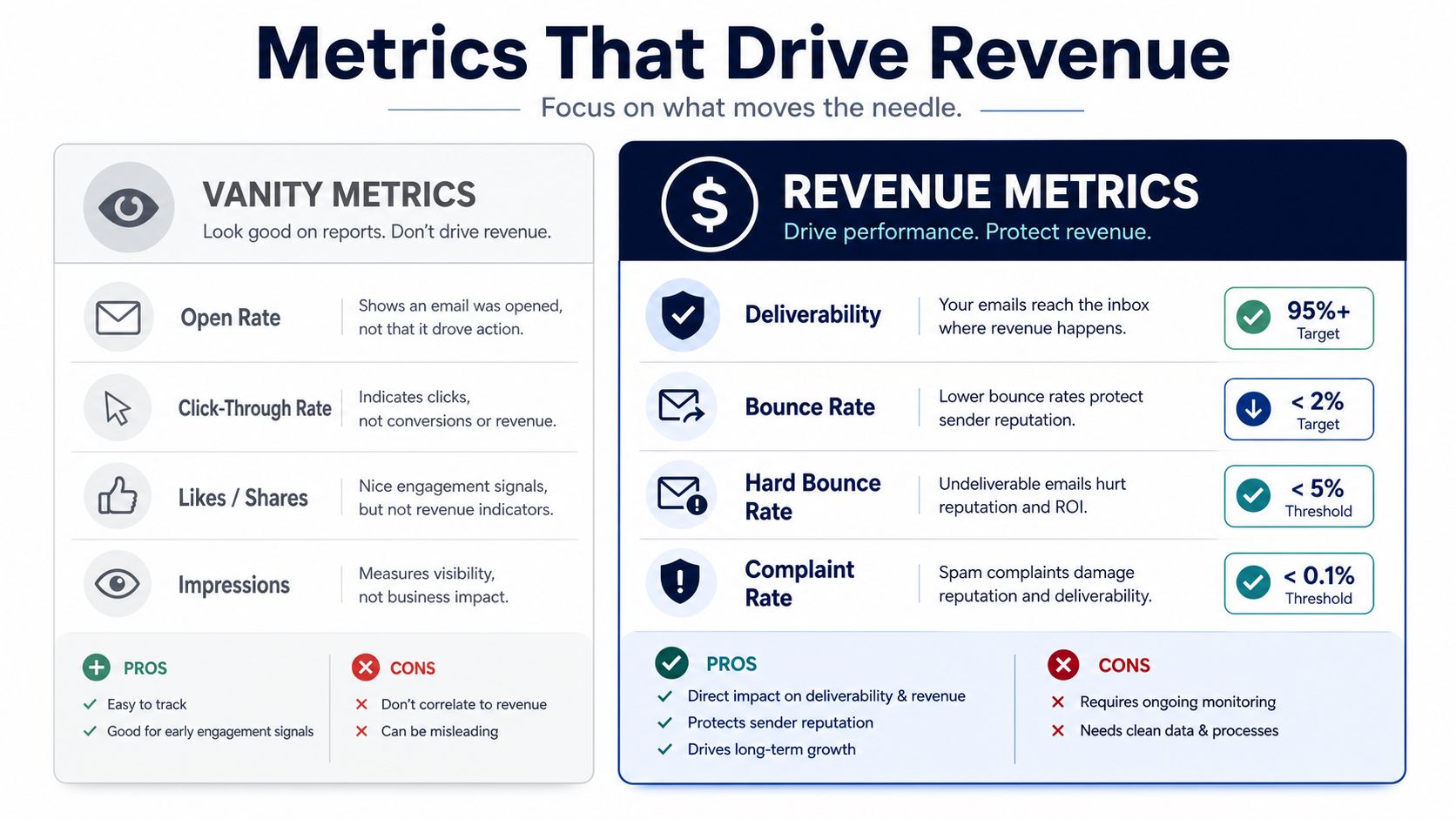
An open means the subject line worked once. It doesn't mean the flow is healthy. If bounces or complaints are drifting up, the campaign is already undercutting itself, and no clever wording will save it.
The better habit is to track the right automation metrics in one place and review them every cycle. A useful reference point is to track key automation metrics so you can separate sender health from vanity noise. That's how you keep the sequence honest.
A/B testing should focus on decisions that change buyer behavior. Compare send time by marketplace, support-led openings versus review-led openings, and subject line framing that stays inside the support lane. Keep samples large enough to matter, or you'll end up flattering noise.
For a clean testing framework, the A/B testing basics guide is a good reference point. But the practical rule is simpler. Test one variable at a time, and don't let a tiny lift convince you to break a sequence that already passes deliverability thresholds.
Here's the operator's filter. If the test doesn't improve inbox placement, complaint rate, or downstream order confidence, it's a distraction. Clever copy without deliverability discipline is just expensive noise.
The sequence should be built like a support process, not a broadcast engine. That means every email has a single reason to exist, every send is tied to the product's actual usage window, and every metric is checked against inbox health before you call it a winner. If you can't explain why a message deserves to go out, don't send it.
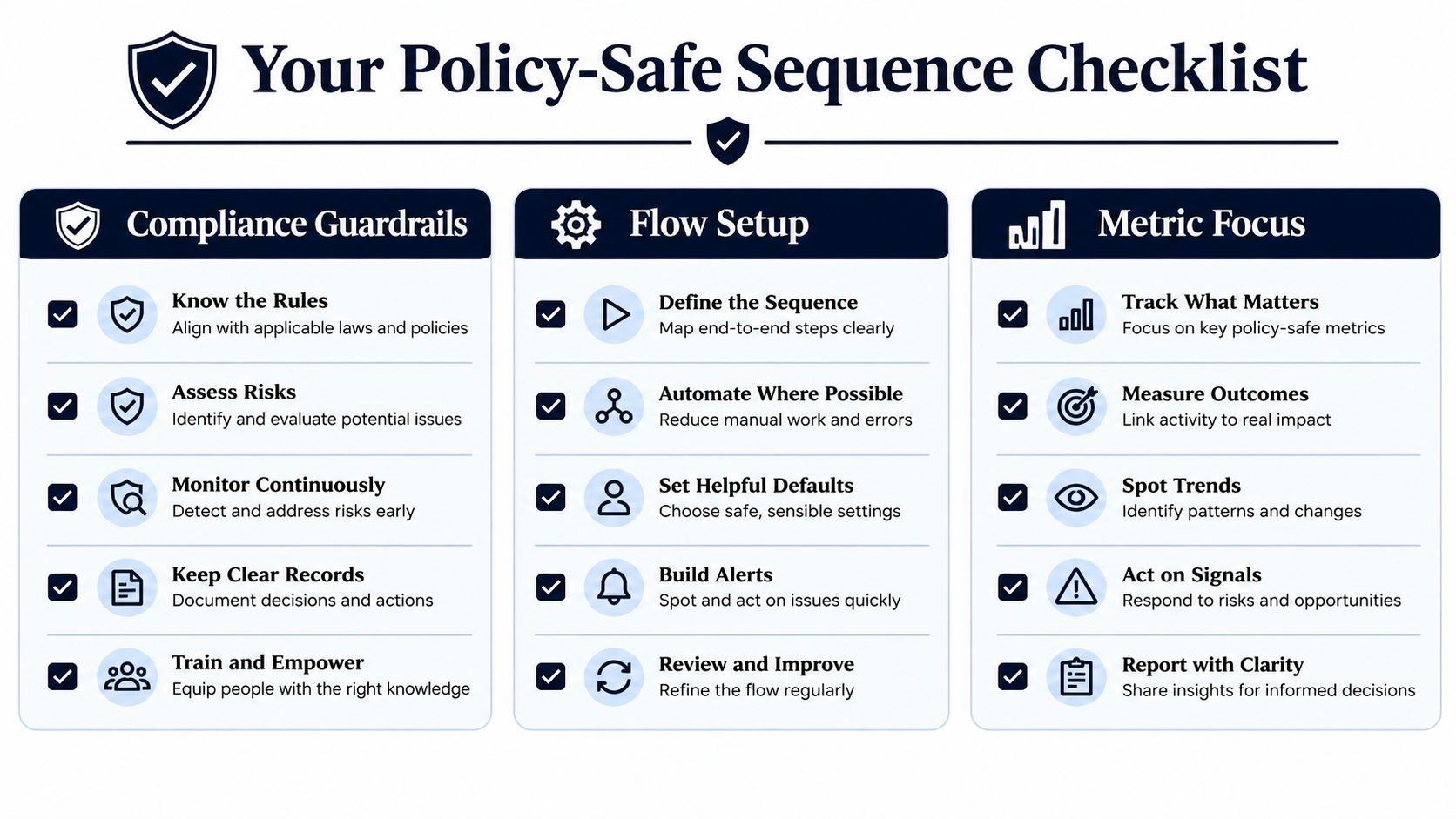
Amazon follow-up email works when it behaves like customer service first and marketing second.
If you want sharper operator-level ideas from sellers who live in the same constraints you do, visit Million Dollar Sellers and compare notes with founders who care about execution, not theory.
Join the Ecom Entrepreneur Community for Vetted 7-9 Figure Ecommerce Founders
Learn MoreYou may also like:
Learn more about our special events!
Check Events