Chilat Doina
February 27, 2026
Digging into who’s behind a product on Amazon is surprisingly simple. Just look for the “Sold by” link on any product page. Clicking that little link is your first step into a seller’s world, taking you straight to their profile and storefront. It's the gateway to everything from their full product catalog to what customers really think of them.
Honestly, this is a non-negotiable skill for anyone serious about making money on the platform.
Before we get into the nitty-gritty of how to do this, we need to talk about why it's so important. On Amazon, success leaves a trail of breadcrumbs, and learning to follow it is a game-changer. Analyzing your competitors isn't just about being nosy; it’s a core business strategy that separates the brands that print money from the ones that barely tread water.
Think about it: every seller's storefront, product lineup, and feedback history tells a story. It’s their entire operational playbook laid bare—what they're selling, how they’re positioning themselves, and, most importantly, where they’re dropping the ball. This isn't just snooping; it's reverse-engineering a successful business model to improve your own.
For anyone trying to build a real e-commerce business, this skill is foundational. It lets you:
This kind of intelligence turns guesswork into a repeatable growth strategy. You stop hoping something works and start knowing what works.
The Amazon marketplace is consolidating fast, with the top sellers gobbling up more and more of the market share. Ever wonder why the smartest sellers are obsessed with competitor research before they even think about launching? It’s because in today's cutthroat environment, looking up a seller is how you spot the true heavyweights.
As of late 2025, more than 100,000 sellers worldwide are pulling in over $1 million in annual revenue. That’s a staggering 67% jump from just 60,000 sellers in 2021. What's wild is that this happened while the total number of active sellers actually dropped by 31%, proving we’re in a "winner-take-most" game. You can dig into more of these Amazon seller statistics for the full picture.
The ability to effectively research and analyze other sellers is arguably one of the most important, yet underrated, skills for scaling an Amazon business. It informs every major decision, from product selection to marketing spend.
Mastering how to look up a seller on Amazon gives you the competitive edge you need to not just survive but actually thrive. It’s the first step toward building a resilient, scalable, and seriously profitable brand on the world's biggest e-commerce stage.
Let’s get practical. You don't need any special software to start looking up a seller on Amazon—just a keen eye and a few strategic clicks right on a product page. This is the foundational skill for any quick competitor check or initial due diligence.
Every single product listing holds the key. Just look for the critical "Sold by" link, which you'll usually find tucked away in the buy box area. It's often positioned just below the "Add to Cart" button, but the exact spot can shift a bit depending on your device and the page layout.
For example, on a listing for a popular supplement, you might see "Ships from Amazon" and, right next to it, "Sold by [Seller's Brand Name]." That seller's brand name is a hyperlink. Clicking it is the first step to pulling back the curtain on their entire operation.
Once you click that "Sold by" link, Amazon takes you to the seller's public profile page. This page is a treasure trove of baseline information and your central hub for initial analysis. It’s where Amazon requires sellers to display key business details for transparency.
Here’s what you can typically find:
This is your first real glimpse into the seller's scale and legitimacy. A seller with 15,000 ratings and a 99% positive feedback score is obviously playing in a different league than one with 150 ratings and an 88% score. The story is in the numbers.
This simple, three-step seller research process visualizes the flow from initial validation to strategic scaling.
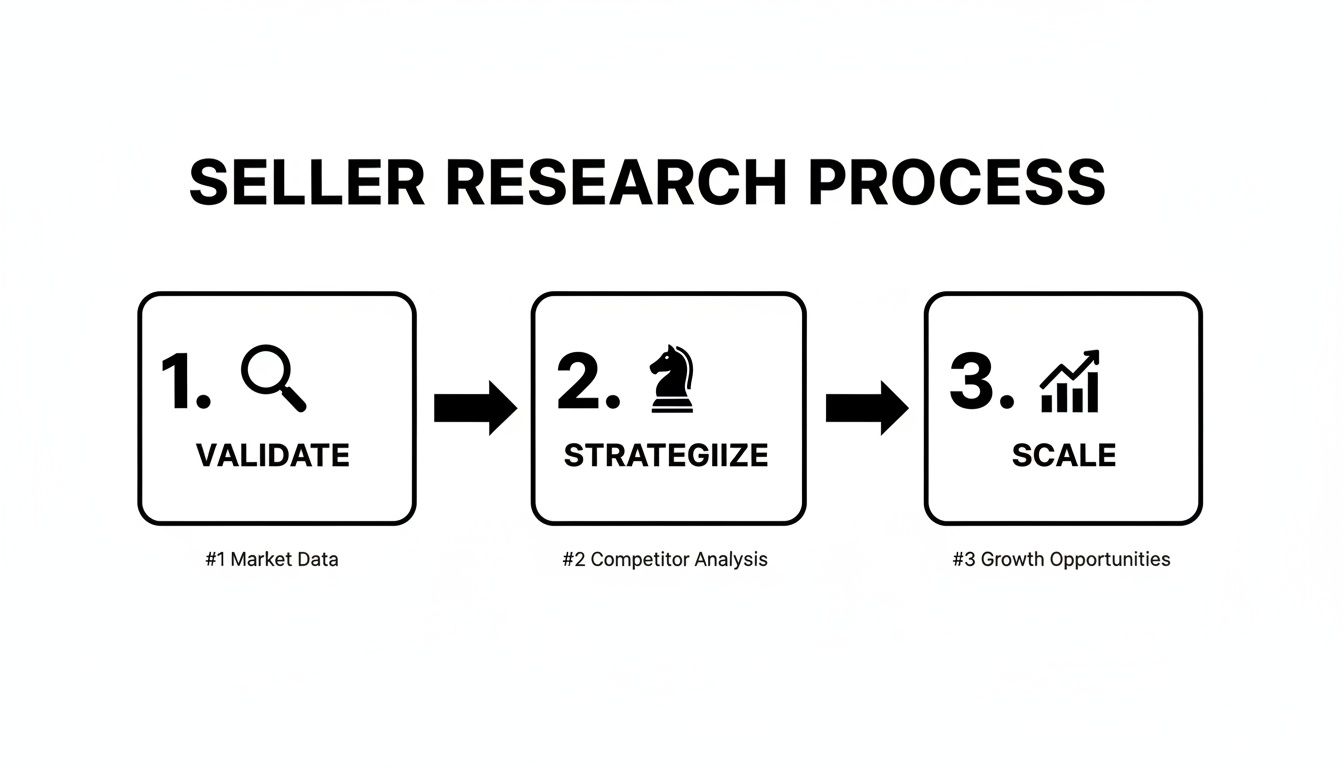
This isn't a one-off task but a cycle: gather data, analyze it for opportunities, and then use those insights to grow your own brand.
The real intelligence gathering begins when you click the link to the seller's storefront. This takes you away from the single product you started on and lays out every single item that seller has listed for sale. This is where you can assess their entire business strategy at a glance.
Are they a niche craft supplies brand with 50 highly-related SKUs, or a generalist retailer slinging everything from phone cases to kitchen gadgets? The first suggests a focused brand builder, while the second points to a wholesale or arbitrage model. That context is critical for understanding their market position.
Analyzing a seller's storefront is like looking at their business plan. The product selection, pricing strategy, and brand consistency reveal their core focus and operational strengths—or weaknesses.
For sellers managing their brand through Amazon's platform, the storefront is their digital footprint. To dive deeper into how sellers set up their presence, check out our guide on what is Amazon Seller Central.
Mastering these manual look-up methods is the essential first step before moving on to more advanced analysis.
Alright, you've found the seller's page. Now the real detective work begins. This is where you go from just finding them to truly understanding them. You're about to turn raw data points into a clear picture of how they operate, what their business model is, and where they're focused. First up: that all-important feedback score.

A seller's positive feedback percentage is the quickest pulse check you can get on their customer service. While a 95% rating might sound pretty good on paper, the best sellers on Amazon live in the 98-99% range, or even higher. Anything less is often a red flag, pointing to consistent problems with shipping, product quality, or just plain bad communication that buyers are calling out again and again.
But don't stop at the percentage. The total number of ratings tells a story all its own. A seller rocking a 99% score across 50,000+ ratings is an absolute machine, running a large-scale operation with dialed-in systems. On the other hand, a seller with just 200 ratings is likely a smaller niche brand or a newcomer still finding their footing. This volume gives you an instant sense of their sales velocity and how long they've been in the game.
Once you’ve sized up their feedback, it’s time to click into their storefront. A seller’s product catalog is basically a blueprint of their entire strategy. It doesn't take long to figure out which of two main camps they fall into.
To really get a feel for their brand and how they present themselves, you need to dig into their storefront. It's worth understanding the strategies for creating an Amazon Storefront that sells, as a well-built one can make a huge difference. If you're looking to build your own, we've got a detailed guide on how to create an Amazon Storefront that walks you through it.
To help you organize your thoughts as you poke around, I've put together a quick checklist. Use this to guide your analysis and turn observations into actionable insights.
.tbl-scroll{contain:inline-size;overflow-x:auto;-webkit-overflow-scrolling:touch}.tbl-scroll table{min-width:600px;width:100%;border-collapse:collapse;margin-bottom:20px}.tbl-scroll th{border:1px solid #ddd;padding:8px;text-align:left;background-color:#f2f2f2;white-space:nowrap}.tbl-scroll td{border:1px solid #ddd;padding:8px;text-align:left}Data Point to CheckWhat It Reveals About ThemActionable Insight for YouProduct NicheAre they a focused specialist or a generalist selling everything?A specialist is building a brand; a generalist is likely a reseller.Brand OwnershipDo all products fall under one brand name they likely own?This indicates a private label or brand owner, not a reseller.Pricing StrategyAre they the cheapest, premium-priced, or somewhere in the middle?Reveals their market position and target customer.A+ Content UsageDo their listings have enhanced brand content (images, custom text)?Shows their level of investment in marketing and brand building.Storefront DesignIs their storefront custom-designed and professional, or just a default grid?A custom storefront suggests a serious brand-focused seller.
This table isn't exhaustive, but it's a solid framework for starting your investigation. Each data point adds another layer to your understanding of who you're up against or who you might want to partner with.
Don't just glance at the feedback score and move on. The real gold is in the comments. This is where you get the raw, unfiltered truth about their business. Start scanning for patterns in both the glowing reviews and the angry ones.
Recurring negative feedback is a goldmine of competitive intelligence. If multiple customers complain about "slow shipping" or "item not as described," you've just identified a competitor's key weakness—one your business could potentially exploit.
Are buyers constantly talking about their "super-fast delivery" or "bulletproof packaging"? That’s a clear strength. Or are there repeated complaints about damaged goods or non-existent customer service? That’s a major operational flaw. This is the kind of deep analysis that moves you from simply looking up a seller to truly mapping out their playbook to inform your own.
While manually checking out a seller’s profile and storefront gives you a solid foundation, it’s really just scratching the surface. If you want to operate like the top-tier sellers, you’ve got to move beyond simple observation and get into data-backed analysis. This is where third-party intelligence tools come in, transforming a simple seller lookup into a full-blown competitive deep dive.
These platforms are built to swim through Amazon's massive ocean of data, pulling out insights that are flat-out impossible to find on your own. By just plugging in a seller's name, their brand, or even a single product ASIN, you can unlock a treasure trove of information about their performance.
Hands down, the most powerful feature of these tools is their ability to generate pretty reliable sales and revenue estimates. Instead of just guessing a competitor’s sales volume based on how many reviews they have, you can get concrete, data-driven projections for their entire product catalog.
For instance, you could drop a competitor’s Seller ID into a tool like Jungle Scout or Helium 10 and instantly see things like:
This kind of intel is a total game-changer. Imagine you're thinking about jumping into the competitive hand warmer market. You can look up the top sellers in that niche and discover one brand is consistently selling 5,000 units a month at a $25 price point, pulling in an estimated $125,000 in monthly revenue from just that one product. That data immediately validates the market demand and helps you set realistic goals for your own launch.
Using advanced tools to look up a seller on Amazon is like switching from a flashlight to floodlights. You're no longer just seeing what's right in front of you; you're illuminating their entire operational landscape, from sales velocity to keyword strategy.
Beyond just the sales figures, these intelligence platforms can essentially reverse-engineer a competitor's entire marketing playbook. They'll show you exactly what keywords a seller's products are ranking for, both organically and through their paid ads (PPC). This lets you see the precise search terms that are driving traffic and sales to their listings.
This is invaluable when you're building your own marketing campaigns. If you see a competitor is sitting on page one for "rechargeable hand warmers for hunting," you've just found a profitable long-tail keyword you can target yourself. You can also dig into their listing copy and A+ Content to figure out how they're positioning their products to appeal to that specific audience. Exploring the right software is crucial for gaining this type of competitive edge. You can learn more by checking out our guide on the best Amazon seller tools.
This data-driven approach takes all the guesswork out of your marketing. Instead of just throwing money at broad keywords and hoping for the best, you can build a strategy based on what's already proven to work for the heavy hitters in your niche. This is how you stop reacting to the market and start proactively carving out your own space within it.
A seller's profile on Amazon is just their public-facing resume; it's polished and shows you exactly what they want you to see. To get the real story, you have to step off the platform and dig into their broader business footprint.
This is how you figure out if you're dealing with a legitimate, established brand or just a temporary, fly-by-night operation. It all starts by taking the business name you found on their Amazon profile and treating it like the first clue in an investigation.
Going off-Amazon helps you build a complete, 360-degree view of the seller. You’re no longer just looking at their Amazon sales numbers but at their entire business strategy. This reveals their level of sophistication and how committed they are for the long haul. A seller with a strong off-Amazon presence is typically far more invested in their brand and reputation.

Your first stop should be public records. In the United States, almost every legitimate business is registered with their state’s Secretary of State (SOS). A quick search on the SOS website for the seller's business name can instantly tell you if they are a registered LLC, corporation, or some other legal entity.
This search is incredibly revealing. It not only confirms the business is real but often gives you details like:
If you come up empty-handed and can't find any record of their business, that’s a pretty big red flag. While a sole proprietor might operate under their own name, any seller with a distinct brand name should have a formal business registration backing it up.
Verifying a seller’s business registration is the fastest way to separate established brands from hobbyist sellers. Public records don’t lie and provide a foundational layer of trust and legitimacy that an Amazon profile alone cannot.
Once you've confirmed their legal status, it’s time to find their digital footprint beyond Amazon. This means searching for their brand name to see if they have a direct-to-consumer (DTC) website, social media profiles, or even trademark filings.
A professional-looking DTC site shows a serious investment in building a brand that isn't totally dependent on a single sales channel. It's a sign of a mature business.
Similarly, it’s worth checking the U.S. Patent and Trademark Office (USPTO) database. A registered trademark is a dead giveaway that a seller is serious about protecting their brand identity and intellectual property.
The absence of a website or trademark doesn't automatically mean a seller is sketchy, but their presence demonstrates a much higher level of brand maturity and investment. This multi-layered approach to how you look up a seller on Amazon and beyond paints a much clearer picture of who you are competing with or buying from.
Not every seller on Amazon is playing the long game. As you dig into a seller's background, you're trying to separate the legitimate brand builders from the black-hat operators and fly-by-night sellers who could tarnish a brand or rip off customers. Knowing what to look for is a critical skill.
One of the best places to start is their negative feedback. Don't just glance at the overall percentage; get in there and read the actual comments. Are you noticing the same complaints popping up over and over again?
Phrases like "fake product," "not authentic," or "item not as described" are massive red flags. Sure, a single bad review could be a fluke, but a clear pattern is a huge warning sign. It often points to a seller peddling counterfeit goods or being deliberately misleading about product quality. This isn't just bad for buyers—it's a direct threat to real brand owners.
Beyond feedback, you have to look at how they operate. A classic trick used by sketchy sellers is listing hijacking. This is where they latch onto a successful, established product listing and start selling a cheap, counterfeit version. If you see a well-known brand's product suddenly being sold by a brand-new seller with zero feedback and a price that seems too good to be true, you should be extremely cautious.
Another thing to check is the business address listed on their profile. Does it pass the sniff test?
Your goal here is to do your homework and make smart business decisions using public information. It's about competitive intelligence, not corporate espionage. Always keep it professional.
This brings us to a really important point. Everything we've talked about—analyzing storefronts, checking public business records, and sifting through feedback—is completely above board and well within Amazon's terms of service. You're simply using public data for research.
But you have to know where to draw the line. Never, ever try to contact a seller’s suppliers, message their past customers, or use their personal information for anything other than basic business verification.
Your research needs to stay focused on their business practices, not their personal lives. The information on a seller’s profile is there for transparency. Using it for harassment or to gain an unfair competitive advantage is a serious violation. Stick to the public data, and you'll gather powerful insights while staying well within ethical and legal boundaries.
As you start digging into how to look up sellers on Amazon, you’ll probably run into the same questions that trip up everyone. The platform has its own quirks, and figuring them out can feel like cracking a code. Let's clear up some of the most common sticking points.
One of the biggest headaches? Finding a seller who actually ships to you, especially if you're shopping internationally. The simplest fix is to set your delivery address at the top of the Amazon homepage before you even start searching.
Once you do that, Amazon automatically filters out everything you can’t get. This one little step saves you the pain of finding the perfect product, only to hit a brick wall at checkout when it says "cannot ship to your location."
You've probably seen "Sold by" and "Shipped by" on a listing and thought they were the same thing. They sound close, but they tell you two completely different stories about how the seller operates.
For a lot of shoppers, that "Shipped by Amazon" label is a huge trust signal. It means the product is eligible for Prime shipping and is backed by Amazon's A-to-z Guarantee. For researchers like us, it’s a clue that the seller is pretty serious and deeply integrated into the Amazon ecosystem.
Every once in a while, you’ll hit a dead end trying to find a seller's info. This usually happens with newer or smaller operations. If clicking the standard "Sold by" link on the product page gets you nowhere, I’ve got a little trick for you.
Head down to the Q&A section on the product listing.
Scan through the questions and look for answers from the seller. Their response will be tagged with their seller name, and you can usually click right on it to get to their profile. It’s a great workaround when the buy box isn't giving you what you need and ensures you can still look up a seller on Amazon even when they’re playing hard to get.
Success in e-commerce requires more than just good products; it demands elite-level intelligence and a network of peers who are executing at the highest level. Million Dollar Sellers is the exclusive, invite-only community where the world's top Amazon and DTC founders share the strategies that are working right now. If you're ready to scale past seven figures and connect with a vetted network of industry leaders, learn more about joining MDS.
Join the Ecom Entrepreneur Community for Vetted 7-9 Figure Ecommerce Founders
Learn MoreYou may also like:
Learn more about our special events!
Check Events